Jenkins – Resolving Jenkins Kubernetes Agent TLS Failures After HTTPS Migration
Overview
During a migration of our internal Jenkins controller from HTTP to HTTPS/TLS, several Jenkins pipelines running on Kubernetes agents began failing.
These pipelines use dynamically provisioned agents created by the Jenkins Kubernetes plugin, where each build runs inside a temporary pod.
After enabling TLS on the Jenkins controller, inbound agents were no longer able to establish a connection, preventing pipelines from starting.
This article explains:
- the symptoms observed during the migration
- why the Jenkins inbound agent (
jnlp) failed to connect - how internal PKI affected TLS validation
- the solution implemented using a custom Jenkins agent image
Environment Architecture
Our Jenkins pipelines run using dynamic Kubernetes agents.
Each pipeline execution creates a pod containing two containers:
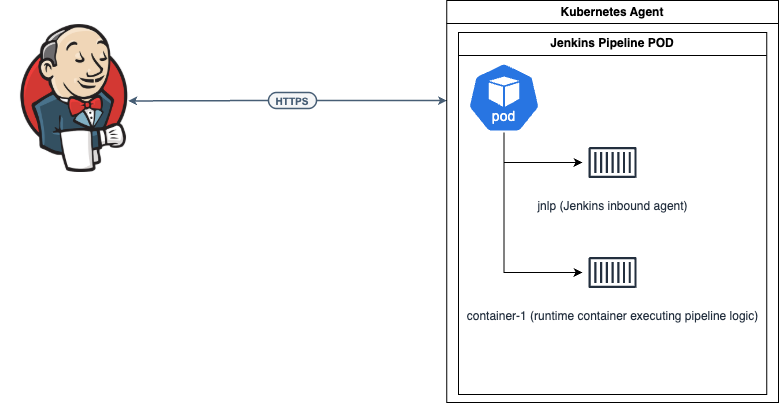
The jnlp container is the actual Jenkins agent responsible for:
- establishing the remoting connection with the Jenkins controller
- managing the workspace
- executing certain Jenkins operations such as
checkout,stash, andunstash
Even if the build logic runs inside another container, the agent itself still runs in the jnlp container.
Symptoms
After migrating Jenkins to HTTPS, pipelines failed immediately when attempting to start Kubernetes agents.
The inbound agent logs showed errors similar to the following:
PKIX path building failed
sun.security.provider.certpath.SunCertPathBuilderException:
unable to find valid certification path to requested target
The agent repeatedly attempted to connect but failed TLS validation, preventing Jenkins from establishing the remoting channel required to run the pipeline.
As a result, pipelines remained stuck during agent provisioning.
Root Cause
The issue was related to internal PKI infrastructure.
Our organization uses Step-CA as an internal certificate authority to issue TLS certificates for internal services.
When Jenkins was migrated to HTTPS, its TLS certificate was issued by this internal CA.
However, the default Jenkins inbound agent image: jenkins/inbound-agent
does not include the internal CA certificate.
Because of this, Java inside the agent container could not validate the TLS certificate chain presented by the Jenkins controller.
The TLS handshake therefore failed:

Solution: Custom Jenkins Inbound Agent Image
The solution was to build a custom Jenkins inbound agent image that includes the internal CA certificate.
This ensures that:
- the Linux system trust store contains the internal CA
- the Java trust store (
cacerts) also contains the CA - TLS connections from the Jenkins agent succeed
Directory Structure
The custom image was built using the following structure:
jenkins-inbound-agent/
├─ Dockerfile
└─ roots.pem
The CA certificate was obtained from the internal Step-CA server:
curl -O https://ca.devops-db.internal/roots.pem
Dockerfile
The Dockerfile extends the official Jenkins inbound agent image and installs the internal CA certificate.
FROM jenkins/inbound-agent:latest-jdk17

USER root

COPY roots.pem /usr/local/share/ca-certificates/devops-db-root.crt

RUN update-ca-certificates && \
    keytool -importcert \
      -alias devops-db-root \
      -file /usr/local/share/ca-certificates/devops-db-root.crt \
      -cacerts \
      -storepass changeit \
      -noprompt

USER jenkins
This process performs two important actions:
- Adds the CA certificate to the system trust store
- Imports the certificate into the Java trust store
This is required because Jenkins remoting uses Java TLS.
Building the Image
The image can be built with:
docker build --platform linux/amd64 \
-t registry.devops-db.internal:5000/jenkins-inbound-agent:1.0.0 .
Tag the image as latest:
docker tag \
registry.devops-db.internal:5000/jenkins-inbound-agent:1.0.0 \
registry.devops-db.internal:5000/jenkins-inbound-agent:latest
Pushing the Image to the Registry
docker push registry.devops-db.internal:5000/jenkins-inbound-agent:1.0.0
docker push registry.devops-db.internal:5000/jenkins-inbound-agent:latest
Updating the Kubernetes Agent Configuration
After building the custom image, the Kubernetes pod template was updated to use it for the jnlp container. https://github.com/faustobranco/devops-db/tree/master/infrastructure/lib-utilities
Pod Template Function
def call(str_Build_id, str_image) {

  def obj_PodTemplate = """
        apiVersion: v1
        kind: Pod
        metadata:
          labels:
            some-label: "pod-template-${str_Build_id}"
        spec:
          securityContext:
            fsGroup: 1000
          containers:
          - name: jnlp
            image: registry.devops-db.internal:5000/jenkins-inbound-agent:latest
            imagePullPolicy: Always
          - name: container-1
            securityContext:
              runAsUser: 1000
              fsGroup: 1000
            image: "${str_image}"
            env:
            - name: CONTAINER_NAME
              value: "container-1"
            - name: ANSIBLE_HOST_KEY_CHECKING
              value: "False"
            volumeMounts:
            - name: shared-volume
              mountPath: /mnt
            command:
            - cat
            tty: true
          volumes:
          - name: shared-volume
            emptyDir: {}
"""
  return obj_PodTemplate
}
Example Pipeline Using the Updated Agent
The following pipeline runs using the updated pod template.
@Library('devopsdb-global-lib') _

import devopsdb.utilities.Utilities
def obj_Utilities = new Utilities(this)

pipeline {
    agent {
        kubernetes {
            yaml GeneratePodTemplate('1234-ABCD', 'registry.devops-db.internal:5000/img-jenkins-devopsdb:2.0')
            retries 2
        }
    }

    options {
        timestamps()
        skipDefaultCheckout(true)
    }

    stages {
        stage('Script') {
            steps {
                container('container-1') {
                    script {

                        def str_folder = "${env.WORKSPACE}/pipelines/python/log"
                        def str_folderCheckout = "/python-log"

                        obj_Utilities.CreateFolders(str_folder)

                        obj_Utilities.SparseCheckout(
                            'https://gitlab.devops-db.internal/infrastructure/pipelines/tests.git',
                            'master',
                            str_folderCheckout,
                            'usr-service-jenkins',
                            str_folder
                        )
                    }
                }
            }
        }

        stage('Cleanup') {
            steps {
                cleanWs deleteDirs: true, disableDeferredWipeout: true
            }
        }
    }
}
Validation
Before deploying the image, we verified that the CA certificate was correctly installed.
Run the container:
docker run --platform linux/amd64 -it \
registry.devops-db.internal:5000/jenkins-inbound-agent:1.0.0 bash
Verify the certificate in the Java trust store:
keytool -list -cacerts -storepass changeit | grep devops
Expected output:
devops-db-root, trustedCertEntry
TLS Connectivity Test
Connectivity to Jenkins can be tested using:
curl -v https://jenkins.devops-db.internal
Successful output includes:
SSL certificate verify ok
Result
After deploying the custom inbound agent image, Kubernetes agents were able to:
- validate the Jenkins TLS certificate
- establish the remoting connection
- start pipelines successfully
Pipeline execution completed normally:
Finished: SUCCESS
Key Lessons
Jenkins agent images must trust internal PKI
If internal services use certificates issued by an internal CA, Jenkins agents must include that CA in their trust stores.
The JNLP container is critical in Kubernetes pipelines
Even if build steps run in another container, the jnlp container is still the Jenkins agent and must be able to establish secure connections.
HTTPS migrations impact CI/CD agents
Migrating infrastructure services such as Jenkins from HTTP to HTTPS often requires updating CI/CD agent images to trust the new certificate chain.