Jenkins – Dynamic Jenkins Parameters with Active Choices (Groovy + API)
In many CI/CD workflows, pipelines need to adapt based on dynamic infrastructure data.
For example:
- listing available databases
- selecting schemas from a specific database
- choosing Kubernetes clusters
- selecting deployment environments
Hardcoding these options inside Jenkins parameters quickly becomes unmaintainable.
A much better approach is using dynamic parameters powered by the Jenkins plugin:
- Active Choices Plugin
This plugin allows parameters to be generated dynamically using Groovy scripts, enabling Jenkins to fetch values from external systems such as APIs.
What Are Active Choices Parameters?
Active Choices parameters allow Jenkins jobs to dynamically generate parameter values using Groovy.
Instead of static dropdown lists like:
- database1
- database2
- database3
the list can be retrieved at runtime from an API or service.
This allows Jenkins to stay synchronized with infrastructure changes without modifying pipeline configuration.
Typical use cases include:
- cloud resources
- database discovery
- container registries
- deployment targets
- feature environments
- Git Tags, Branchs, MR, etc
Groovy Script Limitations in Active Choices
Although the Active Choices Plugin is extremely powerful, it is important to understand that the Groovy scripts executed by Jenkins have significant limitations.
These scripts are intended for lightweight parameter generation, not for implementing complex business logic.
Understanding where and how these scripts run helps explain why using an external API is often the best design choice.
Where the Script Runs
Active Choices scripts are executed inside the Jenkins controller.
This means they run:
- Inside Jenkins
- Inside the controller JVM
- During the job parameter rendering phase
The script executes when the build form is loaded in the Jenkins UI.
Because of this:
- the script runs synchronously
- it affects UI response time
- heavy logic can slow down Jenkins
If a script takes several seconds to execute, the Jenkins UI will feel slow when users open the build page.
Script Security Restrictions
Jenkins enforces strict security controls around Groovy execution.
These controls are managed by:
- Script Security Plugin
Depending on configuration, scripts may run: Sandboxed or Non-sandboxed (admin approval required)
In sandbox mode:
- many classes are blocked
- system access is restricted
- certain methods require administrator approval
This means complex integrations may require manual script approvals, which becomes difficult to maintain.
Complexity Should Not Live in Jenkins
Groovy scripts embedded in Jenkins jobs should remain simple and predictable.
Bad patterns include:
- Complex database queries
- Large data processing
- Infrastructure discovery logic
- Multiple chained API calls
- Heavy business logic
These types of operations make Jenkins harder to maintain and scale.
Instead, Jenkins should act as a consumer of infrastructure information, not the source of that logic.
Why APIs Are the Better Approach
A better architecture is to move complexity outside Jenkins and expose the data through an API.
Example architecture:
Jenkins -> Active Choices Script -> Internal API -> Infrastructure logic
The Groovy script then becomes a simple data fetcher, responsible only for retrieving values and returning them to the UI.
Example responsibility split:
API
- Discover databases
- Validate environments
- Apply business rules
- Query infrastructure systems
- Cache results
Jenkins
- Fetch API response
- Populate dropdown list
- Pass selected values to pipeline
This separation keeps Jenkins pipelines clean and makes infrastructure logic reusable across multiple systems.
Additional Benefits of API-Based Design
Using APIs also brings operational advantages:
Reusability
Multiple tools can use the same API:
- Jenkins
- Terraform pipelines
- Internal dashboards
- Automation tools
- etc
Better Observability
APIs can implement:
- logging
- metrics
- rate limiting
- monitoring
- etc
Which would be difficult to implement inside Groovy scripts.
Improved Security
Authentication and authorization can be handled at the API layer instead of inside Jenkins scripts.
Recommended Design Principle
A good rule of thumb when using Active Choices is: Groovy scripts should retrieve data, not generate it.
Keep the Jenkins side simple and move complexity into well-designed services.
Summary
Active Choices parameters are excellent for creating dynamic Jenkins job interfaces, but they should remain lightweight.
Groovy scripts should:
- be fast
- be simple
- avoid complex logic
- rely on APIs for real infrastructure discovery
This design keeps Jenkins responsive, maintainable, and scalable while allowing infrastructure logic to evolve independently.
Types of Active Choice Parameters
The plugin provides multiple parameter types.
Example API responses might look like:
Databases API
{
  "data": [
    "orders",
    "billing",
    "analytics"
  ]
}
Schemas API
{
  "data": [
    "public",
    "archive",
    "reporting"
  ]
}
The two most useful are:
Active Choices Parameter
Generates a dynamic list when the build form loads.
Example: Available Databases
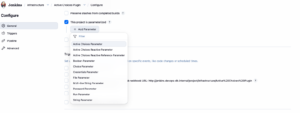
First, add an Active Choices Parameter.
Next, give the parameter a name (this is an important item to receive the value and handle in the next parameter) and add the necessary Groovy script; in this example, it’s a call to an API to list the databases of a PostgreSQL database.
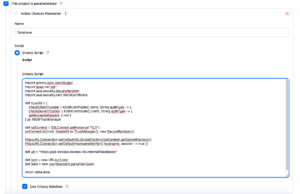
This parameter retrieves a list of available databases from an API.
import groovy.json.JsonSlurper
import javax.net.ssl.*
import java.security.SecureRandom
import java.security.cert.X509Certificate

def trustAll = [
    checkClientTrusted: { X509Certificate[] certs, String authType -> },
    checkServerTrusted: { X509Certificate[] certs, String authType -> },
    getAcceptedIssuers: { null }
] as X509TrustManager

def sslContext = SSLContext.getInstance("TLS")
sslContext.init(null, [trustAll] as TrustManager[], new SecureRandom())

HttpsURLConnection.setDefaultSSLSocketFactory(sslContext.getSocketFactory())
HttpsURLConnection.setDefaultHostnameVerifier({ hostname, session -> true })

def url = "https://api-devops.devops-db.internal/databases"

def json = new URL(url).text
def data = new JsonSlurper().parseText(json)

return data.data
What this script does
- Disables strict SSL validation (useful for internal services).
- Fetches JSON data from an API.
- Parses the response using
JsonSlurper. - Returns the list used to populate the parameter dropdown.
The result becomes the selectable options in Jenkins.
Active Choices Reactive Parameter
Updates dynamically based on the selection of another parameter.
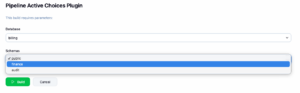
Example: Database → Schema
Selecting a database automatically updates the schema list.
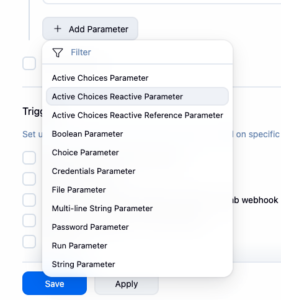
Now add the Active Choices Reactive Parameter; it will be loaded according to the other parameter.
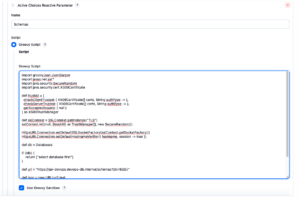
Similar to the previous parameter, provide the name and add the necessary Groovy script. In this case, I receive the value from the Database parameter and send it to the API to retrieve the schemas.
This parameter depends on the previously selected database.
Referenced parameters: Database
import groovy.json.JsonSlurper
import javax.net.ssl.*
import java.security.SecureRandom
import java.security.cert.X509Certificate

def trustAll = [
  checkClientTrusted: { X509Certificate[] certs, String authType -> },
  checkServerTrusted: { X509Certificate[] certs, String authType -> },
  getAcceptedIssuers: { null }
] as X509TrustManager

def sslContext = SSLContext.getInstance("TLS")
sslContext.init(null, [trustAll] as TrustManager[], new SecureRandom())

HttpsURLConnection.setDefaultSSLSocketFactory(sslContext.getSocketFactory())
HttpsURLConnection.setDefaultHostnameVerifier({ hostname, session -> true })

def db = Database

if (!db) {
    return ["select database first"]
}

def url = "https://api-devops.devops-db.internal/schemas?db=${db}"

def json = new URL(url).text
def data = new JsonSlurper().parseText(json)

return data.data
It is very important to specify the parameters that will be referenced in this code; in our case, the Database parameter.

How it works
- Jenkins passes the selected parameter (
Databases) into the script. - The script queries an API endpoint for schemas belonging to that database.
- The response populates the dropdown dynamically.
Using the Parameters in a Jenkins Pipeline
Once the parameters are defined, they can be accessed in a pipeline using params.
Example:
pipeline {
    agent any

    stages {

        stage('Print parameters') {
            steps {
                script {

                    echo "Selected database: ${params.Database}"
                    echo "Selected schema: ${params.Schemas}"

                }
            }
        }

    }
}
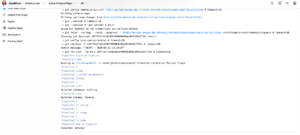
Example output:
Selected database: orders
Selected schema: reporting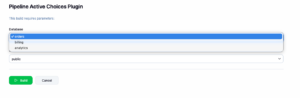
These values can then be used for:
- database migrations
- schema maintenance
- environment-specific deployments
- infrastructure operations
Why This Pattern Is Powerful
Using Active Choices with APIs enables Jenkins pipelines to become infrastructure-aware.
Benefits include:
- no need to update Jenkins jobs when infrastructure changes
- dynamic discovery of resources
- better integration with internal platforms
- cleaner pipelines
- improved user experience when triggering jobs
Instead of maintaining static configuration, Jenkins simply asks the platform for the current state.
Security Considerations
While powerful, this approach should follow several best practices:
Avoid disabling SSL verification in production
The example above disables SSL checks for simplicity. In production environments, proper certificate validation should be used.
Protect internal APIs
The API providing infrastructure data should be protected using:
- authentication tokens
- network restrictions
- internal gateways
Limit script complexity
Active Choice scripts run inside Jenkins and should remain lightweight to avoid performance issues.
Conclusion
The Jenkins Active Choices Plugin enables pipelines to dynamically interact with infrastructure through Groovy scripts and APIs.
By combining:
- Groovy scripting
- REST APIs
- dynamic parameters
you can create Jenkins jobs that adapt automatically to infrastructure changes.
This approach significantly improves maintainability and provides a more flexible CI/CD experience.
If you want, I can also help you turn this into a much stronger DevOps article by adding:
- architecture diagrams
- security notes about Script Security in Jenkins
- caching strategies for APIs
- performance pitfalls with Active Choices
- examples used in large-scale Jenkins installations.