Building and Publishing Multi-Architecture Docker Images to Nexus (Manually, Step by Step)
Introduction
Modern infrastructure is no longer homogeneous. It is increasingly common to run workloads across different CPU architectures — from traditional x86_64 servers to ARM-based environments such as Apple Silicon or cloud-native ARM instances.
In this article, we walk through a fully manual, transparent, and production-grade approach to:
- Creating a Docker registry repository in Nexus
- Building architecture-specific images
- Publishing them independently
- Assembling a multi-architecture image using Docker manifests
- Validating behavior across different platforms
This is not just a “how-to”. It is an exploration of how multi-architecture images actually work under the hood.
1. Nexus Repository Setup
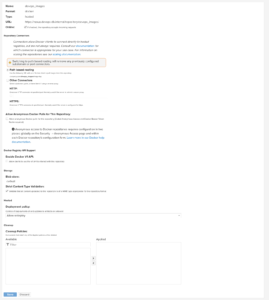
We start by creating a Docker repository in Nexus.
Configuration
Format: docker (hosted)
Repository Connectors: Path based routing
Deployment policy: Disable redeploy
Repository URL:
https://nexus.devops-db.internal/repository/docker-devops-images-public/Why these settings?
- docker (hosted)
Required to allow pushing custom images. Proxy repositories cannot accept uploads. - Path-based routing
Allows us to use a structured naming convention:<host>/<repository>/<image>:<tag> - Disable redeploy
Prevents overwriting existing tags, enforcing immutability — a critical best practice for reproducibility.
2. Project Structure
The application is a Go service:
.
├── blueprints.go
├── database.go
├── docker
│   └── Dockerfile
├── docs
│   ├── docs.go
│   ├── swagger.json
│   └── swagger.yaml
├── gitlab_tags.go
├── go.mod
├── go.sum
├── main.go
├── models.go
└── roots.pemNotably:
Dockerfiledefines a multi-stage buildroots.pemcontains internal CA certificates required for secure communication
3. Preparing for Multi-Architecture Builds
The Problem
By default, Go builds binaries for a single architecture:
GOARCH=amd64
This hardcodes the build target and breaks portability.
The Solution
We replace it with:
ARG TARGETARCH
RUN CGO_ENABLED=0 GOOS=linux GOARCH=$TARGETARCH go build -o devops-api
Why this works
TARGETARCHis injected automatically by Docker Buildx- It allows the same Dockerfile to produce binaries for multiple architectures
- This keeps the build deterministic and portable
Example:
# build stage
FROM golang:1.26-alpine AS builder
WORKDIR /app
COPY go.mod go.sum ./
RUN go mod download
COPY . .
ARG TARGETARCH
RUN CGO_ENABLED=0 GOOS=linux GOARCH=$TARGETARCH go build -o devops-api
# runtime stage
FROM nexus.devops-db.internal/docker-base-images-public/base_go:1.0.4
WORKDIR /app
RUN apt-get update && apt-get install -y ca-certificates && rm -rf /var/lib/apt/lists/*
COPY roots.pem /usr/local/share/ca-certificates/roots.crt
RUN update-ca-certificates
COPY --from=builder /app/devops-api .
EXPOSE 8080
CMD ["./devops-api"]4. Buildx and Builder Configuration
We initialize a builder:
docker buildx rm multiarch-builder
docker buildx create --use --driver docker
docker buildx inspect --bootstrap
Why Buildx?
Standard Docker builds:
- support only one architecture per image
Buildx:
- enables cross-platform builds
- integrates with QEMU for emulation
- exposes architecture-aware variables like
TARGETARCH
5. Building Images (Manual Multi-Arch Approach)
Instead of using automatic multi-platform builds, we deliberately split the process.
The full path nexus.devops-db.internal/docker-devops-images-public explicitly targets the Docker repository namespace inside Nexus, not just the host. Without including the repository name (devops_images), requests are routed incorrectly, leading to failed pushes or unsupported API operations.
https://nexus.devops-db.internal/repository/docker-devops-images-public/
Build AMD64
docker buildx build \
  --platform linux/amd64 \
  -f docker/Dockerfile \
  -t nexus.devops-db.internal/docker-devops-images-public/devops-api:1.1.3-amd64 \
  --load \
  .
Build ARM64
docker buildx build \
  --platform linux/arm64 \
  -f docker/Dockerfile \
  -t nexus.devops-db.internal/docker-devops-images-public/devops-api:1.1.3-arm64 \
  --load \
  .
Why --load?
- Loads the image into the local Docker daemon
- Enables manual control over push operations
- Avoids automatic registry interaction
6. Validating the Builds
Before pushing, we validate architecture correctness:
docker image inspect nexus.devops-db.internal/docker-devops-images-public/devops-api:1.1.3-amd64 | grep Architecture

"Architecture": "amd64"
docker image inspect nexus.devops-db.internal/docker-devops-images-public/devops-api:1.1.3-arm64 | grep Architecture
"Architecture": "arm64"
Why this matters
This confirms:
- the binary inside the container matches the intended architecture
- the build process is working correctly
7. Pushing Images (Individually)
We now push each architecture as an independent image:
docker push nexus.devops-db.internal/docker-devops-images-public/devops-api:1.1.3-amd64
docker push nexus.devops-db.internal/docker-devops-images-public/devops-api:1.1.3-arm64
Why separate pushes?
Because:
- Docker images are inherently single-architecture
- Multi-arch support is achieved via manifests, not image layering
8. Creating the Multi-Architecture Manifest
Now we assemble the final image:
docker manifest create \
  nexus.devops-db.internal/docker-devops-images-public/devops-api:1.1.3 \
  nexus.devops-db.internal/docker-devops-images-public/devops-api:1.1.3-amd64 \
  nexus.devops-db.internal/docker-devops-images-public/devops-api:1.1.3-arm64
Then push it:
docker manifest push nexus.devops-db.internal/docker-devops-images-public/devops-api:1.1.3
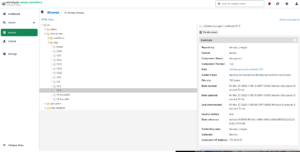
What is a Manifest?
A Docker manifest is:
A pointer that maps a single image tag to multiple architecture-specific images
Conceptually:
devops-api:1.1.3
 ├── amd64 → devops-api:1.1.3-amd64
 └── arm64 → devops-api:1.1.3-arm64
9. Testing Across Architectures
On macOS (ARM) Or AWS EKS ARM
docker pull nexus.devops-db.internal/docker-devops-images-public/devops-api:1.1.3
docker run --rm -p 8080:8080 nexus.devops-db.internal/docker-devops-images-public/devops-api:1.1.3
Validate:
docker inspect nexus.devops-db.internal/docker-devops-images-public/devops-api:1.1.3 | grep Architecture
"Architecture": "arm64"
On Debian (AMD64)
docker pull nexus.devops-db.internal/docker-devops-images-public/devops-api:1.1.3
docker run --rm -p 8080:8080 nexus.devops-db.internal/docker-devops-images-public/devops-api:1.1.3
"Architecture": "amd64"
Why this works
When pulling an image:
- Docker queries the registry
- Retrieves the manifest
- Selects the correct image for the host architecture
- Pulls only that variant
This process is completely transparent to the user