Security – Distributing Trust for an Internal Certificate Authority in a DevOps Infrastructure
Deploying an internal certificate authority is only the first step in building a secure infrastructure.
Once certificates start being issued, every system that communicates with services signed by the CA must trust the root certificate.
Unlike public certificate authorities, an internal CA is not included in the default trust stores of operating systems, containers, or development tools. As a result, systems attempting to connect to services using certificates issued by the internal CA will encounter errors such as:
x509: certificate signed by unknown authority
To avoid this problem, the root certificate must be distributed across the entire infrastructure.
This article describes practical strategies for distributing trust in a DevOps environment using tools such as GitLab, Nexus, Vault, Terraform, and Kubernetes.
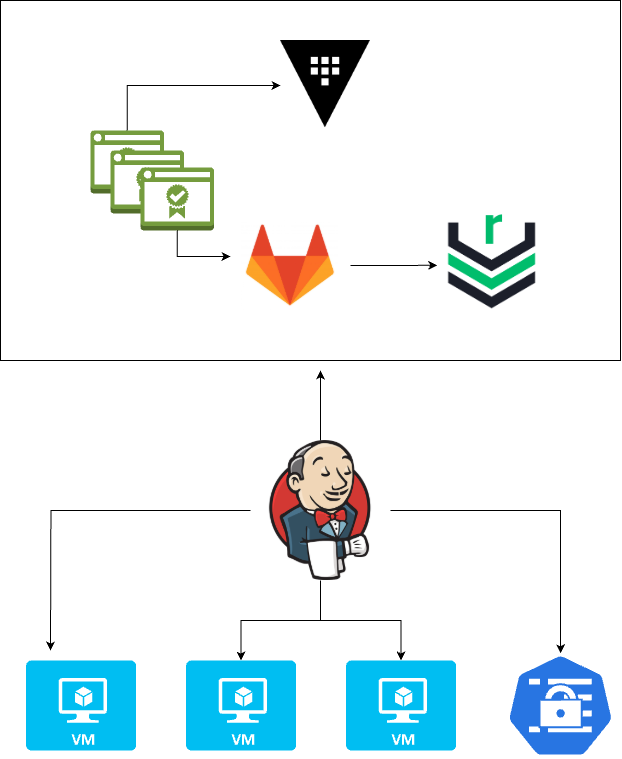
The setup I’m going to put together here in this lab is exactly this: GitLab for version control, Nexus for distribution, Vault for storing keys and secrets, and Jenkins/Terraform/Ansible for generating, storing, and distributing versions.
Understanding What Must Be Distributed
The first important distinction is between public trust material and private key material.
The following file must be distributed to all systems:
devops-db-root-ca.crt
This certificate represents the public trust anchor of the internal PKI.
However, the following files must never be distributed:
- root-ca.key
- intermediate-ca.key
These private keys must remain protected because they control the certificate issuance authority.
Using Git as the Source of Truth
The root certificate should be version controlled so that it can be reliably distributed through infrastructure automation.
A common repository structure might look like this:
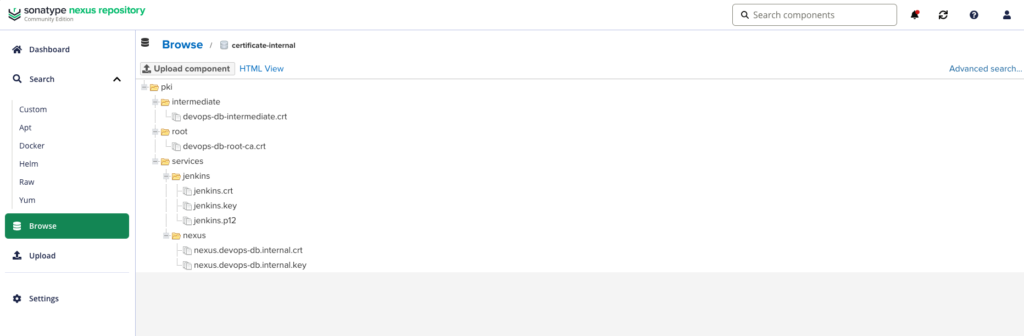
Storing the root certificate in Git provides several advantages:
- version history
- auditability
- easy integration with automation tools
- reproducible infrastructure deployments
Because the root certificate is public by design, storing it in a repository is generally acceptable.
Using an Artifact Repository for Distribution
In many environments it is useful to expose the root certificate through an artifact repository such as Nexus.
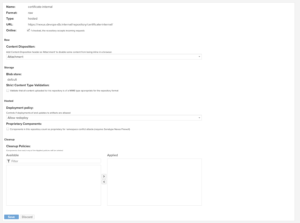

Example endpoint:
https://nexus.devops-db.internal/repository/certificate-internal/pki/root/devops-db-root-ca.crtSystems can retrieve the certificate dynamically during provisioning:
curl -u usr_jenkins_nexus:1234qwer -O https://nexus.devops-db.internal/repository/certificate-internal/pki/root/devops-db-root-ca.crtThis approach allows any system in the infrastructure to retrieve the certificate without requiring direct access to the Git repository.
Installing the Root Certificate on Linux Systems
Once downloaded, the certificate must be added to the system trust store.
cp root-ca.crt /usr/local/share/ca-certificates/devops-db-root-ca.crt
update-ca-certificates
This ensures that all applications on the system trust certificates issued by the internal CA.
Automating Trust Installation with Infrastructure Provisioning
In automated environments, root certificate installation should be part of the infrastructure provisioning process.
For example, a Terraform or cloud-init script might perform the installation during VM creation.
curl -u usr_jenkins_nexus:1234qwer -O https://nexus.devops-db.internal/repository/certificate-internal/pki/root/devops-db-root-ca.crt


update-ca-certificates
This guarantees that newly provisioned systems automatically trust the internal certificate authority.
Installing the Root Certificate in Containers
Containers also need to trust the internal CA.
The recommended approach is to include the certificate in base container images.
Example Dockerfile:
COPY devops-db-root-ca.crt /usr/local/share/ca-certificates/devops-db-root-ca.crt
RUN update-ca-certificates
All containers derived from this image will automatically trust certificates issued by the internal CA.
Distributing Trust to CI/CD Runners
CI/CD environments frequently interact with internal services such as artifact repositories, registries, or APIs.
Installing the root certificate within CI runners ensures that pipelines can communicate securely with internal services.
Example pipeline step:
curl -u usr_jenkins_nexus:1234qwer -O https://nexus.devops-db.internal/repository/certificate-internal/pki/root/devops-db-root-ca.crt

cp devops-db-root-ca.crt /usr/local/share/ca-certificates/devops-db-root-ca.crt
update-ca-certificates
Distributing Trust to Kubernetes Workloads
Kubernetes pods typically run in container images that do not include internal CA certificates.
Instead of rebuilding every image, the root certificate can be distributed using a ConfigMap.
Example:
kubectl create configmap internal-root-ca \
  --from-file=devops-db-root-ca.crt \
  -n kube-system
Pods can then mount the certificate as a volume.
volumes:
  - name: root-ca
    configMap:
      name: internal-root-ca
volumeMounts:
  - name: root-ca
    mountPath: /usr/local/share/ca-certificates/devops-db-root-ca.crt
    subPath: devops-db-root-ca.crt
This allows containers to trust the internal CA without modifying the base image.
Leveraging Step-CA Client Bootstrap
When using Step-CA, clients can also retrieve the root certificate automatically using the bootstrap command.
step ca bootstrap \
  --ca-url https://ca.devops-db.internal \
  --fingerprint <root fingerprint>
This command downloads the root certificate and stores it locally in the Step configuration directory.
Recommended Architecture
A robust trust distribution strategy combines several components.
Step-CA
   │
   ▼
root-ca.crt
   │
   ├ Git repository (source of truth)
   ├ Nexus (distribution endpoint)
   └ Infrastructure automation
         ├ Terraform
         ├ CI pipelines
         └ container images
This architecture ensures that the root certificate is:
- centrally managed
- version controlled
- automatically distributed
- consistently installed across infrastructure components.
Conclusion
Running an internal certificate authority provides flexibility and control over certificate management, but it also introduces the responsibility of distributing trust across the infrastructure.
By combining version control, artifact repositories, and infrastructure automation, organizations can build a reliable and scalable trust distribution system that integrates naturally with modern DevOps workflows.