Orchestrating Parallel Workloads with RabbitMQ Fanout Architecture
The Single Queue Constraint: Why Round-Robin Isn’t Enough
In a standard RabbitMQ configuration, multiple consumers connected to a single queue operate under a Compensating Consumers pattern. RabbitMQ distributes messages using a Round-Robin algorithm, ensuring each message is processed exactly once by one of the available workers.
While this is excellent for horizontal scaling of a single task, it is technically impossible for two distinct services (e.g., a Jenkins Pipeline and a Rest API) to read the same message from the same queue.
These are completely unrelated examples, merely to illustrate two isolated consumers that need to receive the same message at the same time.
Once a consumer acknowledges a message, it is purged from that specific queue to prevent duplicate processing.
https://github.com/faustobranco/devops-db/tree/master/knowledge-base/rabbitmq/MultiQueue
The Solution: The Fanout Exchange Pattern
To allow multiple independent systems to react to the same event, we must decouple the producer from the queues using a Fanout Exchange.
- The Producer sends a message to an Exchange, not a Queue.
- The Fanout Exchange acts as a message duplicator, routing a copy of the message to every queue bound to it.
- Independent Queues ensure that each service has its own persistent buffer. If the Jenkins worker is down, the Health worker can still process its copy without interference.
1. Infrastructure Configuration (REST API)
Using the RabbitMQ Management API is the most efficient way to ensure your infrastructure is declared idempotently. Below are the corrected calls using your production DNS.
A. Creating the Exchange
We declare the jenkins_exchange as a fanout. This is the “broadcaster.”
Bash
curl -i -u admin:J4VPegzqSKC6Syji9ga6w1JDcTRgrvDQ -H "content-type:application/json" \
    -X PUT https://rabbitmq.devops-db.internal/api/exchanges/%2f/jenkins_exchange \
    -d '{"type":"fanout","durable":true}'
B. Declaring Service-Specific Queues
Each service needs its own “mailbox.” We also attach a Dead Letter Exchange (DLX) to handle malformed JSON payloads.
Bash
# Queue for Jenkins Service
curl -i -u admin:J4VPegzqSKC6Syji9ga6w1JDcTRgrvDQ -H "content-type:application/json" \
    -X PUT https://rabbitmq.devops-db.internal/api/queues/%2f/jenkins_deploy_queue \
    -d '{"durable":true,"arguments":{"x-dead-letter-exchange":"jenkins_dlx"}}'

# Queue for Health/Monitoring Service
curl -i -u admin:J4VPegzqSKC6Syji9ga6w1JDcTRgrvDQ -H "content-type:application/json" \
    -X PUT https://rabbitmq.devops-db.internal/api/queues/%2f/health_monitor_queue \
    -d '{"durable":true,"arguments":{"x-dead-letter-exchange":"jenkins_dlx"}}'
C. Binding Queues to the Exchange
Without a binding, the Exchange will discard the messages. This creates the link between the broadcaster and the mailboxes.
Bash
# Link Jenkins
curl -i -u admin:J4VPegzqSKC6Syji9ga6w1JDcTRgrvDQ -H "content-type:application/json" \
    -X POST https://rabbitmq.devops-db.internal/api/bindings/%2f/e/jenkins_exchange/q/jenkins_deploy_queue \
    -d '{"routing_key":""}'

# Link Health Monitor
curl -i -u admin:J4VPegzqSKC6Syji9ga6w1JDcTRgrvDQ -H "content-type:application/json" \
    -X POST https://rabbitmq.devops-db.internal/api/bindings/%2f/e/jenkins_exchange/q/health_monitor_queue \
    -d '{"routing_key":""}'
2. Implementation: The Adaptive Worker
The following Python implementation uses a polymorphic approach, allowing a single codebase to serve different business logics based on a runtime flag.
import pika
import requests
import json
import sys
import urllib3
import argparse

urllib3.disable_warnings(urllib3.exceptions.InsecureRequestWarning)

# Infrastructure Constants
RABBITMQ_HOST = '172.21.5.76'
RABBITMQ_PORT = 31572
RABBITMQ_USER = 'admin'
RABBITMQ_PASS = 'J4VPegzqSKC6Syji9ga6w1JDcTRgrvDQ'
EXCHANGE_NAME = 'jenkins_exchange'

# Service Endpoints
JENKINS_URL = 'https://jenkins.devops-db.internal'
JENKINS_JOB_PATH = 'job/infrastructure/job/pipelines/job/tests/job/RabbitMQ-Example1'
JENKINS_USER = 'fbranco'
JENKINS_API_TOKEN = '11168682ae86c6a8abe39b219fb1d0424e'
HEALTH_API_URL = 'https://dns-api.devops-db.internal/health'

def trigger_jenkins_pipeline(payload):
    build_url = f"{JENKINS_URL}/{JENKINS_JOB_PATH}/buildWithParameters"
    auth_credentials = (JENKINS_USER, JENKINS_API_TOKEN)
    params = {'PAYLOAD_JSON': json.dumps(payload)}

    try:
        response = requests.post(build_url, auth=auth_credentials, data=params, verify=False, timeout=10)
        response.raise_for_status()
        return True
    except Exception as err:
        print(f"Jenkins Integration Error: {err}")
        return False

def trigger_health_api(payload):
    # Note: Health check endpoints often expect GET.
    # If the API accepts POST with data, use requests.post
    try:
        response = requests.get(HEALTH_API_URL, verify=False, timeout=5)
        response.raise_for_status()
        return True
    except Exception as err:
        print(f"Health API Monitoring Error: {err}")
        return False

def process_message(channel, method, properties, body, worker_type):
    print(f"\n[x] Processing message for: {worker_type}")
    try:
        payload = json.loads(body)

        # Strategy pattern based on worker type
        if worker_type == 'jenkins':
            success = trigger_jenkins_pipeline(payload)
        else:
            success = trigger_health_api(payload)

        if success:
            channel.basic_ack(delivery_tag=method.delivery_tag)
            print("[+] Task completed and acknowledged.")
        else:
            # Requeue if it's a transient network error
            channel.basic_nack(delivery_tag=method.delivery_tag, requeue=True)

    except json.JSONDecodeError:
        print("[!] Invalid JSON format. Rejecting to DLX.")
        channel.basic_reject(delivery_tag=method.delivery_tag, requeue=False)

def start_worker(worker_type):
    queue_name = 'jenkins_deploy_queue' if worker_type == 'jenkins' else 'health_monitor_queue'

    credentials = pika.PlainCredentials(RABBITMQ_USER, RABBITMQ_PASS)
    connection = pika.BlockingConnection(pika.ConnectionParameters(
        host=RABBITMQ_HOST, port=RABBITMQ_PORT, credentials=credentials))
    channel = connection.channel()

    # Ensure infrastructure exists via AMQP declaration
    channel.exchange_declare(exchange=EXCHANGE_NAME, exchange_type='fanout', durable=True)
    channel.queue_declare(queue=queue_name, durable=True, arguments={'x-dead-letter-exchange': 'jenkins_dlx'})
    channel.queue_bind(exchange=EXCHANGE_NAME, queue=queue_name)

    channel.basic_qos(prefetch_count=1)

    # Passing context to the callback using a lambda
    on_msg = lambda ch, method, props, body: process_message(ch, method, props, body, worker_type)

    channel.basic_consume(queue=queue_name, on_message_callback=on_msg)
    print(f"[*] Subscribed to {queue_name}. Waiting for messages...")
    channel.start_consuming()

if __name__ == '__main__':
    parser = argparse.ArgumentParser()
    parser.add_argument('--type', choices=['jenkins', 'health'], required=True)
    args = parser.parse_args()
    start_worker(args.type)
Practical Example
I’ll send a message first, even before starting the two consumers, so I can see the status in the RabbitMQ UI.
python3 messages.py
[+] Sending VALID JSON message...
Done. Message published.
Or
curl -s -u admin:J4VPegzqSKC6Syji9ga6w1JDcTRgrvDQ \
    -X GET https://rabbitmq.devops-db.internal/api/queues/%2f/jenkins_deploy_queue \
    | jq '{name: .name, total: .messages, ready: .messages_ready, unacked: .messages_unacknowledged, workers: .consumers}'

{
  "name": "jenkins_deploy_queue",
  "total": 1,
  "ready": 1,
  "unacked": 0,
  "workers": 0
}Activate the two consumers on different terminals.
python3 rabbitmq_worker.py --type health

and

python3 rabbitmq_worker.py --type jenkins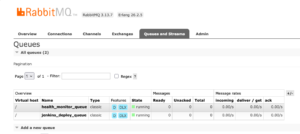
or
curl -s -u admin:J4VPegzqSKC6Syji9ga6w1JDcTRgrvDQ \
    -X GET https://rabbitmq.devops-db.internal/api/queues/%2f/jenkins_deploy_queue \
    | jq '{name: .name, total: .messages, ready: .messages_ready, unacked: .messages_unacknowledged, workers: .consumers}'
{
  "name": "jenkins_deploy_queue",
  "total": 0,
  "ready": 0,
  "unacked": 0,
  "workers": 1
}
Summary of Benefits
- Fault Tolerance: If the
healthworker crashes, messages remain safely stored in thehealth_monitor_queuewithout blocking thejenkinsworker. - Scalability: You can add a third worker (e.g., a logging service) simply by creating a new queue and binding it to the same exchange—no changes required to existing code.
- Observability: By separating queues, you can monitor the individual lag of each service in the RabbitMQ Dashboard.