Kubernetes – Canary Deployment with Gateway API: Building a from Scratch
Introduction
Modern software delivery is no longer about simply deploying code—it’s about controlling risk. Canary deployments are one of the most effective techniques to gradually introduce new versions into production while minimizing impact.
In this article, I’ll walk through a real implementation of a canary deployment using Kubernetes Gateway API, fully managed via Helm. This is not a theoretical overview—it’s a practical, step-by-step evolution from a working single-service deployment to a controlled traffic-splitting setup.
Along the way, I’ll explain not only what was done, but more importantly why each decision was made.
Design Principles
Before diving into implementation, a few principles guided the architecture:
- Keep it simple: Avoid unnecessary abstractions early on
- Use native capabilities: Prefer Gateway API over custom CRDs when possible
- Single source of truth: Everything is managed via Helm
- Separation of concerns:
- Application logic ≠ traffic routing
- Deterministic naming: Avoid dynamic or duplicated naming logic
Step 1 — Making the Application Canary-Friendly
https://github.com/faustobranco/devops-db/tree/master/infrastructure/resources/devops-api
The first step was not infrastructure—it was application design.
Instead of building multiple Docker images for each version, I introduced a simple mechanism:
- The application reads its version from an environment variable
- A new endpoint
/versionexposes that value
Why?
This allows us to:
- Avoid rebuilding images for every test
- Change behavior purely through Helm values
- Clearly observe traffic distribution during testing
Example behavior
GET /version

{"version":"v1.1.1"}
{"version":"v1.1.1-canary"}
Step 2 — Helm as the Control Plane
Everything in this setup is managed via Helm:
- Deployments
- Services
- Gateway
- HTTPRoute
Why Helm?
- Declarative configuration
- Version-controlled infrastructure
- Easy promotion via
helm upgrade - Natural fit for progressive delivery
Step 3 — Splitting Stable and Canary
Instead of modifying an existing deployment, we create two independent releases:
helm upgrade --install devops-api-stable . \
 --values values-stable.yaml \
 -n devops-api \
 --create-namespace


helm upgrade --install devops-api-canary  . \
 --values values-canary.yaml \
 -n devops-api \
--create-namespaceResult
We now have:
devops-api-stable
devops-api-canary
Each with:
- its own Deployment
- its own Service
- its own label (
role=stable/role=canary)
Step 4 — Why Separate Services?
Each version must be independently addressable.
Service → stable pods
Service → canary pods
Why this matters
Without separate services:
- Traffic cannot be split
- Routing becomes ambiguous
- Observability is lost
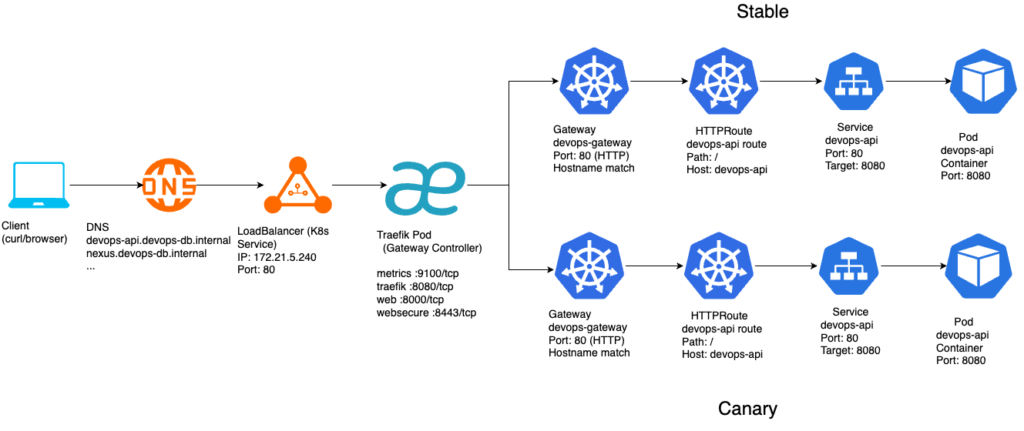
Step 5 — Introducing Gateway API
Instead of using Ingress, we use Gateway API, which provides:
- Explicit routing rules
- Native traffic splitting
- Better separation between infrastructure and routing
Step 6 — The HTTPRoute as the Brain
The canary logic lives entirely in the HTTPRoute.
backendRefs:
  - name: devops-api-stable
    port: 80
    weight: 90
  - name: devops-api-canary
    port: 80
    weight: 10
Why this approach?
- No need for Traefik-specific CRDs
- Uses standard Kubernetes API
- Fully declarative
- Easy to adjust via Helm
Step 7 — Stable Owns the Traffic
A key design decision:
Only the stable release defines the HTTPRoute.
Why?
- Avoids conflicting routes
- Centralizes traffic control
- Keeps canary passive
stable → controls routing
canary → only provides capacity
Step 8 — Helm Values Structure
To keep things simple, we used two values files only:
values-stable.yaml
role: stable

traffic:
  stable: 90
  canary: 10

image:
  tag: "1.1.1"

gateway:
  enabled: true
values-canary.yaml
role: canary

image:
  tag: "1.1.1"

env:
  DEVOPSAPI_VERSION: v1.1.1-canary

gateway:
  enabled: false
Step 9 — Why Avoid Backend Names in Values?
Initially, backend names were configurable:
stableBackend: devops-api-stable
canaryBackend: devops-api-canary
This was removed.
Why?
- Redundant information
- Prone to mismatch errors
- Already derivable from
.Chart.Name
Final approach:
name: {{ printf "%s-stable" .Chart.Name }}
Step 10 — Observing the Canary
Testing the rollout:
for i in {1..20}; do curl -s /version; echo; done
Expected output
for i in {1..20}; do curl -s "http://devops-api.devops-db.internal/version"; echo; done
{"version":"v1.1.1"}
{"version":"v1.1.1"}
{"version":"v1.1.1"}
{"version":"v1.1.1"}
{"version":"v1.1.1"}
{"version":"v1.1.1"}
{"version":"v1.1.1"}
{"version":"v1.1.1"}
{"version":"v1.1.1-canary"}
{"version":"v1.1.1"}
{"version":"v1.1.1"}
{"version":"v1.1.1"}
{"version":"v1.1.1"}
{"version":"v1.1.1"}
{"version":"v1.1.1"}
{"version":"v1.1.1"}
{"version":"v1.1.1"}
{"version":"v1.1.1"}
{"version":"v1.1.1"}
{"version":"v1.1.1-canary"}Interpretation
- Majority → stable
- Minority → canary
- Traffic splitting confirmed
Step 11 — Promotion Strategy
Once validated, promotion is straightforward.
Step 1 — Shift traffic – values-stable.yaml
traffic:
  stable: 0
  canary: 100
Step 2 — Upgrade stable – values-stable.yaml
image:
  tag: v1.1.1-canary
Step 3 — Reset – values-stable.yaml
traffic:
  stable: 100
  canary: 0
Apply helm:
helm upgrade --install devops-api-stable . \
 --values values-stable.yaml \
 -n devops-api \
 --create-namespace
Step 12 — Why This Works Well
This architecture has several strengths:
✔ Simplicity
- No extra controllers
- No custom CRDs
- Minimal moving parts
✔ Observability
- Clear version endpoint
- Easy traffic validation
✔ Safety
- Gradual rollout
- Instant rollback via weights
✔ Extensibility
- Ready for automation
- Compatible with Argo Rollouts
1. Gateway API is powerful enough
You don’t need TraefikService or custom routing logic for basic canary.
2. Naming matters more than expected
Many early issues came from:
- mismatched service names
- duplicated suffixes
- inconsistent release naming
3. Canary is not just routing
It requires:
- API compatibility
- consistent endpoints
- predictable behavior
4. Debugging requires observability
The /version endpoint was critical.
Without it:
- impossible to confirm routing behavior
- harder to isolate issues