Kubernetes – Canary Deployments with NGINX Ingress: A Practical, Helm-Driven Approach
Introduction
Progressive delivery is no longer optional in modern systems—it is a necessity for reducing risk and increasing confidence in production deployments. Among the available strategies, canary deployments stand out as one of the most effective.
In this article, we will build a complete canary deployment setup using:
- Kubernetes
- NGINX Ingress Controller
- MetalLB (for external exposure)
- Helm (as the single control plane)
This is not a theoretical guide. Every decision is explained from a practical and operational perspective, including why each step matters.
Architecture Overview
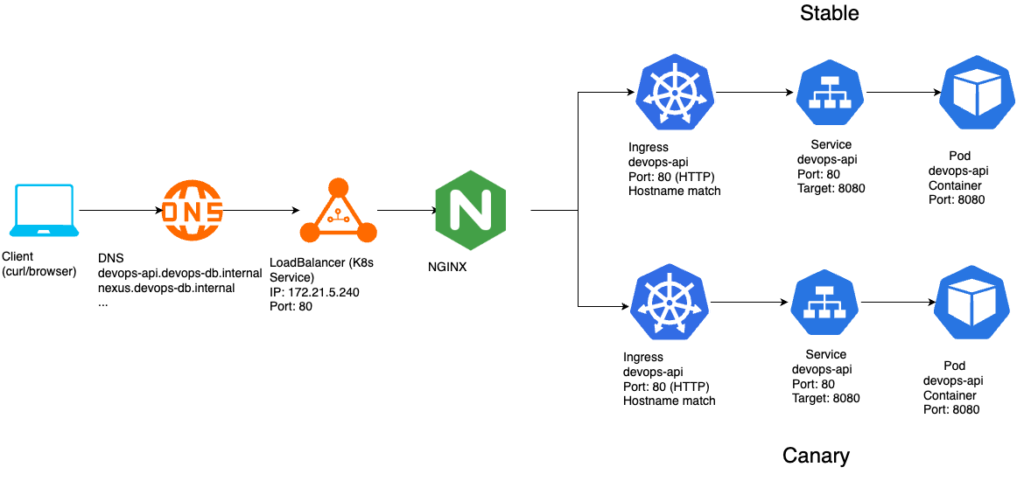
The final architecture looks like this:
Key Design Principle
A critical concept to understand early:
NGINX Ingress does not support weighted routing natively.
Instead, it implements canary deployments using: A secondary Ingress with special annotations
This leads to a fundamental shift in architecture compared to Gateway API.
Step 1 — Preparing the Application for Canary Testing
https://github.com/faustobranco/devops-db/tree/master/infrastructure/resources/devops-api
Before touching infrastructure, we modified the application.
Instead of building multiple images for each version, the application:
- Reads its version from an environment variable
- Exposes it via a
/versionendpoint
Why?
- Avoid unnecessary image builds
- Enable fast iteration via Helm values
- Provide a clear observable signal for traffic distribution
Example
{"version":"v1.1.1"}
{"version":"v1.1.1-canary"}
Step 2 — Everything is Managed via Helm
All resources are defined in Helm:
- Deployments
- Services
- Ingress resources
Why Helm?
- Declarative and version-controlled
- Enables controlled upgrades (
helm upgrade) - Simplifies promotion and rollback
- Keeps infrastructure aligned with application lifecycle
Step 3 — Splitting Stable and Canary
We deploy two independent releases:
helm upgrade --install devops-api-stable . \
--values values-stable.yaml \
-n devops-api \
--create-namespace
helm upgrade --install devops-api-canary . \
--values values-canary.yaml \
-n devops-api \
--create-namespace
This results in:
devops-api-stable
devops-api-canary
Each release has:
- Its own Deployment
- Its own Service
- Its own labels (
role=stable/role=canary)
Step 4 — Why Separate Services?
Each version must be independently routable.
Service → stable pods
Service → canary pods
Without this separation:
- Traffic splitting is impossible
- Observability is lost
- Rollbacks become unsafe
Step 5 — Exposing NGINX with MetalLB
Since this is an on-prem or bare-metal setup, we use MetalLB: type: LoadBalancer
Why MetalLB?
- Provides external IPs in non-cloud environments
- Mimics cloud LoadBalancer behavior
- Integrates seamlessly with Ingress controllers
Step 6 — Creating the Stable Ingress
The stable Ingress is the base routing layer.
apiVersion: networking.k8s.io/v1
kind: Ingress
metadata:
name: devops-api-stable
spec:
ingressClassName: nginx
rules:
- host: devops-api.devops-db.internal
http:
paths:
- path: /
pathType: Prefix
backend:
service:
name: devops-api-stable
port:
number: 80
Why this matters
- This Ingress receives 100% of traffic by default
- It defines the canonical routing behavior
- It acts as the fallback for all requests
Step 7 — Introducing the Canary Ingress
The canary is implemented as a second Ingress:
metadata:
annotations:
nginx.ingress.kubernetes.io/canary: "true"
nginx.ingress.kubernetes.io/canary-weight: "10"
Why annotations?
NGINX Ingress does not support multiple backends with weights.
Instead, it uses annotations to: intercept a percentage of traffic
Step 8 — Critical Constraint: Matching Rules
For canary to work:
Stable and Canary Ingress MUST be identical in:
- host
- path
- pathType
- ingressClass
Why?
NGINX merges both Ingress definitions internally.
If they differ: The canary is ignored
This is one of the most common sources of failure.
Step 9 — Helm Template Structure
We use a single chart with role-based logic:
Stable Ingress
{{- if and .Values.ingress.enabled (eq .Values.role "stable") }}
Canary Ingress
{{- if and .Values.ingress.enabled (eq .Values.role "canary") }}
Why this approach?
- Avoids duplicate charts
- Keeps logic centralized
- Ensures consistency across environments
Step 10 — Traffic Control
Unlike Gateway API, where traffic is centralized, here:
The canary controls the traffic split
Example
traffic:
canary: 10
Applied via:
helm upgrade --install devops-api-canary . \
--values values-canary.yaml \
-n devops-api \
--create-namespace
Step 11 — Testing the Canary
A simple test:
for i in {1..20}; do curl -s --no-keepalive "http://devops-api.devops-db.internal/version"; echo; doneExpected output:
{"version":"v1.1.1"}
{"version":"v1.1.1"}
{"version":"v1.1.1"}
{"version":"v1.1.1"}
{"version":"v1.1.1"}
{"version":"v1.1.1"}
{"version":"v1.1.1-canary"}
{"version":"v1.1.1"}
{"version":"v1.1.1"}
{"version":"v1.1.1"}
{"version":"v1.1.1-canary"}
{"version":"v1.1.1"}
{"version":"v1.1.1"}
{"version":"v1.1.1"}
{"version":"v1.1.1"}
{"version":"v1.1.1"}
{"version":"v1.1.1"}
{"version":"v1.1.1"}
{"version":"v1.1.1"}
{"version":"v1.1.1"}Important Note
Distribution is probabilistic, not deterministic.
Step 12 — Understanding Non-Deterministic Results
You may observe:
1 canary in 20 requests
2 canary in 20 requests
This happens due to:
- connection reuse (keep-alive)
- internal load balancing
- probabilistic routing
Step 13 — Promotion Strategy
The correct promotion flow is:
1. Shift traffic to canary – values-canary.yaml
traffic:
canary: 100
2. Promote to stable – values-stable.yaml
image:
  tag: new-version
helm upgrade --install devops-api-stable . \<br> --values values-stable.yaml \<br> -n devops-api \<br> --create-namespace<br>3. Reset canary – values-canary.yaml
traffic:
  canary: 0
Why this order?
This guarantees:
✔ Full validation before promotion
✔ Instant rollback capability
✔ Zero-risk transition
Step 14 — Rollback Strategy
If something fails: – values-canary.yaml
traffic:<br> canary: 0<br>helm upgrade devops-api-canary ...
Result: 100% traffic returns to stable immediately
Key Differences from Gateway API
| Feature | Gateway API | NGINX Ingress |
|---|---|---|
| Traffic control | Stable | Canary |
| Routing model | Centralized | Distributed |
| Resources | 1 | 2 |
| Clarity | High | Medium |
Conclusion
By combining:
- Helm
- NGINX Ingress
- MetalLB
we built a production-ready canary deployment system that is:
simple
flexible
incremental
While less elegant than Gateway API, this approach remains:
widely adopted
battle-tested
compatible with most infrastructures