Jenkins – Passing Data Between Nodes in Jenkins Pipelines
Modern Jenkins pipelines often run across multiple nodes, containers, or ephemeral agents. While this enables scalability and isolation, it introduces a critical challenge: data does not automatically persist between nodes.
Understanding how Jenkins handles workspaces, environment variables, and artifact transfer is essential for building reliable pipelines.
This article explains how Jenkins pipelines execute across nodes and presents the primary techniques used to pass data safely between stages.
1. Understanding the Distributed Nature of Jenkins
Jenkins is designed as a distributed build system. A typical architecture looks like this:
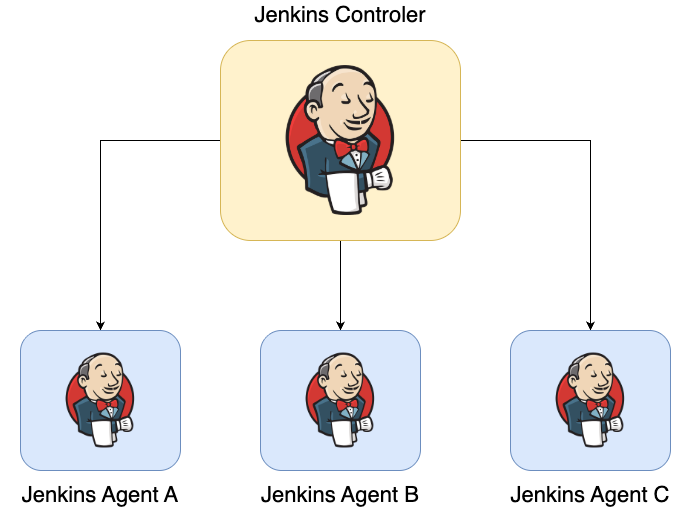
The controller is responsible for:
- Scheduling builds
- Executing pipeline logic
- Managing plugins and credentials
- Maintaining the build queue
However, the actual workload (builds, deployments, testing) runs on agents.
Because these agents are independent systems, their filesystems are not shared.
This means a file created in one node is not automatically available in another node.
2. Workspace Behavior
Every Jenkins job runs inside a workspace directory.
Typical locations include:
/var/lib/jenkins/workspace/my-job
or in Kubernetes-based agents:
/home/jenkins/agent/workspace/my-job
Within a single node, stages share the same workspace.
Example:
stage('Build') {
    steps {
        sh "mkdir dist"
        sh "echo artifact > dist/app.txt"
    }
}

stage('Deploy') {
    steps {
        sh "cat dist/app.txt"
    }
}
If both stages run on the same node, the file is available.
However, if Jenkins schedules the second stage on a different agent:
stage Build  → Agent A
stage Deploy → Agent B
the workspace will be different and the file will not exist.
This is the root cause of many pipeline errors.
3. Methods for Passing Data Between Nodes
There are four main strategies for transferring data between stages running on different nodes:
- Environment variables
- Workspace persistence
stash/unstash- External artifact storage
Each approach has different use cases.
4. Using Environment Variables
The simplest way to share data between stages is through environment variables.
Example:
stage('Compute Version') {
    steps {
        script {
            env.APP_VERSION = "1.2.3"
        }
    }
}

stage('Use Version') {
    steps {
        sh "echo Deploying version $APP_VERSION"
    }
}
Environment variables are stored in the pipeline state, making them available to later stages regardless of which node executes them.
Advantages
- Works across nodes
- Simple to use
- Ideal for small values
Limitations
Environment variables are limited to strings. They are not suitable for transferring files or complex data structures.
5. Workspace-Based Data Sharing
When stages run on the same node, files created in the workspace remain available.
Example:
stage('Generate Config') {
    steps {
        sh "echo configuration > config.yaml"
    }
}

stage('Use Config') {
    steps {
        sh "cat config.yaml"
    }
}
This works because both stages use the same workspace.
However, if Jenkins schedules the stages on different nodes, the workspace contents will not be shared.
This approach is therefore unreliable in distributed pipelines.
6. Using Stash and Unstash
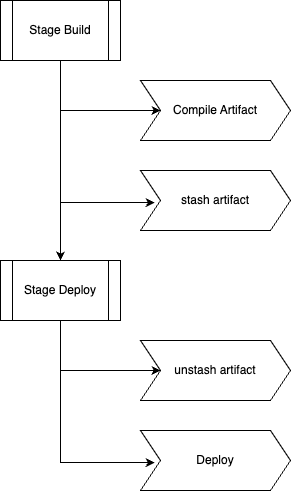
The most common mechanism for transferring files between nodes is stash and unstash.
These steps package files from one stage and restore them in another.
Example
stage('Build') {
    steps {
        sh "mkdir dist"
        sh "echo build artifact > dist/app.txt"

        stash name: "build-artifacts", includes: "dist/*"
    }
}

stage('Deploy') {
    steps {
        unstash "build-artifacts"
        sh "cat dist/app.txt"
    }
}
How It Works
Internally Jenkins:
- Compresses the specified files
- Transfers them to the controller
- Stores them temporarily
- Restores them in the target node’s workspace
This makes the files available even if the stages run on different nodes.
Typical Workflow
Best Practices
stash is ideal for:
- compiled artifacts
- generated configuration files
- small build outputs
However, it is not intended for large files. Transferring hundreds of megabytes through the controller can slow down the system.
7. Archiving Artifacts
Another option is to archive build outputs using archiveArtifacts.
Example:
stage('Build') {
    steps {
        sh "mkdir dist"
        sh "echo artifact > dist/app.txt"

        archiveArtifacts artifacts: "dist/*"
    }
}
Archived artifacts are stored by Jenkins and can be downloaded later.
However, they are primarily intended for build records and downloads, not for transferring files between stages.
8. Using External Artifact Storage
Large pipelines often use external storage systems instead of Jenkins workspaces.
Common examples include:
- Amazon S3
- Artifactory
- Nexus
- Google Cloud Storage
Example workflow:
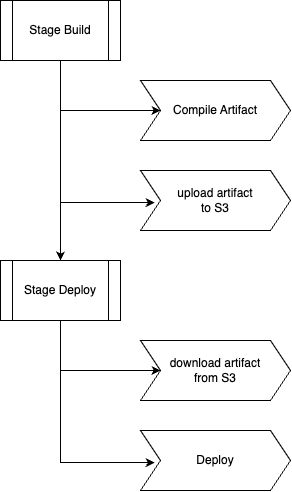
Example pipeline code:
stage('Upload Artifact') {
    steps {
        sh "aws s3 cp dist/app.jar s3://build-artifacts/app.jar"
    }
}

stage('Deploy') {
    steps {
        sh "aws s3 cp s3://build-artifacts/app.jar app.jar"
        sh "deploy app.jar"
    }
}
Advantages
External storage provides:
- high reliability
- scalability
- persistence beyond the pipeline lifecycle
This approach is widely used in enterprise CI/CD systems.
9. Passing Data in Container-Based Pipelines
When using Docker or Kubernetes agents, pipelines often run inside ephemeral containers.
Example:
agent {
    kubernetes {
        yaml podTemplate
    }
}
Each pipeline execution creates a temporary pod.
Once the pipeline finishes, the pod and its filesystem are destroyed.
This means: workspace persistence cannot be relied upon
In these environments, data transfer typically uses:
stash/unstash- artifact repositories
- object storage systems
10. The Role of reuseNode
In container-based pipelines, each stage may create a new container.
This can lead to workspace resets.
The reuseNode option ensures that stages reuse the same workspace.
Example:
agent {
    docker {
        image 'node:20'
        reuseNode true
    }
}
This keeps the container tied to the original node workspace.
However, this only works when Jenkins schedules the pipeline on the same node.
11. Common Problems
Understanding these mechanisms helps diagnose common pipeline issues.
Missing Files
File not found
Cause:
Stages running on different nodes without stash.
Unexpected Empty Workspace
Occurs when:
- a stage runs on another node
- Kubernetes pods restart
- workspace cleanup runs
Slow Pipelines
Using stash with large files can cause performance problems because files are routed through the controller.
12. Recommended Best Practices
Reliable pipelines follow several guidelines.
Keep environment variables small
Use them for metadata such as:
- version numbers
- commit hashes
- configuration flags
Use stash for intermediate artifacts
Ideal for:
- compiled binaries
- generated configuration
- small packages
Use external storage for large artifacts
Production pipelines often store artifacts in:
- S3
- Nexus
- Artifactory
Avoid relying on workspace persistence
Always assume a stage might run on a different node.
Design pipelines accordingly.
13. Summary
Passing data between nodes is a fundamental challenge in distributed Jenkins pipelines.
Because Jenkins agents do not share filesystems, data must be transferred explicitly.
The main techniques include:
- environment variables for simple values
- workspace files when stages share the same node
stashandunstashfor transferring artifacts between nodes- external artifact repositories for large or persistent data
By understanding these mechanisms, engineers can design pipelines that remain reliable even in distributed environments such as Kubernetes-based build systems.
Proper data transfer strategies are essential for scalable and maintainable CI/CD pipelines.