Jenkins – Input Step with LDAP: A Practical Approval Setup
Introducing approval in Jenkins pipelines is straightforward from a technical perspective, but quickly becomes more complex when usability and access control are considered.
The native input step provides the mechanism to pause execution and wait for a user decision. However, using it in a real environment requires additional considerations around visibility, user access, and integration with identity systems such as LDAP.
This is the approach we implemented to make it usable and controlled.
The Limitation of Jenkins Approval
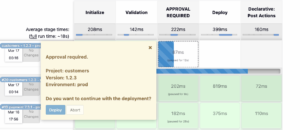
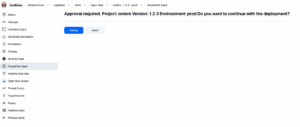
The input step works as expected: it pauses the pipeline and waits for user interaction.
The problem is not functionality — it is visibility.
When a pipeline reaches an approval step:
- There is no notification
- The UI does not clearly highlight required action
- Users must manually check Jenkins
This makes it easy for approvals to be missed.
In most environments, this is typically complemented with external systems such as Slack or email notifications. Jenkins alone is not enough to reliably capture user attention.
In this setup, the focus was to improve the native behavior without adding external dependencies.
Making Approval Explicit in the Pipeline
Instead of embedding approval logic inside another stage, a dedicated stage was introduced:
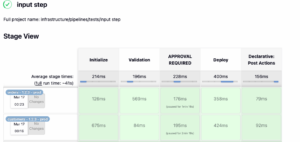
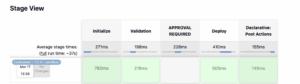
stage('APPROVAL REQUIRED')
This improves readability and makes the pipeline flow easier to understand.
Approval is only required for production:
when {
    expression { params.ENVIRONMENT == 'prod' }
}
This ensures that lower environments are not blocked unnecessarily.
The full implementation can be seen here:
👉
Improving Visibility with Build Description
Since Jenkins does not clearly expose that a pipeline is waiting for approval, the build description was used as a signal:
currentBuild.description = "Waiting for deploy approval"
This allows users to immediately understand the state of the pipeline from the job list, without opening the build.
Controlling Who Can Approve
The approval step is configured with a submitter restriction:
submitter: "DeploymentApprovers,JenkinsAdmin"
This ensures that only specific users or groups can approve the execution.
The approver is also captured:
submitterParameter: "APPROVER"
This provides traceability of who approved the deployment.
LDAP Integration
Authentication and authorization are handled through LDAP.
Three users were created:
- devuser1
- devuser2
- devuser3
All users are allowed to log in to Jenkins through the group:
cn=JenkinsLabGroup,ou=SecurityGroups,dc=ldap,dc=devops-db,dc=info
LDIF Group Assignment
To ensure all users can log in, the group must explicitly include them:
dn: cn=JenkinsLabGroup,ou=SecurityGroups,dc=ldap,dc=devops-db,dc=info
objectClass: groupOfNames
cn: JenkinsLabGroup
member: cn=devuser1,ou=UserGroups,dc=ldap,dc=devops-db,dc=info
member: cn=devuser2,ou=UserGroups,dc=ldap,dc=devops-db,dc=info
member: cn=devuser3,ou=UserGroups,dc=ldap,dc=devops-db,dc=info
Deployment Approvers
Only one user is allowed to approve deployments:
- devuser1
This user belongs to:
cn=DeploymentApprovers,ou=SecurityGroups,dc=ldap,dc=devops-db,dc=info
This group is referenced in the pipeline through the submitter field.
Jenkins LDAP Configuration
The User Search Filter was updated to allow authentication based on group membership:
(&(uid={0})(|(
memberOf=cn=JenkinsAdmin,ou=SecurityGroups,dc=ldap,dc=devops-db,dc=info)
(memberOf=cn=JenkinsLabGroup,ou=SecurityGroups,dc=ldap,dc=devops-db,dc=info)
(memberOf=cn=DeploymentApprovers,ou=SecurityGroups,dc=ldap,dc=devops-db,dc=info)
)))
This ensures that only users belonging to approved groups can access Jenkins.
Behavior in Practice
With this setup:
- devuser1 can approve the pipeline
- devuser2 cannot approve
- devuser3 cannot approve
If a non-authorized user attempts to approve, Jenkins blocks the action.
This matches the expected behavior and enforces proper control over production deployments.

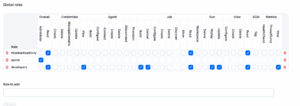
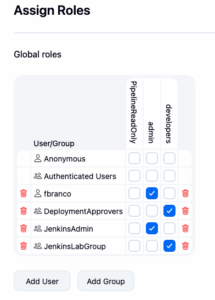
LDAP vs Jenkins Roles
A key question in this setup is where to manage approval permissions.
If LDAP is not managed by your team, it may be tempting to use Jenkins roles instead.
There are two approaches:
LDAP groups (recommended)
- Centralized access control
- Consistent across systems
- Easier to audit
Jenkins roles
- Useful when LDAP changes are not possible
- Managed locally in Jenkins
- Less consistent across environments
In this setup, LDAP groups were used as the source of truth. Jenkins only enforces what LDAP defines.
Final Notes
The Jenkins input step provides the foundation for manual approval, but it is not sufficient on its own.
To make it usable in practice, it requires:
- Explicit pipeline stages
- Visibility improvements
- Controlled access via identity systems
Without these, the approval mechanism works technically, but fails operationally.
With them, it becomes a practical solution for controlled execution in production environments.