From DevOps API to Self-Documented Platform: Building and Documenting a Go API with Swagger in Kubernetes – Part 1
In a previous article, we introduced a DevOps API designed to support dynamic Jenkins parameters using Active Choices and Groovy. That initial version focused on exposing data from internal systems such as GitLab and PostgreSQL.
However, before introducing Swagger, it is important to understand the foundational work that enabled this evolution.
This was not a greenfield project. Instead, Swagger was introduced into an already functional, containerized, and deployed API running in Kubernetes.
Building the Foundation
To simulate a realistic DevOps environment and support future use cases, we first created a set of GitLab repositories representing different services:
- https://gitlab.devops-db.internal/services/customers
- https://gitlab.devops-db.internal/services/inventory
- https://gitlab.devops-db.internal/services/orders
- https://gitlab.devops-db.internal/services/payment
- https://gitlab.devops-db.internal/services/reporting
Each repository was populated with approximately 20 semantic version tags. These tags would later serve as the primary data source for our API endpoints.
Private Container Registry (Nexus)
To support containerized deployments, we created a dedicated Docker repository in Nexus: devops_images
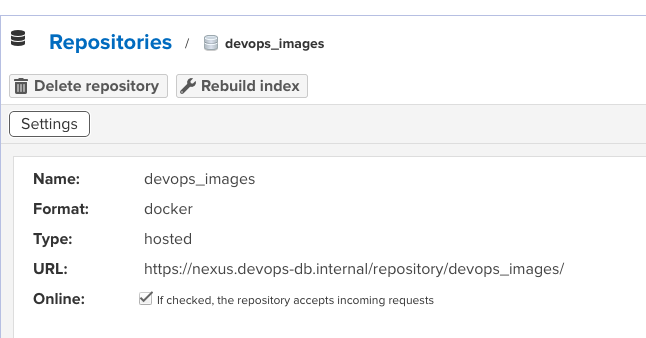
This repository stores all application images, including the DevOps API itself.
Fixing Internal TLS Trust
Since the environment relies on internal certificate authorities, we needed to ensure that containers could trust internal services such as GitLab and Nexus.
This required updating the base image used by our applications:
- adding the internal Root and Intermediate CA certificates
- installing them into the system trust store
- running
update-ca-certificates
This step was critical to allow secure communication without relying on insecure flags such as -k.
curl -u usr_jenkins_nexus:1234qwer -k https://nexus.devops-db.internal/repository/certificate-internal/pki/intermediate/devops-db-intermediate.crt -o devops-db-intermediate.crt

curl -u usr_jenkins_nexus:1234qwer -k https://nexus.devops-db.internal/repository/certificate-internal/pki/root/devops-db-root-ca.crt -o devops-db-root-ca.crt

cat devops-db-intermediate.crt devops-db-root-ca.crt > ca.crt
https://github.com/faustobranco/devops-db/tree/master/Initial%20Images/go
FROM ubuntu:22.04

USER root

ARG TARGETARCH
ENV WORKDIR=/pipeline
ENV DEBIAN_FRONTEND=noninteractive
RUN mkdir -p ${WORKDIR}
WORKDIR ${WORKDIR}
ENV GO_VERSION=1.23.0

COPY ca.crt /usr/local/share/ca-certificates/devops-db.crt

RUN apt-get clean \
    && rm -rf /var/lib/apt/lists/* \
    && apt-get update --fix-missing \
    && apt-get install -y --no-install-recommends \
       ca-certificates \
       wget \
       vim \
       curl \
       less \
       git \
       openjdk-21-jre-headless \
    && update-ca-certificates \
    && rm -rf /var/lib/apt/lists/*

RUN wget https://go.dev/dl/go${GO_VERSION}.linux-${TARGETARCH}.tar.gz \
    && tar -C /usr/local -xzf go${GO_VERSION}.linux-${TARGETARCH}.tar.gz \
    && rm go${GO_VERSION}.linux-${TARGETARCH}.tar.gz

ENV GOPATH=/go
ENV PATH=$PATH:/usr/local/go/bin:$GOPATH/bin

RUN mkdir -p $GOPATH/bin && chmod -R 777 $GOPATHBuilding the Application Image
With the base image fixed, we created the Docker image for the DevOps API using a multi-stage build:
- build stage using Go
- runtime stage based on the internal base image
The resulting image was pushed to Nexus: nexus.devops-db.internal/devops_images/devops-api:<version>
# build stage
FROM golang:1.26-alpine AS builder

WORKDIR /app

COPY go.mod go.sum ./
RUN go mod download

COPY . .

RUN CGO_ENABLED=0 GOOS=linux GOARCH=amd64 go build -o devops-api
#RUN CGO_ENABLED=0 GOOS=linux GOARCH=arm64 go build -o devops-api

# runtime stage
FROM nexus.devops-db.internal/base_images/base_go:1.0.4

WORKDIR /app

COPY --from=builder /app/devops-api .

EXPOSE 8080

CMD ["./devops-api"]
https://github.com/faustobranco/devops-db/tree/master/infrastructure/resources/devops-api/docker
Kubernetes Deployment with Helm
The application was deployed to Kubernetes using Helm, ensuring a reproducible and configurable deployment.
The Helm chart included:
- Deployment
- Service
- ConfigMap
- Secrets
- Gateway API resources
Exposing the API with Gateway API and Traefik
Instead of using traditional Ingress, we adopted the Kubernetes Gateway API with Traefik as the controller.
This provided:
- more explicit routing configuration
- better separation of concerns
- future-proof networking model
The API was exposed using a dedicated hostname: devops-api.devops-db.internal

Configured via DNS:
devops-api IN A 172.21.5.240Database Access
To support endpoints related to databases and schemas, we configured PostgreSQL access:
CREATE USER devops_api WITH PASSWORD '1234qwer';
ALTER USER "devops_api" WITH CREATEDB;
GRANT CONNECT ON DATABASE postgres TO devops_api;This allowed the API to query database metadata dynamically.
Deployment and Validation
Once all components were in place, the application was deployed to Kubernetes and validated through direct API calls.
At this stage, the API already supported endpoints such as:
/health/tags/databases/schemas/blueprints/*
For example:
curl -s "http://devops-api.devops-db.internal/tags?repo=services/reporting&sort=date"returned a list of semantic version tags retrieved directly from GitLab.
curl -s "http://devops-api.devops-db.internal/tags?repo=services/reporting&sort=date" | jq
[
  "v0.1.0",
  "v0.1.1",
  "v0.2.0",
  "v0.2.1",
  "v0.2.2",
  "v0.3.0",
  "v0.3.1",
  "v0.4.0",
  "v0.4.1",
  "v0.5.0",
  "v0.6.0",
  "v0.7.0",
  "v0.8.0",
  "v0.9.0",
  "v0.9.1",
  "v1.0.0",
  "v1.1.0",
  "v1.2.0",
  "v1.2.1",
  "v1.3.0"
]


curl -s "http://devops-api.devops-db.internal/schemas?service=reporting&env=dev&db=devops_test_db" | jq

{
  "status": "ok",
  "data": [
    "infrastructure_tests",
    "public"
  ]
}