Building and Distributing an RPM Package via Nexus YUM Repository: A Practical Deep Dive
Introduction
After successfully implementing a Debian-based distribution workflow, the next logical step is to replicate the same approach using the RPM ecosystem. This article walks through the complete lifecycle of building an RPM package, publishing it to a Nexus YUM repository, and consuming it from a clean client environment.
The focus is not only on how to execute each step, but more importantly on why each step exists, and how all components interact in a real-world DevOps environment.
1. Starting from a Clean Environment
docker run -it --rm --platform linux/amd64 -v $(pwd):/work rockylinux:9 bash
Why this matters
- Ensures a controlled, reproducible environment
- Forces amd64 architecture, matching the compiled binary
- Avoids host contamination
- Simulates real-world deployment targets
Packaging should always be validated in isolation.
2. Installing Required Tooling
dnf install -y rpm-build rpmdevtools
Why these tools
rpm-build: core toolchain to create RPM packagesrpmdevtools: utilities to bootstrap the RPM workspace
3. Creating the RPM Build Structure
rpmdev-setuptree
This generates:
~/rpmbuild/
├── BUILD
├── RPMS
├── SOURCES
├── SPECS
└── SRPMS
Why this structure exists
RPM enforces a strict separation:
- SOURCES → input artifacts (your binary)
- SPECS → build instructions
- RPMS → final output
This design ensures deterministic and repeatable builds.
4. Preparing the Binary
cp /work/git-semver ~/rpmbuild/SOURCES/
Why this step
The RPM build process only works with files inside its controlled environment (SOURCES). This guarantees:
- Reproducibility
- Isolation from external filesystem changes
5. Defining the SPEC File
vi ~/rpmbuild/SPECS/git-semver.spec
Minimal Working SPEC
Name:           git-semver
Version:        0.2.1
Release:        1
Summary:        Git semantic version tool

License:        MIT
BuildArch:      x86_64
Requires:       git

%description
Simple semantic versioning tool.

%install
mkdir -p %{buildroot}/usr/local/bin
cp %{_sourcedir}/git-semver %{buildroot}/usr/local/bin/git-semver
chmod +x %{buildroot}/usr/local/bin/git-semver

%files
/usr/local/bin/git-semver
6. Understanding the SPEC File
Key Elements
Name,Version,Release: uniquely identify the packageBuildArch: ensures architecture compatibilityRequires: declares runtime dependencies
Important Note
Requires: git
This ensures:
- Automatic dependency resolution
- No runtime failures due to missing Git
Dependency management must be handled by the package manager, not by the application.
7. Building the RPM Package
rpmbuild -ba ~/rpmbuild/SPECS/git-semver.spec
Output
~/rpmbuild/RPMS/x86_64/git-semver-0.2.1-1.x86_64.rpm
Why this step is critical
- Validates SPEC correctness
- Produces a distributable artifact
- Ensures filesystem layout is respected
8. Local Installation Test
dnf install -y ~/rpmbuild/RPMS/x86_64/git-semver-0.2.1-1.x86_64.rpm
git-semver --version
git-semver version v0.2.1
Why test locally first
- Isolates packaging issues
- Confirms binary works after installation
- Avoids debugging repository problems prematurely
9. Creating the Nexus YUM Repository
In Nexus Repository Manager, create a YUM (hosted) repository with:
- Repodata Depth:
0 - Deployment Policy: Allow redeploy
Why these settings matter
Repodata Depth = 0
- Assumes a flat repository structure
- Nexus scans only the root for RPMs
- Simplifies metadata generation
Deployment Policy
- Allows iterative development
- Enables overwriting packages during testing
10. Uploading the RPM
curl -k -u usr_jenkins_nexus:1234qwer \
  --upload-file /root/rpmbuild/RPMS/x86_64/git-semver-0.2.1-1.x86_64.rpm \
  https://nexus.devops-db.internal/repository/devops-db-yum/
Why this works
- Nexus automatically detects RPM uploads
- Extracts metadata
- Triggers repository indexing
11. The Critical Step: Metadata (repodata)
This is the most important concept in YUM repositories.
YUM does not scan files directly.
Instead, it relies entirely on:
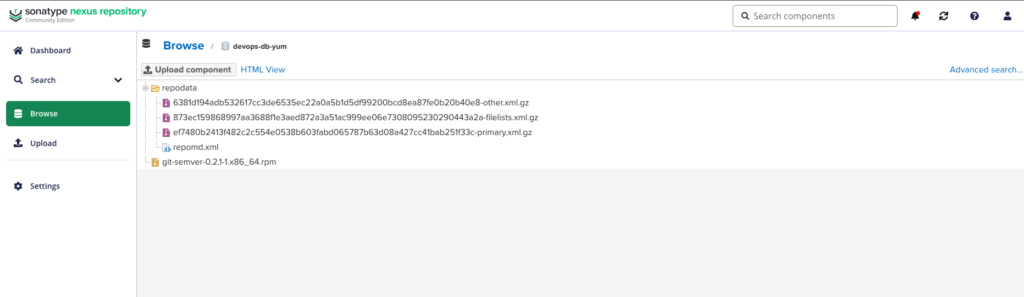
If repodata does not exist:
dnf install git-semver
→ will always fail
12. Rebuilding Repository Metadata
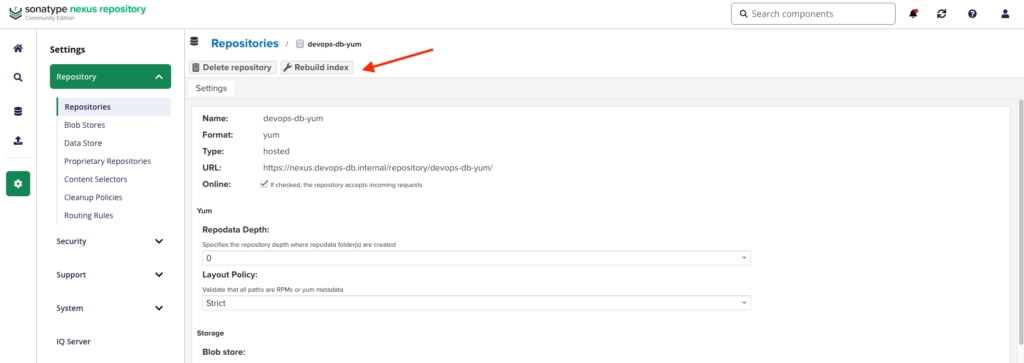
Normally automatic, but if needed:
- Go to Nexus
- Repository → “Rebuild index”
Why this matters
This step:
- Scans RPMs
- Generates metadata
- Makes packages visible to clients
Without metadata, the repository is effectively empty.
13. Preparing the Client Environment
Clean container
docker run -it --rm --platform linux/amd64 -v $(pwd):/work rockylinux:9 bash
Install internal CA
curl -k -o roots.pem https://ca.devops-db.internal/roots.pem

mkdir -p /etc/pki/ca-trust/source/anchors/
cp roots.pem /etc/pki/ca-trust/source/anchors/devops-db-root.crt

update-ca-trust
Why this is required
- Nexus uses an internal certificate
- System must trust the issuing CA
- Otherwise, TLS validation fails
14. Configuring the YUM Repository
cat <<EOF > /etc/yum.repos.d/git-semver.repo
[git-semver]
name=Git Semver Repo
baseurl=https://nexus.devops-db.internal/repository/devops-db-yum/
enabled=1
gpgcheck=0
repo_gpgcheck=0
EOF
15. Refreshing Metadata
dnf clean all
dnf makecache
16. Verifying Availability
dnf repoquery git-semver
Last metadata expiration check: 0:00:08 ago on Thu Mar 26 18:44:58 2026.
git-semver-0:0.2.1-1.x86_64
17. Installing from Repository
dnf install -y git-semver
18. Final Validation
[root@4dcbd74240ed /]# git-semver --version
git-semver version v0.2.1