
Building a Production-Ready APT Package and Repository with Nexus: A Practical Deep Dive
Introduction
This article walks through the complete lifecycle of building, packaging, publishing, and consuming a custom CLI tool (git-semver) using the Debian packaging ecosystem and a private APT repository hosted on Nexus.
https://github.com/faustobranco/git-semver
Rather than focusing only on how, this guide emphasizes why each step exists, what problems it solves, and how all components fit together into a production-grade workflow.
1. Why Package a Binary Instead of Distributing It Directly?
At first glance, distributing a single Go binary via curl seems sufficient. However, packaging introduces several critical advantages:
- Version management via APT
- Dependency handling
- Upgrade paths (
apt upgrade) - Standardized installation locations
- Traceability via
dpkg - Enterprise compatibility
In short:
A
.debpackage turns a binary into a managed system artifact.
2. Cross-Compiling the Binary for Linux
The first step is ensuring the binary matches the target runtime environment.
GOOS=linux GOARCH=amd64 go build -ldflags "-X main.version=v0.2.1" -o git-semver
Why this matters
GOOS=linux: ensures compatibility with Linux systems (e.g., containers, servers)GOARCH=amd64: matches common server architectures-ldflags: injects version metadata at build time
Without this, the binary would not execute in a Linux environment.
3. Debian Package Structure: Understanding the Filesystem Layout
A Debian package is not just a compressed binary — it is a filesystem snapshot.
Directory Structure
git-semver-deb/
├── DEBIAN/
│   └── control
└── usr/
    └── local/
        └── bin/
            └── git-semver
Why this structure?
DEBIAN/: contains metadata and lifecycle scriptsusr/local/bin/: standard location for user-installed binaries
Debian packages mimic the root filesystem (
/) — everything inside is installed relative to it.
4. Control File: The Package Identity
Package: git-semver
Version: 0.2.1
Section: utils
Priority: optional
Architecture: amd64
Maintainer: Fausto <you@example.com>
Depends: git
Description: Simple semantic versioning tool for Git repositories
Why this matters
This file defines:
- How APT identifies the package
- Compatibility (
Architecture) - Upgrade logic (
Version) - Metadata for tooling (
Section,Priority)
APT relies entirely on this metadata to resolve installations and upgrades.
Note on Dependencies: Depends: git
Since git-semver relies on Git to inspect repository history, it is important to declare this explicitly in the package metadata:
Depends: git
Why this matters
Debian packages should always declare their runtime dependencies. This ensures that:
- Required tools are automatically installed
- The package behaves predictably across systems
- Failures are prevented at runtime
Without this declaration, the package may install successfully but fail when executed.
Practical impact
When installing:
apt install git-semver
APT will automatically resolve and install git if it is not already present.
This shifts responsibility from runtime checks to the package manager, which is the correct and expected behavior in Debian-based systems.
5. Lifecycle Scripts: Controlling Installation Behavior
Debian allows hooks at different lifecycle stages:
| Script | When it runs |
|---|---|
| preinst | Before installation |
| postinst | After installation |
| prerm | Before removal |
| postrm | After removal |
Example: postinst
#!/bin/bash
set -e

ln -sf /usr/local/bin/git-semver /usr/bin/git-semver

if ! command -v git >/dev/null; then
    echo "ERROR: git is required"
    exit 1
fi

echo "$(date) - git-semver installed"

chmod +x /usr/local/bin/git-semver
Why this matters
- Ensures binary is available in
/usr/bin - Validates runtime dependency (
git) - Provides audit/logging
Lifecycle scripts turn a static package into a controlled installation process.
Folder Structure
In the end, the folder should have this structure before building the package.
.
└── git-semver-deb
    ├── DEBIAN
    │   ├── control
    │   └── postinst
    └── usr
        └── local
            └── bin
                └── git-semver
6. Building the Package
dpkg-deb --build --root-owner-group git-semver-deb
Why --root-owner-group?
Ensures files inside the package are owned by root, which is required for proper installation on target systems.
7. Inspecting the Package
dpkg-deb -c git-semver-deb.deb

drwxr-xr-x root/root         0 2026-03-26 16:24 ./
drwxr-xr-x root/root         0 2026-03-26 16:21 ./usr/
drwxr-xr-x root/root         0 2026-03-26 16:21 ./usr/local/
drwxr-xr-x root/root         0 2026-03-26 16:21 ./usr/local/bin/
-rwxr-xr-x root/root   3707525 2026-03-26 17:15 ./usr/local/bin/git-semver
Why inspect?
- Verifies structure
- Prevents incorrect paths
- Ensures expected install locations
8. Local Installation Test
sudo dpkg -i git-semver-deb.deb
This bypasses APT and installs directly.
Why test this first?
- Validates package integrity
- Isolates packaging issues from repository issues
9. Clean Environment Testing with Docker
docker run -it --rm -v $(pwd):/work ubuntu:22.04 bash
Inside the container:
apt update
apt install -y ./work/git-semver-deb.deb
git-semver --version
Why use a container?
- Guarantees clean environment
- Avoids local machine contamination
- Simulates real-world installation
11. Nexus APT Repository: Complete Setup and Configuration
Up to this point, we built a valid .deb package and validated it locally. However, the real power of the Debian ecosystem comes from centralized repositories.
This section explains how to configure a fully functional APT repository in Nexus, including why each configuration matters.
11.1 Why Use Nexus as an APT Repository?
Before diving into configuration, it’s important to understand the role Nexus plays:
- Acts as a package distribution server
- Generates and maintains APT metadata (Packages, Release files)
- Provides versioned storage
- Integrates with CI/CD pipelines
- Supports access control and auditing
Nexus replaces the need for manual tools like
repreprooraptly.
11.2 Repository Type Selection
In Nexus Repository Manager, create a new repository:
Type: APT (hosted)
Why hosted?
- You are publishing your own packages
- Nexus becomes the source of truth
- It generates metadata automatically
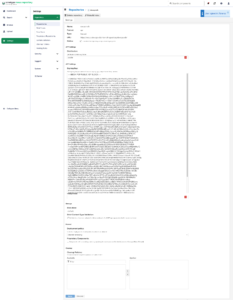
11.3 Core Configuration
Name
devops-db
This becomes part of your repository URL:
https://nexus.devops-db.internal/repository/devops-db/
Distribution
stable
Why stable Makes Sense Here
Your package (git-semver) is:
- A statically compiled Go binary
- Has no system-level dependencies
- Works across multiple Ubuntu versions
Therefore:
Using
stabledecouples the package from OS versions.
Components
main
Why this exists
APT repositories are segmented:
main→ primary packagescontrib,non-free→ optional categories
For internal tools:
mainis sufficient and standard
Architecture
amd64
Why this matters
Ensures:
- Correct package filtering
- Prevents incompatible installations
11.4 APT Signing Key (Critical for Production)
Step 1: Generate GPG Key
gpg --batch --generate-key gpg-batch.conf
Step 2: Export Public Key
gpg --armor --export "git-semver" > public.key
Step 3: Configure in Nexus
Upload public.key into:
APT Signing Key
Why signing is important
APT uses signatures to:
- Verify package integrity
- Prevent tampering
- Ensure repository authenticity
Without signing, you must use:
[trusted=yes]
Which:
❌ disables security checks
✔ acceptable only for testing
11.5 Deployment Policy
Set:
Allow redeploy
Why?
During development:
- You may rebuild the same version
- You need flexibility
In production:
- Prefer immutable versions
11.6 Blob Store
Choose:
default
Why?
Defines where artifacts are stored physically.
In larger setups:
- Separate blob stores for isolation
- Performance tuning
11.7 Final Repository URL Structure
After configuration, and upload the package, your repository behaves like:
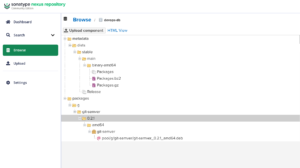
Why this structure matters
APT expects:
dists/<distribution>/<component>/binary-<arch>/PackagesReleasemetadata- Optional
InReleasesignatures
Nexus generates all of this automatically.
11.8 Uploading Packages
curl -u usr_jenkins_nexus:1234qwer \
  -H "Content-Type: multipart/form-data" \
  --data-binary "@git-semver-deb.deb" \
  "https://nexus.devops-db.internal/repository/devops-db/"
Why this works
- Nexus parses the
.deb - Extracts metadata from
control - Updates internal indexes
- Regenerates
Packages.gz
11.9 Repository Metadata Generation
After upload, Nexus automatically updates:
Packages.gzReleaseInRelease(if signing enabled)
Why this is critical
APT does not scan directories — it reads metadata.
If metadata is incorrect, packages are invisible.
11.10 Client Configuration
For testing pourpose, you can crate a Docker Container:
docker run -it --rm -v $(pwd):/work ubuntu:22.04 bash
Configuring Trust (Private CA)
In environments with internal certificates:
curl -O -k https://ca.devops-db.internal/roots.pem

mkdir -p /usr/local/share/ca-certificates/devops-db
cp roots.pem /usr/local/share/ca-certificates/devops-db/devops-db-root.crt

update-ca-certificates
Why this is necessary
- APT requires HTTPS trust
- Without this, repository access fails
- Critical in enterprise environments
- We have a Internal CA
Add repository
echo "deb [trusted=yes] https://nexus.devops-db.internal/repository/devops-db/ jammy main" > /etc/apt/sources.list.d/git-semver.list
Update APT
apt update
Install package
apt install git-semver
11.11 Verifying Repository Functionality
Check installation
git-semver --version

git-semver version v0.2.1
Check package metadata
dpkg -s git-semver | grep Version
Version: 0.2.1
Why both checks?
- Binary version → confirms build correctness
- Package version → confirms repository metadata
