Building a Nexus Raw Repository for Generic Artifact Distribution
In any mature DevOps ecosystem, not everything fits neatly into predefined package formats such as Maven, npm, Docker, or Helm. There is always a long tail of artifacts—custom binaries, configuration bundles, scripts, compressed archives, or even ad-hoc deliverables—that still require controlled, centralized, and traceable distribution.
This is precisely where a Nexus Raw Repository becomes not only useful, but essential.
Despite being the simplest repository type available in Nexus Repository Manager, the raw repository is arguably the most versatile. Its power lies in its lack of constraints: it imposes no structure, no metadata requirements, and no format validation. It behaves like a structured HTTP file server—with all the benefits of Nexus layered on top: access control, auditing, and integration into your CI/CD pipelines.
Why Use a Raw Repository?
Before diving into implementation, it’s important to understand why this repository type exists and when it should be used.
1. Format-Agnostic Storage
Unlike Maven or npm repositories, a raw repository does not enforce any structure or naming convention. This allows you to store:
- Custom binaries
- Compiled artifacts not tied to a package manager
- Infrastructure bundles (e.g., Terraform modules packaged manually)
- Shell scripts or utilities
- Configuration snapshots
- Backup files
2. Simplified Distribution
Artifacts can be uploaded and downloaded via simple HTTP requests. No client tooling is required beyond curl, wget, or a browser.
3. Decoupling from Ecosystem Constraints
Not all teams operate within strict package ecosystems. Raw repositories allow teams to move fast without having to “fit” their artifacts into inappropriate formats.
4. CI/CD Integration
Because uploads and downloads are HTTP-based, integrating with pipelines is trivial and does not require specialized plugins.
Creating the Raw Repository
The repository will be created under the following base URL:
https://nexus.devops-db.internal/repository/infrastructure/
Step 1: Access Nexus UI
- Navigate to your Nexus instance
- Authenticate with appropriate privileges
Step 2: Create a New Repository
- Go to Repositories
- Click Create repository
- Select raw (hosted)
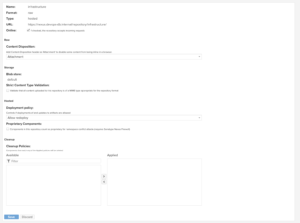
Step 3: Configure Repository
Use the following configuration:
- Name:
infrastructure - Online: Enabled
- Storage:
- Blob store: Default (or a dedicated one if required)
- Deployment Policy:
Allow redeploy(recommended for flexibility)
- Cleanup Policies:
- Optional, depending on retention strategy
Why these choices?
- Hosted: We want to store and serve our own artifacts.
- Allow redeploy: Raw repositories are often used for iterative artifacts; strict immutability can slow down workflows.
- No strict structure: This is intentional—flexibility is the goal.
Uploading Artifacts
There are two main approaches: UI and API (CLI). The latter is preferred for automation.
Option 1: Upload via UI
- Open the
infrastructurerepository - Click Upload
- Select your file
- Define a path (e.g.,
tools/my-binary/v1.0.0/) - Upload
This method is useful for manual or one-off operations.
Option 2: Upload via CLI (Recommended)
Using curl:
curl -u usr_jenkins_nexus:1234qwer --upload-file root-ca.crt https://nexus.devops-db.internal/repository/infrastructure/pki/root/devops-db-root-ca.crt

curl -u usr_jenkins_nexus:1234qwer --upload-file intermediate-ca.crt https://nexus.devops-db.internal/repository/infrastructure/pki/intermediate/devops-db-intermediate.crt
Why this works
- The raw repository maps HTTP paths directly to storage paths.
- No metadata or index is required.
- The URL is the file location.
Best Practices for Paths
Even though raw repositories are unstructured, you should impose logical conventions:
This prevents chaos over time.
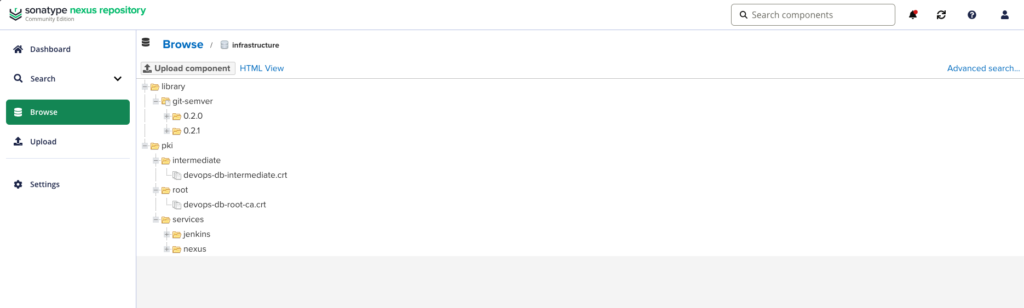
Today, for the time being, our structure is as follows:
Downloading Artifacts
Downloading is even simpler.
Using Curl with authentication
curl -u usr_jenkins_nexus:1234qwer -O https://nexus.devops-db.internal/repository/infrastructure/pki/root/devops-db-root-ca.crt

curl -u usr_jenkins_nexus:1234qwer -O https://nexus.devops-db.internal/repository/infrastructure/pki/intermediate/devops-db-intermediate.crt
Using Curl without authentication
curl -O https://nexus.devops-db.internal/repository/homebrew-devopsdb/pssql/1.0.0/pssql_1.0.0_darwin_arm64.tar.gz
Using wget with authentication
wget --user=usr_jenkins_nexus \
     --password=1234qwer \
https://nexus.devops-db.internal/repository/infrastructure/pki/intermediate/devops-db-intermediate.crtUsing wget without authentication
wget https://nexus.devops-db.internal/repository/homebrew-devopsdb/pssql/1.0.0/pssql_1.0.0_darwin_arm64.tar.gz<br>Direct Browser Access
You can also access the file directly via browser if permissions allow.
Authentication Considerations
For automation:
- Use service accounts
- Avoid embedding credentials directly in scripts
- Prefer environment variables or secret managers
Example:
curl -u "$NEXUS_USER:$NEXUS_PASS" \
     --upload-file artifact.bin \
     https://nexus.devops-db.internal/repository/infrastructure/path/artifact.bin
Trade-offs and Considerations
While raw repositories are powerful, they come with trade-offs.
1. No Metadata
There is no built-in versioning, indexing, or dependency resolution.
👉 You must enforce naming/versioning conventions manually.
2. No Integrity Guarantees
Unlike package managers, there is no automatic checksum validation unless you implement it.
👉 Consider storing .sha256 files alongside artifacts.
3. Potential for Chaos
Without discipline, repositories can become disorganized.
👉 Define and document directory structures early.
4. No Native Promotion Workflow
You cannot “promote” artifacts between stages (like staging → release) without copying them manually or via automation.
When to Use Raw vs Other Repository Types
| Use Case | Raw Repo | Specialized Repo |
|---|---|---|
| Arbitrary binaries | ✅ | ❌ |
| Maven artifacts | ❌ | ✅ |
| Docker images | ❌ | ✅ |
| Scripts and utilities | ✅ | ❌ |
| Temporary build outputs | ✅ | ❌ |