ArgoCD in Practice: Installation, GitOps Workflow, and Canary Deployment with Helm
Introduction
ArgoCD is often introduced as a “deployment tool for Kubernetes”.
That definition is incomplete — and misleading.
ArgoCD is not a deployment engine.
It is a GitOps controller.
This article explains not only how to install and use ArgoCD, but why each step exists, and how it fits into a real-world architecture.
1. What ArgoCD Is (and Is NOT)
Definition
ArgoCD is a state reconciliation system.
Git = desired state
Cluster = actual state
ArgoCD = reconciler
What ArgoCD Does
- ✔ Reads Git repositories
- ✔ Renders manifests (Helm, YAML, Kustomize)
- ✔ Applies them to Kubernetes
- ✔ Continuously ensures consistency
What ArgoCD Does NOT Do
ArgoCD does not perform progressive rollouts.
It does NOT:
- Increase traffic gradually (20% → 50% → 70%) (Canary Deployments with Argo Rollouts: A Practical, Helm-Based Approach)
- Evaluate metrics
- Decide promotion or rollback
Responsibility Model
ArgoCD → applies state
Helm → defines configuration
Ingress → controls traffic
Rollout logic → YOU (or Argo Rollouts)
2. DNS — Why It Matters
Without DNS:
http://192.168.1.10:8080 ❌
With DNS:
https://argocd.devops-db.internal ✔
nslookup argocd.devops-db.internal
Server:		100.64.0.1
Address:	100.64.0.1#53

Name:	argocd.devops-db.internal
Address: 172.21.5.241Why DNS Is Important
- ✔ Human-readable
- ✔ Required for TLS
- ✔ Required for SSO
- ✔ Matches production environments
3. Installing ArgoCD
Note on TLS and Authentication
When exposing ArgoCD via Ingress, it is strongly recommended to enable HTTPS using a valid TLS certificate (e.g., via cert-manager).
Authentication flows handled by Dex (such as LDAP, OIDC, etc.) rely on browser cookies and strict redirect URL validation. These mechanisms are inherently sensitive to protocol mismatches and may fail when using plain HTTP.
Without TLS, you may encounter issues such as:
http: named cookie not presentInvalid redirect URL
Enabling HTTPS ensures:
- Reliable session handling (cookies)
- Correct redirect URI validation
- Compatibility with modern browser security policies
For this reason, TLS should be considered a requirement rather than an optional enhancement when enabling external authentication in ArgoCD.
How to: Security – Configuring TLS Certificates with Step-CA for Nexus, Jenkins, GitLab and Vault
While the install.yaml method provides a quick way to bootstrap ArgoCD, it lacks lifecycle management and reproducibility. A Helm-based installation, on the other hand, introduces structure, versioning, and controlled upgrades — all critical aspects in real-world environments.
The first step is to add the official Argo Helm repository:
helm repo add argo https://argoproj.github.io/argo-helm
helm repo updateThis ensures that we are installing ArgoCD from a maintained and versioned source, rather than relying on static manifests.
Defining the installation (values.yaml)
https://github.com/faustobranco/devops-db/tree/master/infrastructure/helms/argocd
Instead of applying raw manifests, Helm allows us to define the desired state declaratively via a values.yaml file. This becomes the single source of truth for the ArgoCD installation itself.
crds:
install: true
global:
domain: argocd.devops-db.internal
configs:
params:
server.insecure: true
cm:
url: https://argocd.devops-db.internal
server:
ingress:
enabled: true
annotations:
cert-manager.io/cluster-issuer: step-ca-issuer
tls:
- hosts:
- argocd.devops-db.internal
secretName: argocd-tls
ingressClassName: nginx
hosts:
- argocd.devops-db.internal
paths:
- /
pathType: Prefix
service:
type: ClusterIP
controller:
replicas: 1
repoServer:
replicas: 1
applicationSet:
enabled: true
redis:
enabled: true
master:
persistence:
enabled: true
size: 10GiKey design decisions
This configuration is intentionally minimal, but each field serves a specific purpose:
crds.install: true
Ensures that all required Custom Resource Definitions (Applications, AppProjects, ApplicationSets) are installed alongside ArgoCD. This avoids common runtime failures where controllers start before CRDs exist.global.domain+configs.cm.url
These must be aligned with the external access point. ArgoCD uses this value for generating links, callbacks, and UI redirects.server.insecure: true
Disables TLS at the ArgoCD server level. This is acceptable because TLS termination is delegated to the Ingress layer (or postponed entirely during initial setup).- Ingress configuration
Exposes ArgoCD externally using a Kubernetes-native entrypoint. This avoids reliance on port-forwarding and makes the setup immediately usable in a shared environment. - Redis persistence enabled
Although Redis is not a source of truth, enabling persistence improves stability and avoids cache cold starts after restarts. - ApplicationSet enabled
Activates the controller required for managing dynamic application generation patterns (e.g., multi-cluster or multi-env setups).
Installing ArgoCD
With the configuration defined, the installation becomes a single reproducible command:
helm upgrade --install argocd argo/argo-cd \
-n argocd \
--create-namespace \
-f values.yamlThis command is idempotent:
- If ArgoCD is not installed → it installs it
- If it already exists → it upgrades it
This is a key advantage over raw manifests, where updates can be unpredictable.
4. Verification
Once installed, validation should be done at multiple layers to ensure the system is fully operational.
Verify Ingress exposure
kubectl get ingress -n argocd
NAME CLASS HOSTS ADDRESS PORTS AGE
argocd-server nginx argocd.devops-db.internal 127.0.0.1 80 13mThen validate connectivity:
curl -I http://argocd.devops-db.internal
HTTP/1.1 200 OK
Date: Wed, 25 Mar 2026 09:22:51 GMT
Content-Type: text/html; charset=utf-8
Content-Length: 788
Connection: keep-alive
Accept-Ranges: bytes
Content-Security-Policy: frame-ancestors 'self';
Vary: Accept-Encoding
X-Frame-Options: sameorigin
X-Xss-Protection: 1This confirms that:
- DNS (or
/etc/hosts) is correctly configured - Ingress controller is routing traffic
- ArgoCD server is reachable
Command
kubectl create namespace argocd
kubectl apply -n argocd \
-f https://raw.githubusercontent.com/argoproj/argo-cd/stable/manifests/install.yaml
What This Actually Installs
✔ argocd-server (API/UI)
✔ argocd-repo-server (Git + Helm rendering)
✔ argocd-application-controller (reconciliation engine)
✔ redis (cache)
✔ dex (authentication)
Why Installation Is Minimal
ArgoCD deliberately does NOT install:
- Ingress
- DNS
- TLS certificates
- Storage backends
Why?
Because those belong to infrastructure, not to the application layer
3. Exposing ArgoCD — Why You Need an Ingress
Problem
After installation:
kubectl get svc argocd-server -n argocd
You get:
TYPE: ClusterIP
Meaning
ClusterIP = internal-only service
You cannot access it from:
- browser
- external tools
- DNS
Solution: Ingress
kubectl apply -f - <<EOF
apiVersion: networking.k8s.io/v1
kind: Ingress
metadata:
name: argocd
namespace: argocd
annotations:
nginx.ingress.kubernetes.io/backend-protocol: "HTTPS"
spec:
ingressClassName: nginx
rules:
- host: argocd.devops-db.internal
http:
paths:
- path: /
pathType: Prefix
backend:
service:
name: argocd-server
port:
number: 443
EOF
For this example, I created another DNS server in our Bind9 and pointed it to the IP address of our LB (MetalLB).
nslookup argocd.devops-db.internal
Server:		100.64.0.1
Address:	100.64.0.1#53

Name:	argocd.devops-db.internal
Address: 172.21.5.241
Why ArgoCD Does NOT Create an Ingress
Because: Ingress is not standard across clusters
Different environments use:
- nginx
- traefik
- istio
- cloud load balancers
If ArgoCD created one:
would assume a controller
could break environments
would violate separation of concerns
Conclusion
Ingress belongs to infrastructure, not to ArgoCD
5. TLS Certificates — Why ArgoCD Doesn’t Handle Them
TLS is required for:
- authentication
- secure API calls
- browser compatibility
Why ArgoCD Doesn’t Create Certificates
Because:
TLS depends on cluster-specific tooling
Examples:
- cert-manager
- internal CA
- cloud provider certificates
Correct Responsibility
certificates = infrastructure layer
6. Accessing ArgoCD
Get Admin Password
kubectl -n argocd get secret argocd-initial-admin-secret \
  -o jsonpath="{.data.password}" | base64 -d
Why This Exists
ArgoCD generates credentials dynamically to:
✔ avoid hardcoded secrets
✔ improve security
CLI Installation
brew install argocd
Authenticate via CLI
argocd login argocd.devops-db.internal --insecure --grpc-webTwo flags are important here:
--insecure→ required because TLS is not enabled--grpc-web→ ensures compatibility with Ingress (which typically does not support raw gRPC without additional configuration)
Update admin password
argocd account update-passwordThis replaces the bootstrap credential with a secure one and updates the internal secret (argocd-secret).
7. Git Repository Structure — Why It Matters
.
├── README.md
├── argocd
│   ├── devops-api-canary.yaml
│   └── devops-api-stable.yaml
├── envs
│   └── dev
│       ├── values-canary.yaml
│       └── values-stable.yaml
└── helm
    └── devops-api
        ├── Chart.yaml
        ├── charts
        └── templates
            ├── configmap.yaml
            ├── deployment.yaml
            ├── ingress-canary.yaml
            ├── ingress.yaml
            ├── secret.yaml
            └── service.yaml
Why This Separation Exists
Chart ≠ Environment ≠ Deployment
Breakdown
helm/
Application logic (reusable)
envs/
Environment-specific configuration
argocd/
Deployment definitions (Applications)
Why This Is Critical
Avoids:
duplication
tight coupling
environment leakage
8. Connecting GitLab — TLS and .git
Problem
x509: certificate signed by unknown authority
Why This Happens
ArgoCD runs inside Kubernetes and does NOT trust:
your local CA
Correct Fix
openssl s_client -showcerts -connect gitlab.devops-db.internal:443 </dev/null \
  | openssl x509 -outform PEM > gitlab.crt
kubectl create configmap argocd-tls-certs-cm -n argocd \
  --from-file=gitlab.devops-db.internal=gitlab.crt
kubectl rollout restart deployment argocd-repo-server -n argocd
Important Detail
Always use the full URL of your repository, ending with .git, for example:
https://gitlab.devops-db.internal/infrastructure/argocd/devops-api.gitWhy?
ArgoCD does NOT follow redirects:
Git CLI → follows redirect ✔
ArgoCD → does NOT
9. Creating a Project — Why It Exists
kubectl apply -f - <<EOF
apiVersion: argoproj.io/v1alpha1
kind: AppProject
metadata:
  name: devops-api
  namespace: argocd
spec:
  description: DevOps API Project

  sourceRepos:
    - '*'

  destinations:
    - namespace: devops-api
      server: https://kubernetes.default.svc

  clusterResourceWhitelist:
    - group: '*'
      kind: '*'

  namespaceResourceWhitelist:
    - group: '*'
      kind: '*'
EOF
Purpose
Security and isolation boundary
Defines:
- allowed repositories
- allowed namespaces
- cluster access
Why This Matters
Prevents:
accidental deployments
cross-team interference
10. Creating Applications
What an Application Is
"Deployment definition"
Key Fields Explained
source:
  repoURL: Git source
  path: where Helm chart is
  targetRevision: branch

destination:
  namespace: where to deploy

syncPolicy:
  automated: enable GitOps
devops-api-stable.yaml
apiVersion: argoproj.io/v1alpha1
kind: Application
metadata:
  name: devops-api-stable
  namespace: argocd
spec:
  project: devops-api

  source:
    repoURL: https://gitlab.devops-db.internal/infrastructure/argocd/devops-api.git
    targetRevision: HEAD
    path: helm/devops-api
    helm:
      valueFiles:
        - ../../envs/dev/values-stable.yaml

  destination:
    server: https://kubernetes.default.svc
    namespace: devops-api

  syncPolicy:
    automated:
      prune: true
selfHeal: trueand
devops-api-canary.yaml
apiVersion: argoproj.io/v1alpha1
kind: Application
metadata:
  name: devops-api-canary
  namespace: argocd
spec:
  project: devops-api

  source:
    repoURL: https://gitlab.devops-db.internal/infrastructure/argocd/devops-api.git
    targetRevision: HEAD
    path: helm/devops-api
    helm:
      valueFiles:
        - ../../envs/dev/values-canary.yaml

  destination:
    server: https://kubernetes.default.svc
    namespace: devops-api

  syncPolicy:
    automated:
      prune: true
selfHeal: trueWhy valueFiles Path Matters
- ../../envs/dev/values-stable.yaml
Because:
paths are relative to the chart directory
11. Automatic Sync — Why It’s Not Instant
Required Config
syncPolicy:
  automated:
    prune: true
    selfHeal: true

Why It Still Delays
ArgoCD uses:
polling (~3 minutes)
Solution: Webhook
Git push → ArgoCD webhook → instant sync
Why Webhook Is Better
✔ real-time
✔ no polling delay
✔ scalable
12. Canary Deployments — What Actually Controls Traffic
Important Truth
ArgoCD does NOT know what a canary is
Our Setup
NGINX Ingress + annotations
Example
nginx.ingress.kubernetes.io/canary-weight: "50"
Who Controls Traffic?
Ingress controller (nginx)
Who Defines It?
Helm values
Who Applies It?
ArgoCD
13. Can ArgoCD Show Canary Percentage?
No.
Why?
Because:
ArgoCD sees YAML, not intent
It does NOT understand:
- canary
- rollout
- traffic splitting
Where to Check
kubectl describe ingress devops-api-canary
14. Rollout Strategies — Where Logic Lives
Option 1 — Manual (Git-driven)
commit → change weight → ArgoCD applies
Option 2 — Automation
script → commit → push
Option 3 — Argo Rollouts
controller handles progression
Key Insight
ArgoCD executes — it does not decide
15. Critical Pitfall — Resource Ownership
Problem
If resources already exist:
ArgoCD will NOT take control
Why?
ArgoCD is declarative, not invasive
Solution
kubectl delete all --all -n devops-api
Then:
ArgoCD becomes the owner
16. Final Architecture
Git
 ↓
ArgoCD (sync)
 ↓
Helm (render)
 ↓
Kubernetes
 ↓
Ingress (traffic split)
17. Canary Rollout in Practice — End-to-End Flow
At this stage, the system is fully operational:
- ArgoCD is connected to Git
- Applications (stable + canary) are deployed
- Ingress is configured for traffic splitting
Now we validate the most important concept:
Git → change → ArgoCD → cluster → real traffic impact
Step 1 — Modify Canary Weight
Edit: envs/dev/values-canary.yaml
Change:
traffic:
  stable: 50
  canary: 50
Why this works
This value is consumed by Helm and rendered into:
nginx.ingress.kubernetes.io/canary-weight: "50"
Which means:
50% of traffic → canary
50% → stable
Step 2 — Commit and Push
git commit -am "increase canary to 50%"
git push
Why this triggers deployment
Because:
Git = source of truth
ArgoCD = reconciler
If webhook is configured: sync is immediate
Otherwise: sync occurs within ~3 minutes (polling)
Step 3 — Observe ArgoCD UI
In ArgoCD:
Application → devops-api-canary
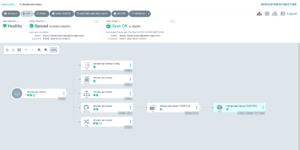
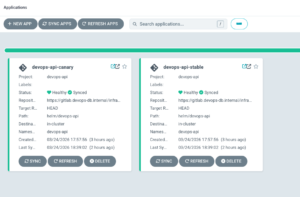
You can also do it via argo cli:
argocd app get devops-api-canary --grpc-web
Name:               argocd/devops-api-canary
Project:            devops-api
Server:             https://kubernetes.default.svc
Namespace:          devops-api
URL:                https://argocd.devops-db.internal/applications/devops-api-canary
Source:
- Repo:             https://gitlab.devops-db.internal/infrastructure/argocd/devops-api.git
  Target:           HEAD
  Path:             helm/devops-api
  Helm Values:      ../../envs/dev/values-canary.yaml
SyncWindow:         Sync Allowed
Sync Policy:        Automated (Prune)
Sync Status:        Synced to HEAD (97089dd)
Health Status:      Healthy

GROUP              KIND        NAMESPACE   NAME                      STATUS  HEALTH   HOOK  MESSAGE
                   Secret      devops-api  devops-api-canary         Synced                 secret/devops-api-canary unchanged
                   ConfigMap   devops-api  devops-api-canary-config  Synced                 configmap/devops-api-canary-config unchanged
                   Service     devops-api  devops-api-canary         Synced  Healthy        service/devops-api-canary unchanged
apps               Deployment  devops-api  devops-api-canary         Synced  Healthy        deployment.apps/devops-api-canary unchanged
networking.k8s.io Ingress devops-api devops-api-canary Synced Healthy ingress.networking.k8s.io/devops-api-canary configuredExpected flow:
Synced → OutOfSync → Syncing → Synced
Why this happens
ArgoCD detects:
desired state (Git) ≠ current state (cluster)
So it:
re-renders Helm → appli
Step 4 — Validate Ingress Change
kubectl describe ingress devops-api-canary -n devops-api
Name:             devops-api-canary
Labels:           <none>
Namespace:        devops-api
Address:          127.0.0.1
Ingress Class:    nginx
Default backend:  <default>
Rules:
  Host                           Path  Backends
  ----                           ----  --------
  devops-api.devops-db.internal
                                 /   devops-api-canary:80 (10.1.137.170:8080)
Annotations:                     argocd.argoproj.io/tracking-id: devops-api-canary:networking.k8s.io/Ingress:devops-api/devops-api-canary
                                 nginx.ingress.kubernetes.io/canary: true
                                 nginx.ingress.kubernetes.io/canary-weight: 50
Events:
  Type    Reason  Age                 From                      Message
  ----    ------  ----                ----                      -------
Normal Sync 3s (x5 over 3h43m) nginx-ingress-controller Scheduled for syncWhy this matters
This is the actual control point of traffic.
Not ArgoCD.
Not Helm.
👉 The Ingress controller enforces traffic distribution.
Step 5 — Real Traffic Test
Run:
for i in {1..20}; do curl -s "http://devops-api.devops-db.internal/version"; echo; done
{"version":"v1.1.1"}
{"version":"v1.1.1"}
{"version":"v1.1.1"}
{"version":"v1.1.2-canary"}
{"version":"v1.1.1"}
{"version":"v1.1.2-canary"}
{"version":"v1.1.1"}
{"version":"v1.1.2-canary"}
{"version":"v1.1.2-canary"}
{"version":"v1.1.1"}
{"version":"v1.1.2-canary"}
{"version":"v1.1.2-canary"}
{"version":"v1.1.2-canary"}
{"version":"v1.1.1"}
{"version":"v1.1.1"}
{"version":"v1.1.2-canary"}
{"version":"v1.1.2-canary"}
{"version":"v1.1.1"}
{"version":"v1.1.2-canary"}
{"version":"v1.1.2-canary"} Conclusion
ArgoCD is intentionally minimal because:
it solves ONE problem:
state reconciliation
Everything else:
✔ networking
✔ security
✔ rollout strategy
✔ observability
belongs outside of it.