Building a Private Homebrew Tap with GitLab and Nexus: A Practical, End-to-End Guide
Introduction
Distributing internal CLI tools in a controlled, scalable, and reproducible way is a recurring challenge in enterprise environments. While package managers like APT or YUM provide strong distribution mechanisms, they come with significant overhead and infrastructure complexity.
On macOS, Homebrew offers a much lighter alternative. However, that simplicity comes with a trade-off: distribution, hosting, and access control are entirely your responsibility.
This article walks through a real-world implementation of:
- A private source repository hosted on GitLab
- Binary artifact distribution via Sonatype Nexus Repository
- A public Homebrew tap repository
- Multi-architecture builds (amd64 and arm64)
- End-to-end installation using
brew install
We will not only explain how to do it, but why each decision matters.
1. Architecture Overview
The key architectural insight is separation of concerns:
GitLab (private) → source code
↓
CI / local build → binaries
↓
Nexus (public read) → artifact distribution
↓
Homebrew tap (public) → installation metadata
Why this separation?
Homebrew does not authenticate when downloading binaries. Therefore:
The binary URL must be publicly accessible via
curlwithout authentication.
This immediately invalidates:
- GitLab uploads (require session or auth)
- Private endpoints
- Token-based downloads
Instead, we use Nexus as a public artifact distribution layer, while keeping source code private.
2. Preparing the Go Project

This step must be executed in the source code repository, not in the Homebrew repository.
In this setup, the source repository is:
git@gitlab.devops-db.internal:infrastructure/resources/pssql.git
This repository contains:
- the Go source code
- the
pssql.jsonconfiguration template - the build logic
Why this separation matters
The Homebrew tap is not responsible for building software. It only defines: what to download + how to install it
All build artifacts must originate from the source repository.
Module Initialization
go mod init gitlab.devops-db.internal/infrastructure/resources/pssql
go mod tidyThis ensures:
- consistent dependency resolution
- reproducible builds
- alignment with internal repository structure
Building Multi-Architecture Binaries
CGO_ENABLED=0 GOOS=darwin GOARCH=amd64 go build -ldflags="-s -w" -o pssql_darwin_amd64
CGO_ENABLED=0 GOOS=darwin GOARCH=arm64 go build -ldflags="-s -w" -o pssql_darwin_arm64These binaries are produced from the source repository, and not from the Homebrew tap.
3. Packaging Strategy (Critical Step)
Homebrew expects a very specific archive structure.
Correct Layout
pssql
pssql.jsonAll packaging steps must also happen here:
mkdir -p dist/amd64
mv pssql_darwin_amd64 dist/amd64/pssql
cp pssql.json dist/amd64/

mkdir -p dist/arm64
mv pssql_darwin_arm64 dist/arm64/pssql
cp pssql.json dist/arm64/


tar -czf pssql_1.1.3_darwin_amd64.tar.gz -C dist/amd64 .
tar -czf pssql_1.1.3_darwin_arm64.tar.gz -C dist/arm64 .🔥 Important: The Homebrew repository never contains compiled binaries or
.tar.gzfiles.
Calculating SHA256 Checksums
After creating the archives, generate their SHA256 hashes:
shasum -a 256 pssql_1.1.3_darwin_amd64.tar.gz
shasum -a 256 pssql_1.1.3_darwin_arm64.tar.gzExample output:
656c8a281c46ab6c626c91f409485877cef9b9b180ce4a5be1a3730ab806c2d6  pssql_1.1.3_darwin_amd64.tar.gz

08956802444143beca75a596e0ef9a9c5c44a0b77199df4da40c82831e50060d pssql_1.1.3_darwin_arm64.tar.gzWhy This Is Required
Homebrew uses SHA256 hashes to:
- verify download integrity
- prevent tampering
- ensure reproducibility
Important Note
These SHA256 values will be required later when defining the Homebrew formula.
Without correct hashes, the installation will fail during the verification step.
Common Pitfall
Any change to the archive (even a single byte) will:
invalidate the SHA256 hash
This means:
- if you rebuild the binary
- or recreate the
.tar.gz
👉 you must recalculate the hashes.
4. Versioning Strategy
git tag v1.1.3
git push origin v1.1.3
Why tagging still matters (even without releases)
Even if you don’t use GitLab Releases:
- tags provide traceability
- link binary → source commit
- enable reproducible builds
5. Using GitLab Releases for Homebrew (Behavior and Limitations)
At first glance, GitLab Releases appear to be a natural solution for distributing binaries, similar to how it is commonly done with GitHub.
However, unlike GitHub, GitLab behavior depends heavily on instance configuration.
Expected Behavior (When It Works)
If the repository is public and the instance allows anonymous access, release assets can be downloaded directly:
curl -I https://gitlab.example.com/-/project/<id>/uploads/<hash>/file.tar.gzResult:
HTTP/2 200In this scenario:
✔️ The URL is publicly accessible
✔️ Homebrew can download the binary
✔️ GitLab can be used as a distribution source
⚠️ Why It Sometimes Fails
In many self-hosted GitLab environments, additional security settings are enabled, such as:
enforce_auth_checks_on_uploads = trueOr global authentication requirements.
In these cases:
- upload URLs require authentication
- anonymous requests are redirected or rejected
- the same URL may work in a browser but fail in
curl
🔍 Observable Behavior
| Scenario | Result |
|---|---|
| Browser (logged in) | ✔️ Works |
| curl (anonymous) | ❌ 302 / 404 |
| Homebrew | ❌ Fails |
💡 Key Insight
GitLab can serve as a valid Homebrew distribution backend — but only if anonymous HTTP access to artifacts is allowed.
🧪 Validation Rule
Before using any URL in a Homebrew formula:
curl -L <url>If this command fails, Homebrew will also fail.
⚖️ GitHub vs GitLab (Clarified)
| Feature | GitHub | GitLab |
|---|---|---|
| Release assets public by default | ✔️ | ⚠️ depends |
| Anonymous download guaranteed | ✔️ | ❌ not always |
| Suitable for Homebrew out-of-the-box | ✔️ | ⚠️ environment-dependent |
🧾 Final Takeaway
GitLab Releases are not inherently incompatible with Homebrew —
but their usability depends entirely on instance-level access policies.
6. Uploading to Nexus
As discussed in the previous section, using GitLab as a binary distribution backend is possible, but not guaranteed.
Its behavior depends on:
- repository visibility
- instance-level security policies
- anonymous access configuration
In controlled or enterprise environments, these conditions are often restricted.
Why Nexus Was Chosen
To avoid relying on environment-specific behavior, we intentionally chose Sonatype Nexus Repository as the distribution layer.
This decision was based on the following requirements:
- predictable, anonymous HTTP access
- independence from GitLab configuration
- clear separation between source code and artifacts
- compatibility with Homebrew’s download model
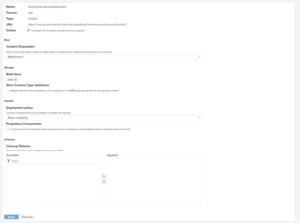
The repository is now located at: https://nexus.devops-db.internal/repository/homebrew-devopsdb-public/
Key Requirement
The artifact endpoint must be accessible via
curlwithout authentication.
Nexus satisfies this requirement when configured with:
anonymous read access enabled
This makes it a reliable backend for Homebrew formulas.
curl -u usr_jenkins_nexus:1234qwer  --upload-file pssql_1.1.3_darwin_amd64.tar.gz \
  "https://nexus.devops-db.internal/repository/homebrew-devopsdb-public/pssql/1.1.3/pssql_1.1.3_darwin_amd64.tar.gz"


curl -u usr_jenkins_nexus:1234qwer --upload-file pssql_1.1.3_darwin_arm64.tar.gz \
  "https://nexus.devops-db.internal/repository/homebrew-devopsdb-public/pssql/1.1.3/pssql_1.1.3_darwin_arm64.tar.gz"
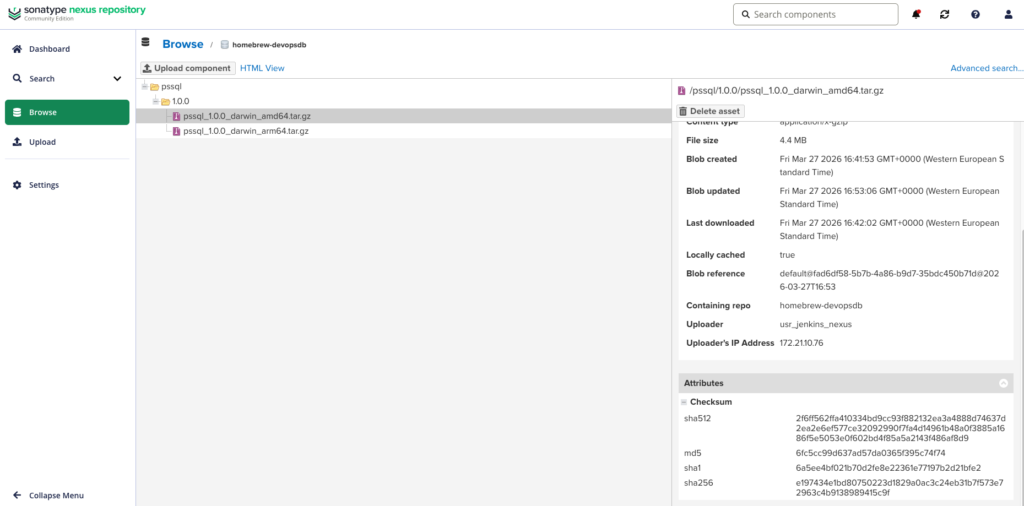
Repository structure
pssql/
  1.1.3/
    pssql_1.1.3_darwin_amd64.tar.gz
    pssql_1.1.3_darwin_arm64.tar.gz
Critical requirement
Nexus must allow:
anonymous read access
Otherwise:
- Homebrew fails
- same issue as GitLab
7. Homebrew Tap Repository
This step must be executed in a separate repository dedicated to Homebrew formulas.
In this setup, the tap repository is:
git@gitlab.devops-db.internal:resources/homebrew-devopsdb.gitCritical Requirement
The Homebrew tap repository must be publicly accessible.
Homebrew performs:
git clone <tap-repository>with no authentication by default.
Therefore:
- ❌ private GitLab repo → fails
- ✔️ public repo → works
Repository Responsibility
This repository must contain only:
Formula/
pssql.rbIt should not include:
- source code
- binaries
- build artifacts
Formula Definition
Remember the sha256 calculated in step 3? It’s important here.
class Pssql < Formula
  desc "Command-line tool for PostgreSQL (pssql)"
  homepage "https://gitlab.devops-db.internal/infrastructure/resources/pssql"
  version "1.1.3"  if Hardware::CPU.intel?
    url "https://nexus.devops-db.internal/repository/homebrew-devopsdb-public/pssql/1.1.3/pssql_1.1.3_darwin_amd64.tar.gz"
    sha256 "656c8a281c46ab6c626c91f409485877cef9b9b180ce4a5be1a3730ab806c2d6"
  else
    url "https://nexus.devops-db.internal/repository/homebrew-devopsdb-public/pssql/1.1.3/pssql_1.1.3_darwin_arm64.tar.gz"
    sha256 "08956802444143beca75a596e0ef9a9c5c44a0b77199df4da40c82831e50060d"
  end  def install
    bin.install "pssql"
    etc.install "pssql.json" => "pssql.json.example"
  end  def caveats
    <<~EOS
      To get started, create your configuration directory and copy the example file:
          mkdir -p ~/.pssql
          cp #{etc}/pssql.json.example ~/.pssql/pssql.json
    EOS
  end  test do
    system "#{bin}/pssql", "--version"
  end
end💡 Understanding caveats
The caveats block is used to display post-installation instructions to the user.
Unlike automated installation steps, caveats are:
- not executed automatically
- shown as informational output after
brew install - intended to guide the user through manual setup
Why caveats are needed here
In this case, the tool requires a user-specific configuration file:
~/.pssql/pssql.json
However:
- Homebrew installs files under system-controlled paths (e.g.,
/opt/homebrew/etc) - it does not modify user home directories
What the caveat does
It instructs the user to:
mkdir -p ~/.pssql
cp /opt/homebrew/etc/pssql.json.example ~/.pssql/pssql.jsonThis ensures:
- separation between system-managed files and user configuration
- safe upgrades (user config is not overwritten)
- predictable behavior across installations
Design Insight
Homebrew formulas should not modify user environments implicitly.
Using caveats respects this principle while still providing a clear onboarding path.
8. Installation Flow
brew tap devopsdb/tools git@gitlab.devops-db.internal:resources/homebrew-devopsdb.git
brew update
brew install devopsdb/tools/pssql
Result
pssql --version
INFO  pssql version 1.1.3
9. Final Architecture (Production-Ready)
GitLab (private source)
↓
Build (Go)
↓
Nexus (public artifacts)
↓
Homebrew Tap (public metadata)
↓
Developer machines (brew install)