Jenkins – Slack Notifications with Jenkins
In a real-world DevOps environment, notifications are not just about sending messages — they must be:
- Structured
- Contextual
- Reliable
- Maintainable
This guide demonstrates a production-ready approach to integrating Slack notifications with Jenkins, using:
- Block Kit templates
- Shared libraries
- Error handling
- Approval workflows
Architecture Overview
The solution is built around three core components:
- Slack templates (Block Kit JSON)
- Jenkins Shared Library
- Pipeline orchestration
This separation ensures:
- Clean code
- Reusability
- Easy maintenance
Slack Message Templates (Block Kit)
In most Jenkins + Slack integrations, messages are built inline using raw JSON or simple text.
That approach works initially, but quickly becomes difficult to maintain as complexity grows.
Instead, this setup uses Slack Block Kit templates stored as external JSON files, which are dynamically rendered at runtime.
Why Use Templates Instead of Inline Messages
Embedding Slack payloads directly in Jenkins pipelines creates several problems:
- Pipelines become cluttered with JSON
- Message formats are duplicated across jobs
- Small changes require editing multiple pipelines
- Debugging becomes harder
By externalizing templates:
- Message structure is centralized
- Pipelines remain clean and readable
- Changes are applied globally
- Templates can be versioned alongside code
What is Slack Block Kit
Slack provides a structured message system called Block Kit.
Instead of plain text, messages are composed of blocks such as:
section→ main contentfields→ structured datacontext→ metadata (timestamps, links)actions→ buttons and interactionsimage→ visual elements
How Templates Work in This Setup
Each message is defined as a JSON file with placeholders:
  { "text": "*Service:*\n${service}" },
  { "text": "*Environment:*\n${environment}" },
{ "text": "*Error:*\n${errorMessage}" }At runtime:
- The template is loaded from the shared library
- Placeholders like
${service}, ${environment}, ${errorMessage}, etc are replaced on Shared Lib slackNotify - The final JSON is sent to Slack
This allows the same template to be reused across different pipelines.
Shared Library — Slack Sender
The core logic is centralized in a shared function:
 def call(Map config) {
    def templateName = config.template
    def slackWebhookURL = config.slackWebhookURL
    def data = config.data ?: [:]

    def template = libraryResource("slack/${templateName}.json")
    def payload = renderTemplate(template, data)

    sh(
        script: """
            curl -s -X POST -H 'Content-type: application/json' \
            --data '${payload}' \
            ${slackWebhookURL}
        """,
        label: "Send Slack notification"
    )
}
Full implementation: https://github.com/faustobranco/devops-db/blob/master/infrastructure/lib-utilities/vars/slackNotify.groovy
Key Design Decisions
template→ defines message typedata→ dynamic valuesslackWebhookURL→ configuration (not mixed with data)
This separation keeps the interface clean and predictable.
Template Rendering Strategy
Templates use simple variable replacement:
result = result.replace("\${${key}}", value.toString())
This approach is:
- Lightweight
- Fast
- Easy to debug
Jenkins Pipeline Integration
The pipeline orchestrates the full workflow:
Full pipeline: https://github.com/faustobranco/devops-db/tree/master/infrastructure/pipelines/deployment
Validation Stage
Fail early with explicit error message:
if (!params.APPLICATION_VERSION?.trim()) {
    env.ERROR_MESSAGE = "APPLICATION_VERSION cannot be empty"
    error(env.ERROR_MESSAGE)
}
Why this matters
Jenkins does not expose error messages in post { failure }.
Solution:
- Store error in
env.ERROR_MESSAGE - Reuse later in notifications
Error Handling Strategy
In the failure block:
def errorMessage = env.ERROR_MESSAGE?.trim() ?
                   env.ERROR_MESSAGE :
                   "FAILED for any reason"
Benefits
- Always shows meaningful error
- Avoids empty or generic alerts
- Works across all failure types
Success Notifications
Example template: https://github.com/faustobranco/devops-db/blob/master/infrastructure/lib-utilities/resources/slack/deployment_success.json
Includes:
- Service
- Environment
- Version
- Pipeline link
- Timestamp

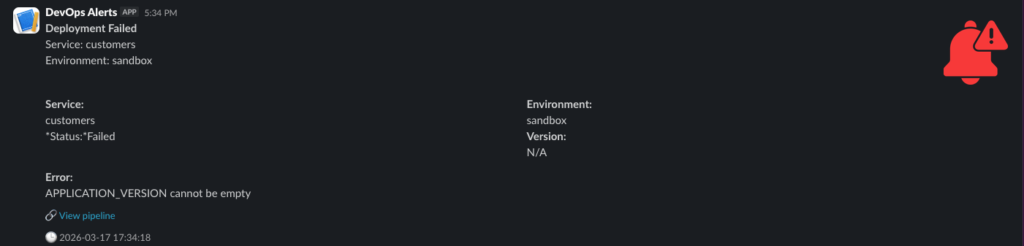
Failure Notifications
Includes:
- Structured error message
- Context fields
- Direct link to pipeline
Approval Flow (Production Pattern)
For production deployments:
stage('APPROVAL REQUIRED') {
    when {
        expression { params.ENVIRONMENT == 'prod' }
    }
}
Slack Notification Before Approval
urlApproval: env.BUILD_URL + "input"
Template Example
This generates a Slack message with:
- Context (service, environment, version)
- Button → “Approve or Reject”

Important Limitation
Slack cannot directly approve/reject Jenkins builds.
The button redirects to:
${BUILD_URL}/input
Where the user performs the action.
Why This Approach Works
This architecture provides:
Separation of Concerns
- Templates → presentation
- Shared lib → logic
- Pipeline → orchestration
Reusability
- Same templates across pipelines
- Same function across projects
Maintainability
- Change message format without touching pipelines
- Centralized logic
Observability
- Structured alerts
- Direct pipeline links
- Clear error messages
Production Considerations
1. Do not break pipeline on Slack failure
Use:
returnStatus: true
2. Avoid leaking secrets
Always use:
withCredentials(...)
3. Keep templates simple
Slack rendering can be inconsistent with complex layouts.
4. Standardize messages
Use consistent fields across:
- success
- failure
- approval
Final Result
With this setup, Slack becomes:
- A real-time deployment dashboard
- A control point for approvals
- A debugging aid with contextual errors