Security – Implementing TOTP Two-Factor Authentication in Go
Two-Factor Authentication (2FA) using TOTP (Time-based One-Time Password) is one of the most widely adopted security mechanisms for protecting user accounts.
Authenticator applications such as:
- Microsoft Authenticator
- Google Authenticator
generate temporary verification codes that change every 30 seconds.
This article demonstrates how to implement a complete TOTP 2FA flow in Go, including:
- generating Base32 secrets
- creating QR codes
- building the otpauth URI
- validating codes using the Go library pquerna/otp
- implementing the TOTP algorithm manually
- understanding the security model behind the system
The algorithm itself is defined in:
- RFC 6238
Secret Collisions and Why They Are Not a Security Problem
When implementing TOTP, a common question arises:
What happens if two users end up with the same secret?
In theory, this is possible. In practice, it is astronomically unlikely and does not introduce meaningful security risk when TOTP is used correctly.
Understanding why requires looking at how secrets are generated and how authentication actually works.
Secret Entropy and Collision Probability
A typical TOTP secret is a 160-bit value encoded in Base32.
Example:
TRKQWWZUCB2ZK6WMAJQ7GVJNVVNGHWF4
Base32 uses 32 possible symbols, meaning each character represents 5 bits.
A 32-character Base32 secret therefore contains:
32 × 5 = 160 bits
The total number of possible secrets is:
2^160 ≈ 1.46 × 10^48
That is:
1,460,000,000,000,000,000,000,000,000,000,000,000,000,000
Even if a system generated billions of secrets, the probability of a collision would still be effectively zero.
This is comparable to the randomness used in cryptographic keys.
What If Two Users Somehow Share the Same Secret?
If two users had the same secret, they would generate the same TOTP codes at the same time.
Example:
User A secret: X
User B secret: X
Both devices might generate:
482193
during the same 30-second window.
However, this does not break authentication security, because TOTP verification is always tied to a specific user account.
A typical validation flow looks like this:
1. User submits username/password
2. Server identifies the user
3. Server loads that user's secret from the database
4. Server verifies the TOTP using that secret
Even if two users share the same secret, the authentication system still validates the code only against the secret associated with the logged-in account.
The system never searches globally for matching codes.
Why TOTP Must Be a Second Factor
TOTP is designed to be a second authentication factor, not the primary one.
The correct model is:
- Something you know → password
- Something you have → authenticator device
Authentication therefore requires both.
Password + TOTP code
Because of this, an attacker would need multiple conditions to exploit a collision scenario:
- The attacker must know the user’s correct password
- The attacker must be authenticating against the same service
- The attacker must be targeting the same user account
- The attacker must generate the correct TOTP within the time window
Without the first factor, the TOTP code alone is useless.
Why Code Collisions Are Harmless
TOTP codes are intentionally short.
A 6-digit code only has:
1,000,000 possible values
Which means code collisions happen constantly across the world.
At any given moment, millions of people share the same TOTP code.
This is not a problem because the verification process always uses the secret stored for a specific account. And that happens every 30 seconds, which greatly changes the probability.
Authentication is not performed by checking whether a code exists somewhere — it is performed by checking whether the code matches the expected value derived from the user’s secret.
The Real Security Boundary
The real security boundary in TOTP systems is the secret itself, not the code.
As long as:
- secrets are generated with cryptographically secure randomness
- each user has a unique secret
- secrets are stored securely
the system remains secure.
The short-lived codes are merely a convenient way to prove possession of the secret.
Summary
Even though secret collisions are theoretically possible, they are:
- astronomically unlikely
- harmless in properly designed systems
- irrelevant without the first authentication factor
TOTP remains a robust second-factor mechanism because authentication always depends on: correct user + correct secret + correct time window
Not merely on matching a 6-digit code.
How TOTP Works
TOTP is based on a shared secret between two parties:
- the authentication server
- the user’s authenticator application
Both sides independently generate the same code using: secret + current_time
More precisely: TOTP = HMAC-SHA1(secret, time_step)
Where: time_step = UnixTime / 30
Because both sides share the same secret and time window, they produce identical codes.
It is very important that the mobile phone and the server/computer testing the code have their times synchronized; they don’t need to be in the same time zone, but they must be correct.
No external service or API is required.
Step 1 — Generating a Base32 Secret
The first step is generating a cryptographically secure secret.
We generate random bytes and encode them as Base32, which is the standard format used by authenticator apps.
package main

import (
	"crypto/rand"
	"encoding/base32"
	"fmt"
)

func generateBase32Secret(length int) (string, error) {
	bytes := make([]byte, length)

	_, err := rand.Read(bytes)
	if err != nil {
		return "", err
	}

	secret := base32.StdEncoding.WithPadding(base32.NoPadding).EncodeToString(bytes)

	return secret, nil
}

func main() {
	secret, err := generateBase32Secret(20)
	if err != nil {
		panic(err)
	}

	fmt.Println("Base32 Secret:", secret)
}
Example output:
TRKQWWZUCB2ZK6WMAJQ7GVJNVVNGHWF4This secret must be unique to each user of your application and must be persisted somewhere, whether in a database, LDAP, Query, etc. This is because it will be needed when validating 2FA on the service side, your infrastructure.
Step 2 — Creating the OTPAuth URI
Authenticator applications recognize accounts using a special URI format:
otpauth://totp/{issuer}:{account}?secret={secret}&issuer={issuer}Example:
otpauth://totp/devops-db.internal:your.email@devops-db.com?secret=TRKQWWZUCB2ZK6WMAJQ7GVJNVVNGHWF4&issuer=devops-db.internal&algorithm=SHA1&digits=6&period=30Parameters:
| Parameter | Description |
|---|---|
| issuer | application or service name |
| account | user identifier |
| secret | Base32 secret |
| algorithm | hash algorithm (usually SHA1) |
| digits | number of digits (usually 6) |
| period | code lifetime (usually 30 seconds) |
Step 3 — Generating a QR Code
For the user to add the account to the authenticator, it’s necessary to generate a QR code, open the app on the phone, and scan it. So let’s generate a simple QR code using Go for the OTpauth generated above.
Generate the QR code:
package main

import (
	"log"

	qrcode "github.com/skip2/go-qrcode"
)

func main() {

	otpURL := "package main

import (
	"log"

	qrcode "github.com/skip2/go-qrcode"
)

func main() {

	otpURL := "otpauth://totp/devops-db.internal:your.email@devops-db.com?secret=TRKQWWZUCB2ZK6WMAJQ7GVJNVVNGHWF4&issuer=devops-db.internal&algorithm=SHA1&digits=6&period=30"

	err := qrcode.WriteFile(otpURL, qrcode.Medium, 256, "qrcode.png")
	if err != nil {
		log.Fatal(err)
	}
}
"

	err := qrcode.WriteFile(otpURL, qrcode.Medium, 256, "qrcode.png")
	if err != nil {
		log.Fatal(err)
	}
}
Example of the generated QR code.
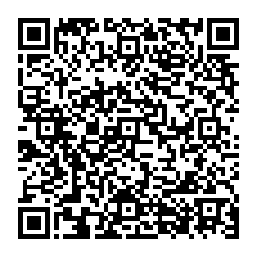
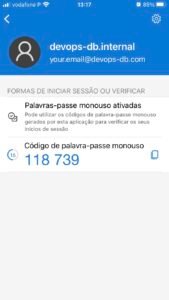
When scanned, the account appears in the authenticator application.
And no, Microsoft or Google do not have these codes or secrets, accounts stored on their servers.
Step 4 — Verifying Codes with Go
To validate the user’s code we can use the Go library:
- pquerna/otp
Install it:
go get github.com/pquerna/otp
go get github.com/pquerna/otp/totp
Example validation:
package main

import (
	"bufio"
	"fmt"
	"os"
	"strings"
	"time"

	"github.com/pquerna/otp"
	"github.com/pquerna/otp/totp"
)

func validateOTP(secret string, code string) bool {

	opts := totp.ValidateOpts{
		Period:    30,
		Skew:      1,
		Digits:    otp.DigitsSix,
		Algorithm: otp.AlgorithmSHA1,
	}

	valid, err := totp.ValidateCustom(code, secret, time.Now(), opts)
	if err != nil {
		return false
	}

	return valid
}

func main() {

	secret := "TRKQWWZUCB2ZK6WMAJQ7GVJNVVNGHWF4"

	reader := bufio.NewReader(os.Stdin)

	fmt.Print("Enter the 6-digit code from your authenticator: ")
	input, _ := reader.ReadString('\n')

	code := strings.TrimSpace(input)

	if validateOTP(secret, code) {
		fmt.Println("Code valid. Authentication successful.")
	} else {
		fmt.Println("Invalid code.")
	}
}
Important options:
| Option | Purpose |
|---|---|
| Period | code validity window |
| Digits | number of digits |
| Algorithm | hashing algorithm |
| Skew | tolerance for clock drift |
Setting Skew = 1 allows a ±30 second tolerance.
Time Windows and Clock Tolerance in TOTP
By default, the TOTP algorithm defined in RFC 6238 generates a new code every 30 seconds.
Authenticator applications such as:
- Microsoft Authenticator
- Google Authenticator
follow this default configuration.
Each code is derived from a time window, calculated as:
time_step = UnixTime / 30
This means the code changes every 30-second interval.
Handling Clock Drift
In practice, the server clock and the user’s device clock may not be perfectly synchronized.
Even a small drift of a few seconds can cause valid codes to fail.
To handle this, many implementations allow a small tolerance window when validating codes.
In the Go implementation using pquerna/otp, this tolerance is controlled by the Skew parameter.
Example:
opts := totp.ValidateOpts{
    Period:    30,
    Skew:      1,
    Digits:    otp.DigitsSix,
    Algorithm: otp.AlgorithmSHA1,
}
What Skew: 1 Means
Setting:
Skew = 1
allows the server to accept codes from three possible time windows:
previous window | current window | next window
Each window represents 30 seconds.
Therefore the server effectively accepts codes generated within:
30s (previous) + 30s (current) + 30s (next) ≈ 90 seconds
This translates to approximately ±30 seconds of clock tolerance around the current time window.
Why This Is Safe
Even though the validation window expands slightly, the code is still:
- tied to the user’s secret
- valid only for a very short period
- unpredictable without knowledge of the secret
This tolerance significantly improves reliability while maintaining strong security.
Step 5 — Manual Implementation of TOTP in Go
Although libraries simplify development, the TOTP algorithm itself is fairly compact.
Below is a minimal implementation.
package main

import (
	"crypto/hmac"
	"crypto/sha1"
	"encoding/base32"
	"encoding/binary"
	"fmt"
	"strings"
	"time"
)

func generateTOTP(secret string) (string, error) {

	secret = strings.ToUpper(secret)

	key, err := base32.StdEncoding.WithPadding(base32.NoPadding).DecodeString(secret)
	if err != nil {
		return "", err
	}

	timestep := time.Now().Unix() / 30

	var buf [8]byte
	binary.BigEndian.PutUint64(buf[:], uint64(timestep))

	h := hmac.New(sha1.New, key)
	h.Write(buf[:])
	hash := h.Sum(nil)

	offset := hash[len(hash)-1] & 0x0F

	truncated := binary.BigEndian.Uint32(hash[offset : offset+4])
	truncated &= 0x7fffffff

	code := truncated % 1000000

	return fmt.Sprintf("%06d", code), nil
}

func main() {

	secret := "TRKQWWZUCB2ZK6WMAJQ7GVJNVVNGHWF4"

	code, err := generateTOTP(secret)
	if err != nil {
		panic(err)
	}

	fmt.Println("Current TOTP:", code)
}
This implementation produces the same codes generated by authenticator applications.
Complete Authentication Flow
A typical implementation follows this sequence.
Enabling 2FA
1. Server generates secret 2. Server stores secret 3. Server generates QR code 4. User scans QR code 5. User submits first OTP 6. Server verifies OTP 7. 2FA enabled
Login Flow
1. User enters username/password 2. Server verifies credentials 3. Server requests OTP code 4. User enters code 5. Server validates TOTP 6. Authentication completed
Security Considerations
There are several best practices when implementing TOTP:
Use secure randomness
Secrets must be generated using:
crypto/rand
Never derive secrets from user data.
Protect stored secrets
Secrets should ideally be:
- encrypted at rest
- protected with a server-side key
- stored in a secure database
Prevent OTP replay
Within the same 30-second window, the same code can be reused.
A common mitigation is storing: last_used_totp_timestamp
to prevent duplicate authentication attempts.
Provide recovery codes
If users lose their device, recovery codes allow account access.
Example:
AB7F-92KD
XQ3L-11OP
MZ7R-44AA
These should be single-use.
Why TOTP Is Still Popular
Despite newer authentication methods, TOTP remains widely used because it:
- works offline
- requires no external infrastructure
- follows an open standard
- is compatible with many authenticator apps
Even major platforms rely on it.
Conclusion
TOTP remains one of the simplest and most robust ways to implement multi-factor authentication.
With only a few components, a Go backend can support:
- secure secret generation
- QR-based enrollment
- standards-compliant OTP validation
- compatibility with popular authenticator applications
Understanding the underlying algorithm also helps developers implement custom security controls and avoid common pitfalls.
If you are building authentication systems or security tooling, implementing TOTP from scratch is a valuable exercise in understanding modern authentication workflows.
If you want, I can also help you turn this into a much stronger article for devops-db.com, including:
- architecture diagrams
- sequence diagrams
- threat model (phishing, replay, secret leakage)
- production hardening tips used by GitHub / AWS / GitLab
- SEO optimization for “TOTP Go implementation” searches.