Message Queuing: Mastering Resilience with Dead Letter Exchanges (DLX)
Introduction
In our previous guide, we established a basic connection between Kubernetes-based RabbitMQ and Jenkins. However, in production-grade DevOps, “basic” is not enough. Systems fail, network partitions occur, and malformed data can stall entire pipelines.
To build a truly resilient system, an engineer must understand the internal mechanics of RabbitMQ: Exchanges, Queues, and Channels, and implement a safety net for failed messages known as the Dead Letter Exchange (DLX). This article deep dives into these concepts and provides a step-by-step technical implementation.
https://github.com/faustobranco/devops-db/tree/master/knowledge-base/rabbitmq/dead-letter-exchange
1. The Trinity of RabbitMQ: Channels, Exchanges, and Queues
Before configuring resilience, we must understand the three pillars of the AMQP protocol:
Channels: The Virtual Pipelines
Opening and closing TCP connections is resource-intensive. RabbitMQ solves this with Channels. A Channel is a light, virtual connection inside a single, persistent TCP connection.
- Why? It allows a single process (like our Python Worker) to perform multiple operations or listen to multiple queues without the overhead of managing multiple network sockets.
Exchanges: The Post Office
An Exchange is the entry point for messages. Producers never send messages directly to a queue; they send them to an Exchange.
- The Logic: The Exchange acts as a router. Based on “Routing Keys,” it decides which queue should receive the data.
Queues: The Safe Storage
The Queue is the final destination where messages sit until a consumer is ready to process them.
- Persistence: By declaring queues as
durable, we ensure that messages survive a RabbitMQ pod restart within our Kubernetes cluster.
2. The Concept of Dead Lettering
What happens when a message cannot be processed? In a default setup, if a worker rejects a message, it might be lost forever.
Dead Lettering provides a “purgatory” for these messages. When a message is rejected by the worker (and not re-queued), RabbitMQ automatically reroutes it to a special exchange—the Dead Letter Exchange (DLX)—which then deposits it into a Dead Letter Queue (DLQ) for manual audit and debugging.
3. Infrastructure Setup
In a mature DevOps ecosystem, manual configuration via a web interface represents a bottleneck. To ensure the reproducibility of our pipeline, we need to automate the creation of our message topology. Below, we present how you create queues in the UI and the two most flexible methods to achieve this goal: using the RabbitMQ REST API for message management and the Python Pika library.
Follow these steps in the RabbitMQ Management UI to prepare the environment:
Step 1: Create the DLX (The Safety Net)
- Go to the Exchanges tab.
- Add a new exchange:
- Name:
jenkins_dlx - Type:
fanout(This ensures any message arriving here hits our error queue).
- Name:
Step 2: Create the DLQ (The Audit Log)
- Go to the Queues tab.
- Add a new queue:
- Name:
jenkins_dead_letter_queue
- Name:
- Go back to the Exchanges tab, click on
jenkins_dlx, and create a Binding:- To queue:
jenkins_dead_letter_queue
- To queue:
Step 3: Create the Primary Queue with DLX Logic
Note: If the queue already exists, you must delete it or use a Policy to add this argument.
Go to the Queues tab and add a new queue:
Name: jenkins_deploy_queue
Arguments: Add x-dead-letter-exchange with the value jenkins_dlx.
The REST API (Platform Agnostic)
The RabbitMQ Management Plugin exposes a full REST API. This is the “cleanest” method for Jenkins agents, as it only requires curl, which is pre-installed on almost every OS.
We can use the PUT method to ensure our entities exist (idempotent operations). Here is the sequence to provision our full DLX topology:
# 1. Create the Dead Letter Exchange (Fanout type)
curl -i -u admin:PASSWORD -X PUT -H "Content-Type: application/json" \
  -d '{"type":"fanout","durable":true}' \
  https://rabbitmq.devops-db.internal/api/exchanges/%2f/jenkins_dlx

# 2. Create the Dead Letter Queue
curl -i -u admin:PASSWORD -X PUT -H "Content-Type: application/json" \
  -d '{"durable":true}' \
  https://rabbitmq.devops-db.internal/api/queues/%2f/jenkins_dead_letter_queue

# 3. Bind the DLX to the DLQ
curl -i -u admin:PASSWORD -X POST -H "Content-Type: application/json" \
  -d '{"routing_key":"","arguments":{}}' \
  https://rabbitmq.devops-db.internal/api/bindings/%2f/e/jenkins_dlx/q/jenkins_dead_letter_queue

# 4. Create the Primary Queue with the DLX Argument
curl -i -u admin:PASSWORD -X PUT -H "Content-Type: application/json" \
  -d '{"durable":true,"arguments":{"x-dead-letter-exchange":"jenkins_dlx"}}' \
  https://rabbitmq.devops-db.internal/api/queues/%2f/jenkins_deploy_queue
The Python Bootstrap Script (Integrated Logic)
If your goal is to keep the logic outside of Jenkins’ Groovy scripts, a Python bootstrap script is the best approach. It uses the same pika library as our Worker, keeping the tech stack consistent.
rabbitmq_bootstrap.py
import pika
import sys

# Connection setup
credentials = pika.PlainCredentials('admin', 'J4VPegzqSKC6Syji9ga6w1JDcTRgrvDQ')
parameters = pika.ConnectionParameters(host='172.21.5.76', port=31572, credentials=credentials)

def setup_infra():
    try:
        connection = pika.BlockingConnection(parameters)
        channel = connection.channel()

        # Defining the DLX Infrastructure
        channel.exchange_declare(exchange='jenkins_dlx', exchange_type='fanout', durable=True)
        channel.queue_declare(queue='jenkins_dead_letter_queue', durable=True)
        channel.queue_bind(exchange='jenkins_dlx', queue='jenkins_dead_letter_queue')

        # Defining the Primary Infrastructure with DLX arguments
        # Note: 'x-dead-letter-exchange' is mandatory for the DLX logic to work
        channel.queue_declare(
            queue='jenkins_deploy_queue',
            durable=True,
            arguments={'x-dead-letter-exchange': 'jenkins_dlx'}
        )

        print("[+] RabbitMQ Topology provisioned successfully.")
        connection.close()
    except Exception as err:
        print(f"[!] Provisioning failed: {err}")
        sys.exit(1)

if __name__ == '__main__':
setup_infra()4. Implementing the Resilient Producer
We updated our producer to include a --corrupt flag. This allows us to simulate a failure by sending a plain string instead of valid JSON, triggering the DLX logic.
messages.py
import pika
import sys
import json
import argparse

# Infrastructure Connection Parameters
RABBITMQ_HOST = '172.21.5.76'
RABBITMQ_PORT = 31572
RABBITMQ_USER = 'admin'
RABBITMQ_PASS = 'J4VPegzqSKC6Syji9ga6w1JDcTRgrvDQ'
EXCHANGE_NAME = 'jenkins_exchange'
ROUTING_KEY = 'deploy_app'

def send_message(corrupt=False):
    try:
        credentials = pika.PlainCredentials(RABBITMQ_USER, RABBITMQ_PASS)
        connection = pika.BlockingConnection(pika.ConnectionParameters(
            host=RABBITMQ_HOST, port=RABBITMQ_PORT, credentials=credentials))
        channel = connection.channel()

        if corrupt:
            message_body = "INVALID_DATA_NOT_JSON_FORMAT"
            print("[!] Sending CORRUPT message to test DLX...")
        else:
            deployment_payload = {
                "application": "frontend-service",
                "environment": "production",
                "version": "v1.4.2",
                "author": "devops-team"
            }
            message_body = json.dumps(deployment_payload)
            print("[+] Sending VALID JSON message...")

        channel.basic_publish(
            exchange=EXCHANGE_NAME,
            routing_key=ROUTING_KEY,
            body=message_body,
            properties=pika.BasicProperties(delivery_mode=2, content_type='text/plain')
        )
        connection.close()
    except Exception as err:
        print(f"Error: {err}")

if __name__ == '__main__':
    parser = argparse.ArgumentParser(description='RabbitMQ Message Producer')
    parser.add_argument('--corrupt', action='store_true', help='Send an invalid non-JSON message')
    args = parser.parse_args()
    send_message(corrupt=args.corrupt)
5. The Intelligent Worker: Handling Rejections
The worker is the “brain” of the operation. It decides whether to Acknowledge (ACK) a message, Re-queue (NACK) it for a second attempt, or Reject it to the DLX.
rabbitmq_worker.py
import pika
import requests
import json
import sys
import urllib3

urllib3.disable_warnings(urllib3.exceptions.InsecureRequestWarning)

RABBITMQ_HOST = '172.21.5.76'
RABBITMQ_PORT = 31572
QUEUE_NAME = 'jenkins_deploy_queue'

# Jenkins Config
JENKINS_URL = 'https://jenkins.devops-db.internal'
JENKINS_JOB_PATH = 'job/infrastructure/job/pipelines/job/tests/job/RabbitMQ-Example1'
JENKINS_USER = 'fbranco'
JENKINS_API_TOKEN = '11168682ae86c6a8abe39b219fb1d0424e'

def process_message(channel, method, properties, body):
    print(f"\n[x] Received message: {body.decode()}")

    try:
        # 1. Attempt to parse JSON
        payload = json.loads(body)

        # 2. Attempt to trigger Jenkins
        build_url = f"{JENKINS_URL}/{JENKINS_JOB_PATH}/buildWithParameters"
        response = requests.post(build_url, auth=(JENKINS_USER, JENKINS_API_TOKEN),
                                 data={'PAYLOAD_JSON': json.dumps(payload)}, verify=False)
        response.raise_for_status()

        print("[+] Success: Acknowledging message.")
        channel.basic_ack(delivery_tag=method.delivery_tag)

    except json.JSONDecodeError:
        print("[!] Fatal Error: Invalid JSON. Rejecting to DLX...")
        # requeue=False triggers the routing to Dead Letter Exchange
        channel.basic_reject(delivery_tag=method.delivery_tag, requeue=False)

    except Exception as err:
        print(f"[?] Transient Error: {err}. Requeueing...")
        channel.basic_nack(delivery_tag=method.delivery_tag, requeue=True)

def start_worker():
    credentials = pika.PlainCredentials('admin', 'J4VPegzqSKC6Syji9ga6w1JDcTRgrvDQ')
    connection = pika.BlockingConnection(pika.ConnectionParameters(RABBITMQ_HOST, RABBITMQ_PORT, '/', credentials))
    channel = connection.channel()

    # CRITICAL: Arguments must match the UI configuration (x-dead-letter-exchange)
    queue_args = {'x-dead-letter-exchange': 'jenkins_dlx'}
    channel.queue_declare(queue=QUEUE_NAME, durable=True, arguments=queue_args)

    channel.basic_qos(prefetch_count=1)
    channel.basic_consume(queue=QUEUE_NAME, on_message_callback=process_message)
    channel.start_consuming()

if __name__ == '__main__':
    start_worker()
6. Practical Example
Start the worker
python3 rabbitmq_worker.py
Connecting to AMQP Broker at 172.21.5.76:31572...
AMQP connection established successfully.
[*] Worker is listening to 'jenkins_deploy_queue'. To exit press CTRL+C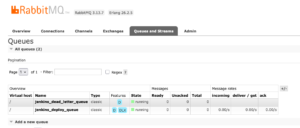
Send a message, intentionally containing errors, to force the message to be returned.
python3 messages.py --corrupt
[!] Sending CORRUPT message to test DLX...
Done. Message published.
Result:
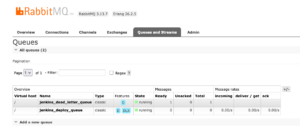
Managing the Dead Letter Queue
In a production-grade messaging ecosystem, the Dead Letter Queue (DLQ) is not a “trash bin” where malformed data goes to die; it is a quarantine zone for forensic analysis and system recovery. Implementing a DLQ is only half the battle; the other half is defining how to inspect, recover, and clear these messages to close the operational loop.
1. The Forensic Phase: Manual Inspection
When messages start accumulating in the jenkins_dead_letter_queue, the first step is always manual inspection. The RabbitMQ Management UI provides a quick way to “peek” into the failed data without consuming it permanently.
- How to inspect: Navigate to the Queues tab, select your DLQ, and use the “Get Messages” feature.
- What to look for: Check the message headers. RabbitMQ automatically appends an
x-deathheader to dead-lettered messages, containing crucial metadata:- Reason: Why it was rejected (e.g.,
rejected). - Original Exchange: Where it came from (
jenkins_exchange). - Time: Exactly when the failure occurred.
- Reason: Why it was rejected (e.g.,
2. The Recovery Phase: Implementing a “Redrive” Script
Once you have identified and fixed the root cause (e.g., a bug in the Producer’s JSON formatting or a temporary schema mismatch), you don’t want to lose the original deployment requests. Instead of manual re-entry, we implement a Redrive (Re-run) Script.
This Python script consumes messages from the DLQ and publishes them back to the primary Exchange, allowing the updated Worker to process them correctly.
redrive_errors.py
import pika
import sys

# Connection setup (Matches your worker configuration)
RABBITMQ_HOST = '172.21.5.76'
RABBITMQ_PORT = 31572
credentials = pika.PlainCredentials('admin', 'J4VPegzqSKC6Syji9ga6w1JDcTRgrvDQ')

def redrive_messages():
    try:
        connection = pika.BlockingConnection(pika.ConnectionParameters(
            host=RABBITMQ_HOST, port=RABBITMQ_PORT, credentials=credentials))
        channel = connection.channel()

        print("[*] Starting Redrive process from jenkins_dead_letter_queue...")

        while True:
            # Use basic_get to safely pull one message at a time
            method_frame, header_frame, body = channel.basic_get(queue='jenkins_dead_letter_queue')

            if not method_frame:
                print("[+] No more messages in DLQ. Recovery completed.")
                break

            print(f"[+] Recovering message: {body.decode()}")

            # Re-publish to the primary exchange to give it a second chance
            channel.basic_publish(
                exchange='jenkins_exchange',
                routing_key='deploy_app',
                body=body
            )

            # Acknowledge the message to remove it from the DLQ
            channel.basic_ack(delivery_tag=method_frame.delivery_tag)

        connection.close()
    except Exception as err:
        print(f"[!] Redrive failed: {err}")

if __name__ == '__main__':
    redrive_messages()
3. The Observability Loop: Proactive Monitoring
Leaving messages in a DLQ indefinitely is a silent failure. A mature DevOps strategy includes monitoring these queues using the RabbitMQ REST API.
You can automate alerts (via Slack, PagerDuty, or Email) by periodically checking the message count of your DLQ. A simple curl command can be integrated into a monitoring cronjob or a Jenkins “Watchdog” job:
Bash
# Check if DLQ message count is greater than 0
MSG_COUNT=$(curl -s -u admin:PASSWORD https://rabbitmq.devops-db.internal/api/queues/%2f/jenkins_dead_letter_queue | jq '.messages')

if [ "$MSG_COUNT" -gt "0" ]; then
  echo "CRITICAL: $MSG_COUNT messages pending in Dead Letter Queue!"
  # Trigger alert logic here
fi
Final Summary
By combining automated rejection in the Worker, persistent storage in the DLX, and programmatic recovery via Redrive scripts, we create a circular, fault-tolerant architecture. This ensures that even when the system fails, your deployment data remains safe, auditable, and most importantly, recoverable.