Publishing Python Packages to a Private PyPI Repository on Nexus
1. Introduction
In enterprise environments, relying directly on the public Python Package Index (PyPI) is often not acceptable due to:
- Security and compliance requirements
- Dependency control and reproducibility
- Air-gapped or restricted network environments
To address this, organizations commonly deploy private artifact repositories such as Sonatype Nexus, which can act as:
- A hosted repository (for internal packages)
- A proxy repository (caching public PyPI)
- A group repository (aggregating both)
This article walks through the full lifecycle of:
- Creating and structuring a Python package
- Building distributable artifacts
- Publishing to a Nexus PyPI repository
- Installing from that repository using
pip - Understanding and correctly handling TLS certificates
The emphasis is not only on how, but also why each step matters.
https://github.com/faustobranco/devops-db/tree/master/knowledge-base/python/tokens/modulo
2. Project Structure and Packaging Philosophy
Python packaging is standardized through PEP 517/518, which defines how projects are built.
A minimal, correct structure:
token-lib/
├── token_lib/
│   ├── __init__.py
│   ├── paseto.py
│   ├── jwt.py
│   ├── branca.py
│   ├── keys.py
│   └── utils.py
└── pyproject.toml
Why this structure?
token_lib/→ actual importable package- root directory → build context
- separation ensures correct packaging and avoids namespace issues
3. Defining the Package (pyproject.toml)
[build-system]
requires = ["setuptools", "wheel"]
build-backend = "setuptools.build_meta"

[project]
name = "token-lib"
version = "0.1.0"
description = "Token generation and validation (PASETO, JWT, Branca)"
authors = [{ name = "Fausto Branco" }]
readme = "README.md"
requires-python = ">=3.8"

dependencies = [
    "cryptography"
]Why this matters
build-system→ tells Python how to build the packagesetuptools.build_meta→ standard backenddependencies→ ensures runtime requirements are installed automaticallyversion→ critical for artifact immutability in repositories
4. Local Installation (Editable Mode)
pip3 install -e .
What happens internally?
pipreadspyproject.toml- Builds metadata
- Creates an editable wheel
- Links your source code instead of copying it
Why use editable mode?
- Immediate feedback during development
- No need to rebuild after each change
5. Building the Package
pip3 install build
python3 -m build
Output
dist/
├── token_lib-0.1.0.tar.gz
└── token_lib-0.1.0-py3-none-any.whl
Why two artifacts?
| Artifact | Purpose |
|---|---|
.tar.gz | Source distribution (sdist) |
.whl | Pre-built binary (fast install) |
Why this step exists
Build is decoupled from upload:
- Ensures reproducibility
- Enables CI/CD pipelines
- Allows validation before publishing
6. Nexus PyPI Repository Concepts
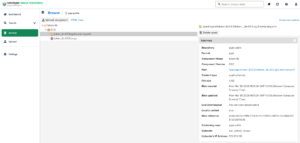
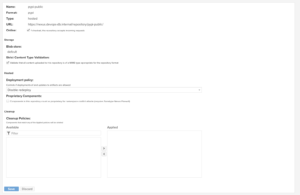
Before uploading, it is critical to understand Nexus repository types:
| Type | Purpose |
|---|---|
| hosted | internal uploads |
| proxy | cache public PyPI |
| group | unified endpoint for installs |
Important distinction
- Upload → hosted repository
- Install → group repository
In our case:
https://nexus.devops-db.internal/repository/pypi-public/
is typically a group repository used for installs.
7. TLS Certificates: The Real Enterprise Problem
The core issue
Python does not use the system trust store.
Instead:
pip,twine,requestsuse certifi- certifi includes only public Certificate Authorities
Result
Even if:
- browser works ✅
- curl works ✅
Python may fail with:
CERTIFICATE_VERIFY_FAILED
8. Building the Certificate Chain
You correctly retrieve:
curl -O https://nexus.devops-db.internal/repository/certificate-internal/pki/root/devops-db-root-ca.crt

curl -O https://nexus.devops-db.internal/repository/certificate-internal/pki/intermediate/devops-db-intermediate.crt
Why both are required
TLS validation requires a complete chain:
Server → Intermediate → Root
Python does not reconstruct this chain automatically.
Build the chain
mkdir ~/.certs/
cat devops-db-intermediate.crt devops-db-root-ca.crt > ~/.certs/nexus-chain.pemWhy order matters
- Intermediate
- Root
Incorrect ordering breaks validation.
9. Configuring pip
~/.config/pip/pip.conf
[global]
break-system-packages = true
cert = /Users/fausto.branco/.certs/nexus-chain.pem
break-system-packages = true cert = /Users/fausto.branco/.certs/nexus-chain.pem
Why this works
certoverrides certifi trust store- applied globally to all pip operations
- avoids passing
--certrepeatedly
10. Uploading the Package (Twine)
pip3 install twine
twine upload \
  --repository-url https://nexus.devops-db.internal/repository/pypi-public/ \
  -u usr_jenkins_nexus -p 1234qwer \
  dist/*
Why Twine?
- Uses secure HTTPS upload
- Avoids deprecated
setup.py upload - Supports authentication and modern APIs
.pypirc note
[nexus-devopsdb]
repository = https://nexus.devops-db.internal/repository/pypi-public/
Used for:
- repository aliasing
- credentials
Not used for TLS configuration
11. Installing from Nexus
python3 -m pip install token-lib
What happens internally
- pip queries
/simpleAPI - resolves available versions
- downloads
.whlor.tar.gz - installs dependencies
12. Why This Setup Works
Summary of critical decisions
| Problem | Solution |
|---|---|
| Python ignores system CA | custom cert |
| Multiple cert layers | chain file |
| repeated flags | pip.conf |
| reproducibility | build artifacts |
| secure upload | twine |
13. Final Architecture
Developer
   ↓
build (python -m build)
   ↓
twine upload → Nexus (hosted)
   ↓
Nexus group (pypi-public)
   ↓
pip install