Designing a Multi-Repository, Multi-Environment GitOps Architecture with ArgoCD
Introduction
Modern Kubernetes delivery pipelines require more than just automation — they demand clarity, separation of concerns, reproducibility, and governance.
This article presents a real-world GitOps architecture built around ArgoCD, designed to support:
- Multiple environments: dev, staging, prod
- Multiple applications:
devops-api,totp-api - Separation of responsibilities across repositories
- Helm-based deployments with centralized packaging
- Full Git-driven control of infrastructure and application lifecycle
The goal is not only to describe how this system works, but why each design decision matters.
https://github.com/faustobranco/devops-db/tree/master/infrastructure/argocd/MultiRepo/argocd
Architectural Overview
The system is built around four distinct repository types, each with a clearly defined responsibility:
Helm Source Repos       → define HOW to deploy
Helm Registry (Nexus)   → version and distribute charts
Values Repos            → define WHAT to deploy (configuration)
Applications Repo       → define WHERE and WHEN to deploy
Repository Roles
1. Helm Source Repositories
https://gitlab.devops-db.internal/infrastructure/argocd/helms/devops-api.git
https://gitlab.devops-db.internal/infrastructure/argocd/helms/totp-api.git
These repositories contain:
- Helm templates
- Chart definitions
- Deployment logic (Ingress, Services, etc.)
Why separate this?
Because deployment logic should be immutable and versioned independently from configuration.
This allows:
- Reusability across environments
- Stable versioning
- Clear ownership (platform vs application teams)
2. Helm Registry (Nexus)
https://nexus.devops-db.internal/repository/helm-devops-db-public/
Charts are packaged and published:
devops-api-1.0.5.tgz
totp-api-1.0.7.tgz
Why use a Helm registry?
- Promotes immutable artifacts
- Enables version pinning
- Avoids direct Git dependency during deployment
- Aligns with enterprise artifact management practices
3. Values Repositories (Per Application)
https://gitlab.devops-db.internal/infrastructure/argocd/applications/devops-api.git
https://gitlab.devops-db.internal/infrastructure/argocd/applications/totp-api.git
Structure:
envs/
  dev/
  staging/
  prod/
Each environment defines:
- Canary vs Stable configuration
- Replica counts
- Ingress weights
- Feature toggles
Why separate values?
This is one of the most critical design decisions:
Chart = deployment logic
Values = runtime behavior
This separation enables:
- Environment-specific overrides
- Safer promotions
- Reduced duplication
- Git-driven rollout control
4. ArgoCD Applications Repository (Control Plane)
https://gitlab.devops-db.internal/infrastructure/argocd/argocd-applications.gitStructure:
applications/
  dev/
  staging/
  prod/
root/
  dev.yaml
  staging.yaml
  prod.yaml
This repository defines:
- ArgoCD Applications
- Environment scoping
- Deployment topology
Why isolate this repo?
Because this is the control plane of your cluster.
It answers:
What runs?
Where does it run?
Which version runs?
Multi-Environment Design
The system supports three environments:
dev
staging
prod
Each environment has:
- Its own ArgoCD instance
- Its own root application
- Its own subset of configurations
Root Application Pattern
Each cluster applies only its own root:
# root/prod.yaml
apiVersion: argoproj.io/v1alpha1
kind: Application
metadata:
  name: root-apps
  namespace: argocd
spec:
  project: default

  source:
    repoURL: https://gitlab.devops-db.internal/infrastructure/argocd/argocd-applications.git
    targetRevision: HEAD
    path: applications/prod
    directory:
      recurse: true

  destination:
    server: https://kubernetes.default.svc
    namespace: argocd

  syncPolicy:
    automated:
      prune: true
      selfHeal: true
Why this matters
This enforces strict isolation:
| Environment | ArgoCD Scope |
|---|---|
| dev | applications/dev |
| staging | applications/staging |
| prod | applications/prod |
This prevents:
- Cross-environment contamination
- Accidental production deployments
- Misconfigured rollouts
Multi-Source Applications (Core Concept)
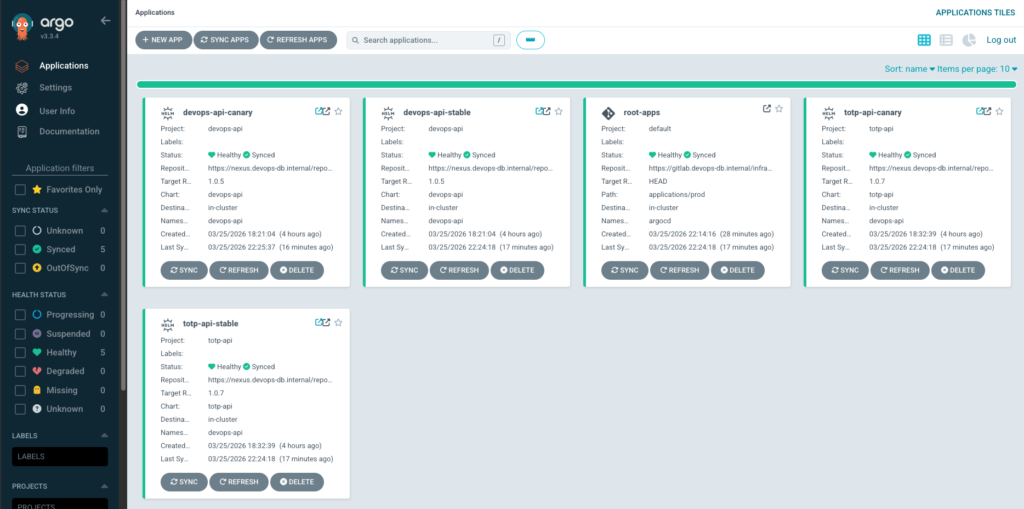
Each application uses ArgoCD multi-source:
sources:
  - repoURL: Nexus (Helm chart)
  - repoURL: GitLab (values)
Example:
apiVersion: argoproj.io/v1alpha1
kind: Application
metadata:
  name: totp-api-canary
  namespace: argocd
spec:
  project: totp-api

  sources:
    # Chart (Nexus)
    - repoURL: https://nexus.devops-db.internal/repository/helm-devops-db-public/
      chart: totp-api
      targetRevision: 1.0.7
      helm:
        valueFiles:
          - $repo-app-values/envs/prod/values-canary.yaml

    # Values (GitLab)
    - repoURL: https://gitlab.devops-db.internal/infrastructure/argocd/applications/totp-api.git
      targetRevision: HEAD
      ref: repo-app-values

  destination:
    server: https://kubernetes.default.svc
    namespace: devops-api

  syncPolicy:
    automated:
      prune: true
selfHeal: trueWhy this design?
Because deployment requires two different concerns:
- Structure (Helm chart)
- Configuration (values)
ArgoCD combines both at runtime:
Fetch chart → Fetch values → Render → Apply
Important Detail: $values Reference
ref: repo-app-values
This creates an alias:
$repo-app-values → Git repository
Then:
$repo-app-values/envs/prod/values.yaml
means:
<repo root>/envs/prod/values.yaml
Why is this powerful?
Because it allows:
- Cross-repo composition
- Centralized configuration
- Dynamic environment selection
Deployment Strategy: Canary + Stable
Each application defines:
stable
canary
This enables:
- Progressive delivery
- Traffic splitting via Ingress
- Safe rollouts
Why not use Argo Rollouts?
In this setup:
- Canary is controlled via Helm + values
- Simpler and fully Git-driven
- No extra CRDs required
GitOps Flow
End-to-End Flow
Git Commit (values or applications repo)
        ↓
ArgoCD detects change
        ↓
Fetch chart (Nexus)
Fetch values (Git)
        ↓
Render Helm
        ↓
Apply to Kubernetes
Promotion Flow
Promotion is entirely Git-driven:
dev → staging → prod
Example:
- Change values in
dev - Validate behavior
- Promote to
staging - Promote to
prod
Why Git-based promotion?
Because it guarantees:
- Auditability
- Reproducibility
- Consistency across environments
Why This Architecture Works
1. Clear Separation of Concerns
| Component | Responsibility |
|---|---|
| Helm | How to deploy |
| Values | What to deploy |
| Applications | Where to deploy |
2. Scalability
Adding a new service requires:
- New Helm chart
- New values repo
- New Application YAML
No structural changes needed.
3. Security and Governance
Using ArgoCD AppProjects:
- Restricts allowed repositories
- Enforces boundaries
- Enables multi-team setups
4. Reproducibility
Everything is:
- Versioned
- Declarative
- Git-controlled
5. Flexibility
Supports:
- Multiple environments
- Multiple clusters
- Multiple teams