GitLab Webhooks with ArgoCD: Instant GitOps Sync — Configuration
Introduction
One of the most common misconceptions in GitOps is assuming that changes in Git are instantly reflected in Kubernetes.
By default, this is not true.
ArgoCD relies on polling: Git → (wait ~3 min) → ArgoCD sync
This introduces delay, inefficiency, and unpredictability.
The correct production approach is: Git → GitLab Webhook → ArgoCD → immediate sync
This article explains not only how to configure GitLab webhooks, but more importantly:
- Why they are required
- How GitLab networking security affects them
- How to troubleshoot real-world issues
- What actually happens internally
- How to validate the full GitOps loop
1. Why Webhooks Are Required
Default Behavior (Polling)
Without webhook: ArgoCD periodically checks Git (~3 minutes)
Problems with Polling
Delayed deployments
Unnecessary API calls
Poor scalability
Non-deterministic timing
With Webhook
git push → GitLab → ArgoCD → immediate sync
Key Insight
Webhook does NOT deploy anything
Webhook only triggers ArgoCD to re-evaluate Git
2. ArgoCD Webhook Endpoint
ArgoCD exposes a dedicated endpoint:
https://argocd.devops-db.internal/api/webhook
Why this endpoint exists
ArgoCD needs a way to: “be notified when Git changes”
Important
This endpoint must be:
✔ reachable from GitLab
✔ resolvable via DNS
✔ accessible via HTTP/HTTPS
3. GitLab Webhook Configuration
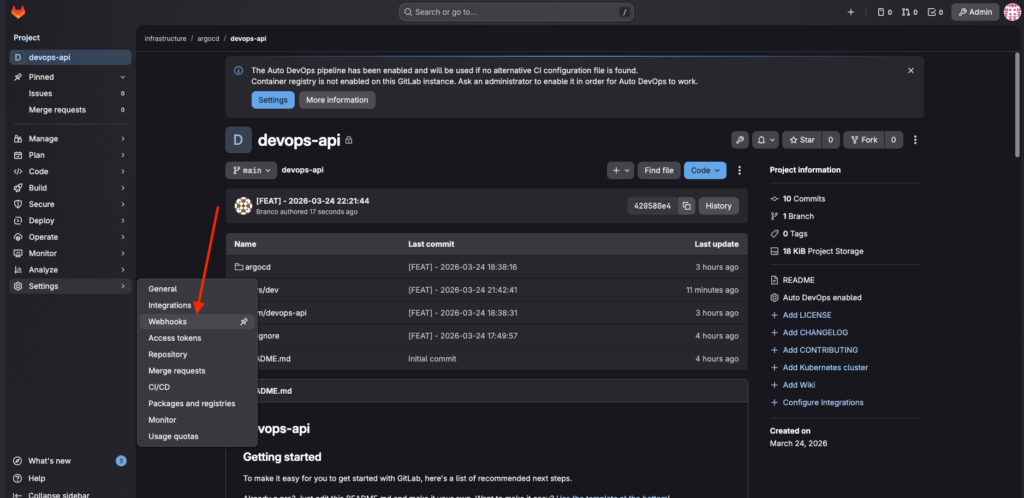
Navigate to:
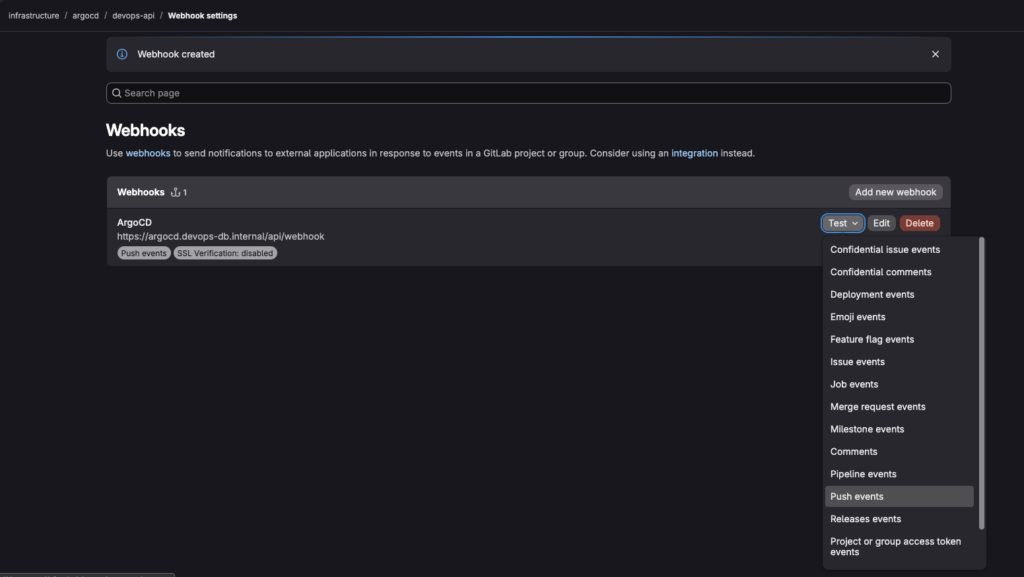
GitLab → Repository → Settings → Webhooks
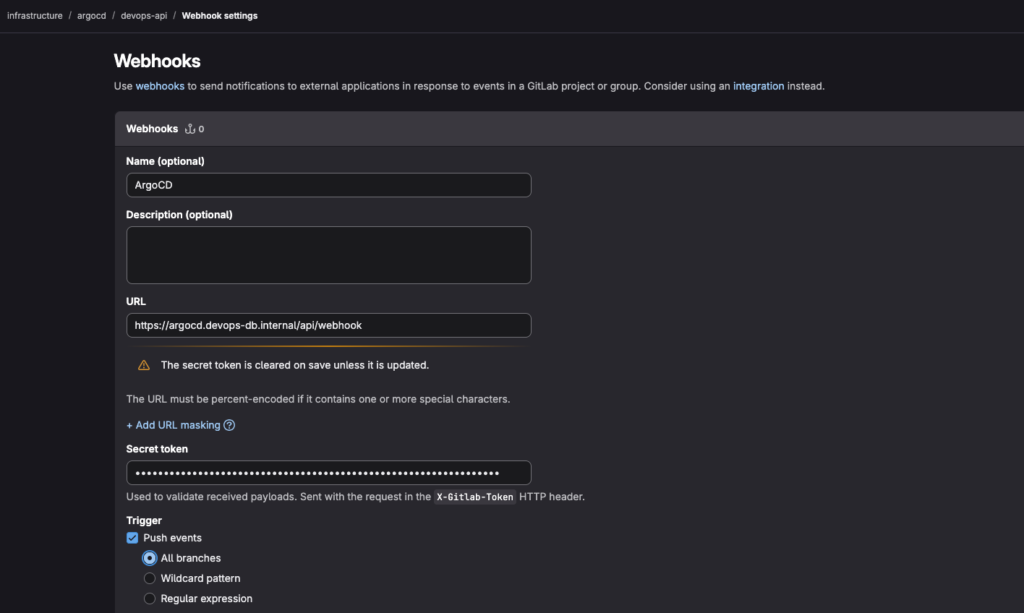
Required Fields
URL
https://argocd.devops-db.internal/api/webhook
Trigger
✔ Push events
Why only Push events?
Push = change in desired state
Optional: Secret Token
Generate any token you want; it can be a phrase or random characters.
37WbAzGIbXtXovDGaKVL6BoZWp4mmz24rhB6TBlYCr8Sts6QX5QiRTsK74HMfTI1
Why use a secret?
✔ prevents unauthorized calls
✔ validates webhook origin
✔ improves security
4. GitLab Network Security — The Real Challenge
This is where most real-world setups fail.
Problem 1 — Local Network Blocking
Error:
Requests to the local network are not allowed
Why this happens
GitLab protects against:
SSRF (Server-Side Request Forgery)
By default, GitLab blocks:
✔ 127.0.0.1
✔ 10.x.x.x
✔ 172.x.x.x
✔ internal domains (.internal, .lan)
Solution
Go to:
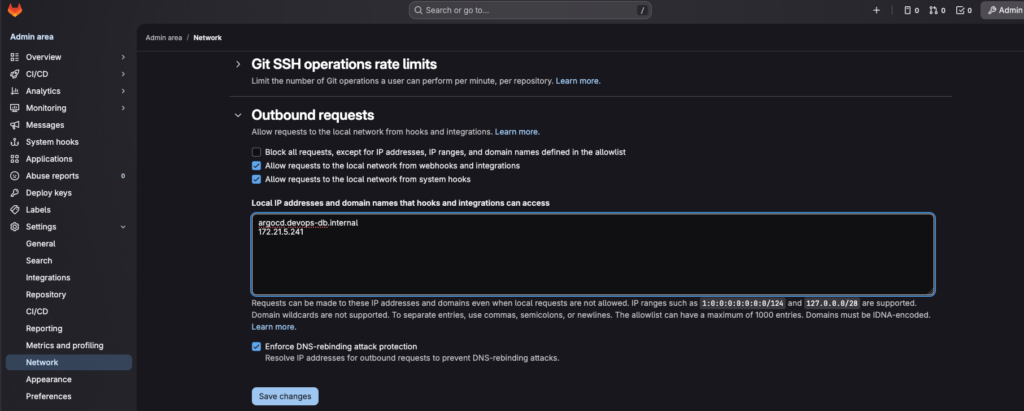
Admin Area → Settings → Network → Outbound Requests
Enable:
✔ Allow requests to the local network from webhooks and integrations
✔ Allow requests to the local network from system hooks
5. DNS Rebinding Protection — Hidden Blocker
Even after allowing local network access, requests may still fail.
Why?
GitLab also enforces: DNS rebinding protection
What it does
domain → resolves → internal IP → BLOCKED
Solution 1 (simple)
Disable: Enforce DNS-rebinding attack protection
Solution 2 (better)
Use allowlist:
argocd.devops-db.internal
172.21.5.241
Why allowlist is better
✔ keeps security
✔ allows only trusted targets
6. DNS Resolution — Critical Requirement
Webhook flow:
GitLab → resolves domain → calls endpoint
If DNS fails:
webhook fails
no sync
Validation
nslookup argocd.devops-db.internal
Server:		100.64.0.1
Address:	100.64.0.1#53

Name:	argocd.devops-db.internal
Address: 172.21.5.2417. Connectivity Validation
DNS is not enough.
Test from GitLab host
curl -k https://argocd.devops-db.internal/api/webhook
Unknown webhook event
Why this is correct
✔ endpoint reachable
✔ ArgoCD responding
✔ only missing payload
8. End-to-End Flow
Once configured:
git push
   ↓
GitLab webhook
   ↓
ArgoCD receives event
   ↓
ArgoCD compares Git vs cluster
   ↓
If different → sync
9. Real Test — Canary Deployment Update
Step 1 — Modify Git
Change:
traffic:<br> stable: 30<br> canary: 70Step 2 — Commit
git add .
DATE_MSG="[FEAT] - $(date '+%Y-%m-%d %H:%M:%S')"
git commit -m ${DATE_MSG}
git push origin main
Step 3 — Immediate Effect
No waiting.
Webhook triggers instantly
Step 4 — Validate in Kubernetes
kubectl describe ingress devops-api-canary -n devops-api
Name:             devops-api-canary
Labels:           <none>
Namespace:        devops-api
Address:          127.0.0.1
Ingress Class:    nginx
Default backend:  <default>
Rules:
  Host                           Path  Backends
  ----                           ----  --------
  devops-api.devops-db.internal
                                 /   devops-api-canary:80 (10.1.137.170:8080)
Annotations:                     argocd.argoproj.io/tracking-id: devops-api-canary:networking.k8s.io/Ingress:devops-api/devops-api-canary
                                 nginx.ingress.kubernetes.io/canary: true
                                 nginx.ingress.kubernetes.io/canary-weight: 70
Events:
  Type    Reason  Age                 From                      Message
  ----    ------  ----                ----                      -------
Normal Sync 2s (x6 over 4h11m) nginx-ingress-controller Scheduled for syncEvent log
Normal Sync nginx-ingress-controller Scheduled for sync
What this proves
✔ Git change propagated
✔ ArgoCD applied new state
✔ Ingress updated traffic
✔ System reacted in real time
10. Final Architecture
Git
 ↓
GitLab (webhook)
 ↓
ArgoCD
 ↓
Helm
 ↓
Kubernetes
 ↓
Ingress (traffic control)