Canary Deployments with Argo Rollouts: A Practical, Helm-Based Approach
Introduction
Canary deployments are not about deploying code — they are about controlling risk in production systems.
In Kubernetes, the default Deployment strategy provides rolling updates, but lacks:
- Traffic control
- Observability checkpoints
- Safe interruption points
This is where Argo Rollouts becomes essential.
This article presents a fully Helm-driven implementation of a canary deployment using Argo Rollouts, focusing on:
- Exact resource relationships (labels, selectors, ingress)
- Correct creation order
- Real traffic validation
- Operational control (pause, resume, rollback)
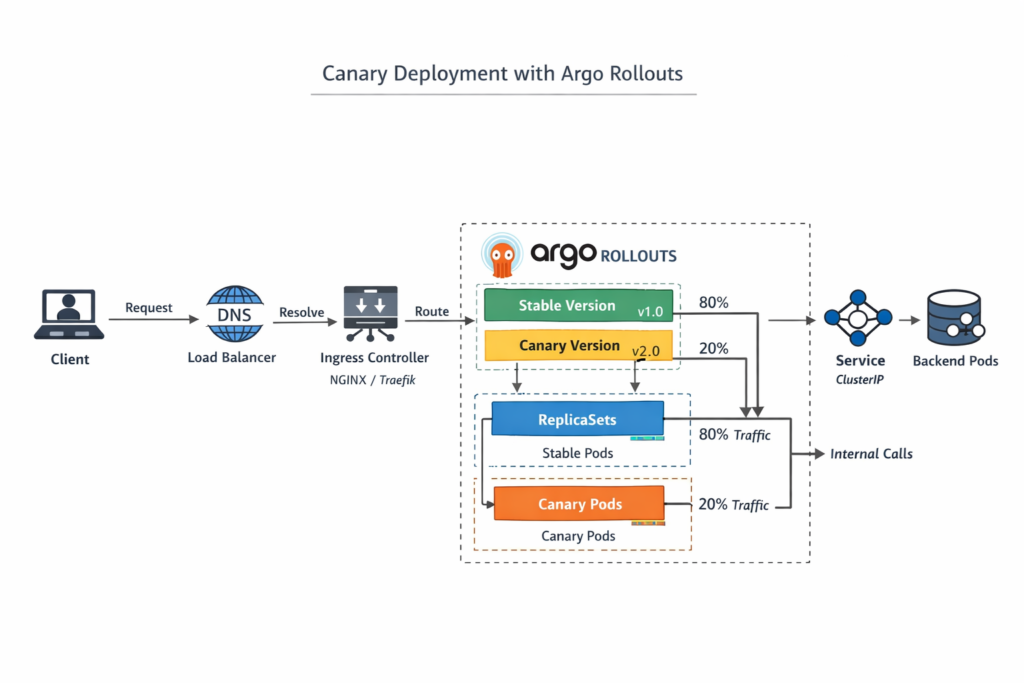
System Architecture (Real Flow)
Client
  ↓
DNS (devops-api.devops-db.internal)
  ↓
Ingress Controller (NGINX)
  ↓
Ingress (stable + canary annotations)
  ↓
Service (stable / canary)
  ↓
Pods (selected via labels)
Core Principle: Labels Drive Everything
Kubernetes networking is label-driven.
Rollout Pod Template
spec:
  selector:
    matchLabels:
      app: devops-api

  template:
    metadata:
      labels:
        app: devops-api
        role: api
Why this matters
Service selector → matches Pods via labels
Rollout selector → controls ReplicaSets
Ingress → targets Services (not Pods)
If labels are wrong:
→ Service has no endpoints
→ Ingress returns 503
Helm as the Source of Truth
All resources are defined via Helm:
✔ Rollout
✔ Services (stable + canary)
✔ Ingress
✔ ConfigMaps / Secrets
Why Helm is critical here
✔ Ensures naming consistency (.Release.Name)
✔ Prevents selector mismatch
✔ Enables reproducible environments
✔ Supports GitOps workflows
Resource Definitions (Key Components)
1. Services
Stable Service
apiVersion: v1
kind: Service
metadata:
  name: devops-api
spec:
  selector:
    app: devops-api
  ports:
    - port: 80
      targetPort: 8080
Canary Service
apiVersion: v1
kind: Service
metadata:
  name: devops-api-canary
spec:
  selector:
    app: devops-api
  ports:
    - port: 80
      targetPort: 8080
Important detail
Both services point to the same label:
app: devops-api
Traffic separation is NOT done by services.
2. Ingress
Stable Ingress (Helm)
metadata:
  name: devops-api
spec:
  rules:
    - host: devops-api.devops-db.internal
      http:
        paths:
          - path: /
            backend:
              service:
                name: devops-api
Canary Ingress Creation in Argo Rollouts
In this setup, the canary Ingress is not explicitly defined in Helm. Instead, it is automatically created by the Argo Rollouts controller.
When the Rollout is configured with:
trafficRouting:
  nginx:
stableIngress: devops-apiArgo Rollouts performs the following actions:
- Detects the existing stable Ingress (
devops-api) - Creates a secondary Ingress resource for canary traffic
- Links it to the defined
canaryService - Dynamically manages its annotations (e.g., traffic weight)
The generated Ingress follows this naming pattern:
<stable-ingress-name>-<canary-service-name>In this case: devops-api-devops-api-canary
This automatically created Ingress includes:
nginx.ingress.kubernetes.io/canary: "true"
nginx.ingress.kubernetes.io/canary-weight: "<dynamic>"kubectl get ingress -n devops-api
NAME CLASS HOSTS ADDRESS PORTS AGE
devops-api nginx devops-api.devops-db.internal 127.0.0.1 80 11h
devops-api-devops-api-canary nginx devops-api.devops-db.internal 127.0.0.1 80 56mImportant Considerations
- This behavior is implicit and managed entirely by Argo Rollouts
- The resource is not part of the Helm chart
- It is not version-controlled, which may complicate debugging and auditing
Recommendation
For production environments, it is recommended to:
- Define the canary Ingress explicitly in Helm
- Allow Argo Rollouts to only manage the traffic weight
This ensures:
✔ Full declarative control
✔ Predictable resource naming
✔ Better GitOps alignment
✔ Easier troubleshooting
Who controls the weight?
Argo Rollouts Controller
It dynamically updates:
nginx.ingress.kubernetes.io/canary-weight
3. Rollout Definition
  Strategy:
    Canary:
      Canary Service:  devops-api-canary
      Stable Service:  devops-api
      Steps:
        Set Weight:  20
        Pause:
          Duration:  60
        Set Weight:  50
        Pause:
          Duration:  60
        Set Weight:  70
        Pause:
          Duration:  60
        Set Weight:  100
      Traffic Routing:
        Nginx:
Stable Ingress: devops-apiWhat Argo Actually Does
✔ Creates new ReplicaSet
✔ Scales canary pods
✔ Updates ingress annotations
✔ Pauses execution when configured
It does NOT:
❌ Route traffic directly
❌ Modify services
Correct Deployment Order (Critical)
- Install Argo Rollouts
- Deploy application (Helm)
- Verify services and ingress
- Apply rollout
- Observe traffic
Installation (Helm)
Install Argo Rollouts
helm repo add argo https://argoproj.github.io/argo-helm
helm repo update

helm upgrade --install argo-rollouts argo/argo-rollouts \
  -n argo-rollouts \
  --create-namespace \
  --set dashboard.enabled=true
Deploy Application
helm upgrade --install devops-api . \
  -f values-stable.yaml \
  -n devops-api \
  --create-namespace
Observing Traffic Behavior
Real Traffic Test
for i in {1..20}; do curl --no-keepalive -s "http://devops-api.devops-db.internal/version"; echo; done
Example Output
{"version":"v1.1.1"}
{"version":"v1.1.1"}
{"version":"v1.1.2"}
{"version":"v1.1.1"}
{"version":"v1.1.2"}
{"version":"v1.1.1"}
{"version":"v1.1.1"}
{"version":"v1.1.2"}
...
Why this is important
✔ Confirms real traffic split
✔ Validates ingress behavior
✔ Detects anomalies immediately
Observing Rollout State
Monitoring Rollouts via CLI (--watch)
Argo Rollouts provides a real-time view of rollout progression directly in the terminal using the --watch flag:
kubectl argo rollouts get rollout devops-api -n devops-api --watchName: devops-api
Namespace: devops-api
Status: ॥ Paused
Message: CanaryPauseStep
Strategy: Canary
Step: 1/7
SetWeight: 20
ActualWeight: 20
Images: nexus.devops-db.internal/docker-devops-images-public/devops-api:1.1.1 (stable)
nexus.devops-db.internal/docker-devops-images-public/devops-api:1.1.2 (canary)
Replicas:
Desired: 1
Current: 2
Updated: 1
Ready: 2
Available: 2
NAME KIND STATUS AGE INFO
⟳ devops-api Rollout ॥ Paused 77m
├──# revision:5
│ └──⧉ devops-api-6b5d77bb78 ReplicaSet ✔ Healthy 77m canary
│ └──□ devops-api-6b5d77bb78-qpjrf Pod ✔ Running 4s ready:1/1
└──# revision:4
└──⧉ devops-api-546bc4f884 ReplicaSet ✔ Healthy 76m stable
└──□ devops-api-546bc4f884-wqgpv Pod ✔ Running 75m ready:1/1Why this is useful
✔ Streams live rollout updates
✔ Shows step progression (weights, pauses)
✔ Displays ReplicaSet transitions (stable vs canary)
✔ Provides immediate feedback without relying on UI
Practical impact
Instead of polling manually, the --watch mode allows you to:
→ Observe traffic shifts as they happen
→ Detect pauses instantly
→ React quickly (resume, promote, abort)
This makes the CLI a reliable, real-time observability tool, especially in environments where dashboards are unavailable or unreliable.
Interpretation
✔ Canary is live
✔ Traffic partially shifted
✔ Rollout paused for validation
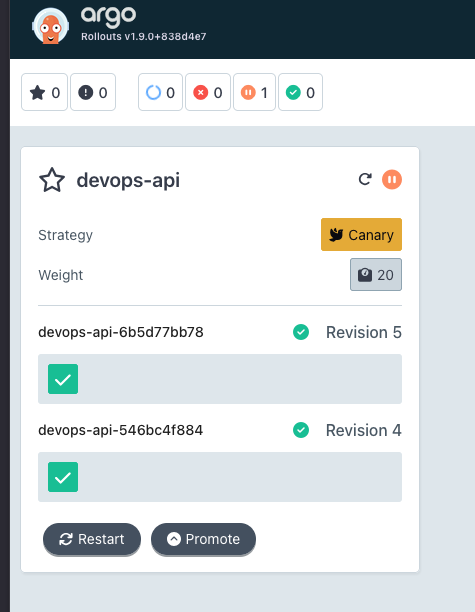
Dashboard (Visualization Layer)
The Argo Rollouts dashboard provides:
- Step progression
- Traffic distribution
- ReplicaSets (stable vs canary)
- Health status
Operational Control
Pause Rollout
kubectl argo rollouts pause devops-api -n devops-api
Resume Rollout
kubectl argo rollouts resume devops-api -n devops-api
Promote (Skip Pause)
kubectl argo rollouts promote devops-api -n devops-api
Abort (Rollback)
kubectl argo rollouts abort devops-api -n devops-api
What Each Command Does
pause    → freezes rollout progression
resume   → continues next step
promote  → skips pause and advances
abort    → restores stable version immediately
End-to-End Flow Summary
1. Deploy stable version (v1.1.1)
2. Deploy new version (v1.1.2)
3. Argo creates canary ReplicaSet
4. Argo updates ingress weight (20%)
5. Traffic splits via NGINX
6. Validate via curl / metrics
7. Resume or abort rollout
Key Engineering Insights
1. Services Do Not Split Traffic
Ingress does.
2. Labels Are the Backbone
Wrong label = broken system
3. Argo Is a Controller, Not a Router
It orchestrates, it does not proxy
4. Always Validate with Real Traffic
curl > assumptions