Kubernetes – From Ingress to Gateway API: A Practical Migration with Traefik and MetalLB
Introduction
For years, Kubernetes Ingress has been the default way to expose applications to the outside world. It works, it is widely adopted, and for simple use cases it is more than enough.
But as systems grow — microservices, multiple teams, advanced deployment strategies — the limitations of Ingress become increasingly visible. Configuration becomes fragmented, heavily dependent on controller-specific annotations, and difficult to evolve.
This is exactly where the Gateway API comes in.
Rather than being just an iteration of Ingress, the Gateway API represents a fundamental redesign of traffic management in Kubernetes, introducing a more structured, extensible, and role-oriented model (CNCF).
In this article, we walk through a real migration from a traditional Ingress setup to a modern architecture using:
- Gateway API
- Traefik as the controller
- MetalLB for LoadBalancer support in bare metal
This is not theoretical — it is based on a working implementation, commands, and real outputs .
The Starting Point: A Traditional Ingress
The initial setup was straightforward:
A Nexus service exposed via an Ingress resource:
Host: nexus.devops-db.internal
Service: nexus:8081
TLS enabled
Ingress Class: public
This model centralizes external access and works well for basic routing. However, it comes with inherent limitations:
- Routing logic depends on the controller (NGINX, Traefik, etc.)
- Advanced features rely on annotations (non-standard)
- Limited extensibility
- Harder to implement progressive delivery (canary, A/B testing)
Ingress was designed for simplicity — not for complex traffic control.
Why Move to Gateway API?
The Gateway API was introduced to address exactly these issues.
Instead of a single resource trying to do everything, it introduces clear separation of concerns:
GatewayClass→ defines the controllerGateway→ defines the entry pointHTTPRoute→ defines routing logic
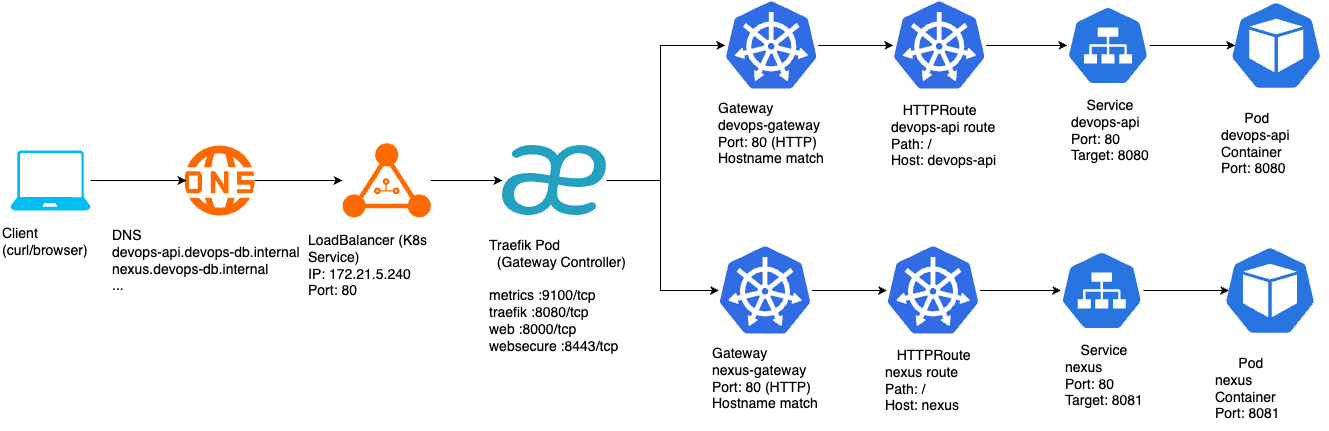
This separation enables better collaboration between teams and more flexible architectures.
More importantly, it unlocks advanced capabilities:
- Native traffic splitting (canary)
- Header-based routing
- Multi-protocol support (HTTP, TCP, gRPC, etc.) (Cloud Native Deep Dive)
- Standardized behavior across implementations
In short:
Gateway API is not just “Ingress v2” — it is a new model.
Step 1: Installing the Gateway API
The migration begins by installing the Gateway API CRDs:
microk8s kubectl apply -f https://github.com/kubernetes-sigs/gateway-api/releases/download/v1.0.0/standard-install.yaml
This introduces new Kubernetes primitives such as Gateway, HTTPRoute, and GatewayClass.
At this stage, nothing changes in the running system — we are only extending the API.
Step 2: Introducing Traefik as Gateway Controller
Unlike Ingress, the Gateway API does not come with a built-in controller.
We installed Traefik with Gateway API support:
helm install traefik traefik/traefik \
  --namespace traefik \
  --create-namespace \
  --set providers.kubernetesGateway.enabled=true \
  --set ports.web.port=8000 \
  --set ports.web.exposedPort=80 \
  --set ports.websecure.port=8443 \
  --set ports.websecure.exposedPort=443
This step is more subtle than it looks.
Traefik internally listens on ports 8000 and 8443, while exposing 80 and 443. This mapping is critical — without it, the Gateway would not bind correctly.
Once deployed:
kubectl get gatewayclass
We confirm:
traefik traefik.io/gateway-controller True
At this point, Traefik is ready to act as a Gateway controller.
Step 3: Defining the Gateway
The Gateway is the new “entry point” into the cluster.
kind: Gateway
spec:
  gatewayClassName: traefik
  listeners:
    - name: web
      port: 8000
      protocol: HTTP
    - name: websecure
      port: 8443
      protocol: HTTPS
      hostname: nexus.devops-db.internal
      tls:
        mode: Terminate
        certificateRefs:
          - name: nexus-tls
This replaces what used to be implicit in the Ingress controller.
Now, we explicitly define:
- Ports
- Protocols
- TLS termination
- Host binding
Step 4: Replacing Ingress with HTTPRoute
Instead of embedding routing rules in a single resource, we now define them separately:
kind: HTTPRoute
spec:
  parentRefs:
    - name: nexus-gateway
  hostnames:
    - nexus.devops-db.internal
  rules:
    - matches:
        - path:
            type: PathPrefix
            value: /
      backendRefs:
        - name: nexus
          port: 8081
This is where traffic decisions are made.
The key difference:
Routing is no longer controller-specific — it is standardized.
Step 5: Safely Disabling the Old Ingress
Instead of deleting the Ingress immediately, it was disabled:
kubectl patch ingress nexus-ingress -p '{"spec":{"ingressClassName":"disabled"}}'
This approach allows:
- Safe rollback
- Zero downtime migration
- Side-by-side validation
Even though Gateway API was already working, the system remained stable.
Step 6: Introducing MetalLB
At this point, the system worked — but with a limitation:
EXTERNAL-IP: <pending>
PORTS: 80:30144, 443:31262
Traffic relied on NodePort, which is not ideal.
To simulate a real LoadBalancer in a bare-metal environment, MetalLB was installed:
microk8s enable metallb
Using the range:
172.21.5.240-172.21.5.250
During installation, a common error appeared:
failed calling webhook... connection refused
This is expected.
It happens because the webhook service is not yet ready when Kubernetes attempts validation. MetalLB retries automatically and eventually succeeds — exactly as observed in the logs .
The Final Result
After MetalLB assigns an IP:
kubectl get pods -n metallb-system
NAME                          READY   STATUS    RESTARTS   AGE
controller-7bc774c5f4-qd58c   1/1     Running   0          4m23s
speaker-fd8xt                 1/1     Running   0          4m23s


kubectl get ipaddresspools -n metallb-system
NAME                  AGE
default-addresspool   4m4s


kubectl get svc -n traefik
NAME      TYPE           CLUSTER-IP      EXTERNAL-IP    PORT(S)                      AGE
traefik   LoadBalancer   10.152.183.98   172.21.5.240   80:30144/TCP,443:31262/TCP   25m
Previously, the DNS pointed to the server where the microk8s was installed, but now the LB has its own IP address, so we need to change the DNS.
### Before:
nexus.devops-db.internal → 172.21.5.76

### Now:
nexus.devops-db.internal → 172.21.5.240

cat devops-db.internal
$TTL 2d

$ORIGIN devops-db.internal.

@                    IN      SOA    ns1.devops-db.internal. admin.devops-db.internal. (
                                    2022122800      ; serial
                                    12h             ; refresh
                                    15m             ; retry
                                    3w              ; expire
                                    2h              ; minimum ttl
                                    )

                     IN      NS     ns1.devops-db.internal.
ns1                  IN      A      172.21.5.155

; -- add dns records below

gitlab               IN      A      172.21.5.153
registry             IN      A      172.21.5.76
jenkins              IN      A      172.21.5.154
ldapman              IN      A      172.21.5.76
devpi                IN      A      172.21.5.160
vault                IN      A      172.21.5.157
postgresql           IN      A      172.21.5.158
nexus                IN      A      172.21.5.240
ca                   IN      A      172.21.5.76


nslookup nexus.devops-db.internal
Server:		172.21.5.155
Address:	172.21.5.155#53

Name:	nexus.devops-db.internal
Address: 172.21.5.240
And finally:
curl https://nexus.devops-db.internal
Returns the Nexus UI — cleanly, without ports or workarounds.
Advantages of This Approach
The benefits of this architecture become clear immediately.
1. Standardization
Gateway API removes reliance on controller-specific annotations and introduces a consistent model across implementations (Kong Inc.).
2. Separation of Concerns
Instead of one overloaded resource (Ingress), responsibilities are split:
- Infrastructure → Gateway
- Routing → HTTPRoute
This aligns better with real-world team structures.
3. Advanced Traffic Management
Features like:
- Weighted routing (canary)
- Header-based routing
- Traffic splitting
are now native capabilities — not hacks.
4. Protocol Flexibility
Ingress is mostly limited to HTTP/HTTPS, while Gateway API supports multiple protocols including TCP and gRPC (Cloud Native Deep Dive).
5. Production-Like Networking
With MetalLB:
- Real LoadBalancer IP
- Clean DNS integration
- No NodePort exposure
Trade-offs and Challenges
This approach is not without its downsides.
1. Increased Complexity
More resources:
- Gateway
- HTTPRoute
- GatewayClass
More concepts to understand.
2. Maturity
While production-ready, the ecosystem is still evolving, and documentation can be inconsistent.
3. Controller Behavior
Some behavior still depends on the implementation (Traefik, Envoy, etc.).
4. Setup Sensitivity
Small misconfigurations (like port mismatches) can break the system — as seen with entrypoints earlier.
Conclusion
This migration is more than a simple replacement.
It represents a shift from:
Ingress (controller-driven, annotation-based)
to:
Gateway API (declarative, structured, extensible)
The final architecture is:
- Cleaner
- More flexible
- Easier to extend
- Aligned with Kubernetes’ future direction
As of today, the Gateway API is not just an alternative — it is increasingly becoming the recommended approach for new deployments (OneUptime).